
Print PLA for almost everything: it’s the easier filament and the better one for fine detail. Switch to PETG when a part has to survive heat, knocks or the outdoors. SUNLU rates its PETG at a 70 °C heat deflection temperature against 55 °C for its PLA, and every beginner printer we list can run it.
You’ve had a few good PLA prints off the plate and you’re wondering whether PETG deserves a spool. This guide puts the two side by side with makers’ published figures, gives you a simple rule for choosing per print, and lists the settings that change when you load PETG on a beginner printer.
For the temperature ranges makers publish for each material, see our filament temperature chart.
PLA vs PETG: properties at a glance
The figures come from SUNLU’s data sheets for the two filaments in our catalogue; the behaviour notes come from Prusa’s material guides. Each maker tests its own filament, so another brand’s PLA or PETG will differ a little.
| Property (source) | PLA | PETG |
|---|---|---|
| Heat deflection temperature (SUNLU) | 55 ± 5 °C | 70 ± 5 °C |
| Tensile strength (SUNLU) | 40 ± 6 MPa | 48 ± 10 MPa |
| Notched impact strength (SUNLU) | 5 ± 3 kJ/m² | 3 ± 1 kJ/m² |
| How parts fail (Prusa) | Brittle; breaks along layers or into shards on impact | Tough; good layer adhesion, and its flexibility often stops it breaking |
| Ease of printing (Prusa) | One of the easiest materials to print | Easy to print with low warping, but bonds strongly to the plate |
| Stringing (Prusa) | Sometimes prone to stringing and oozing | Prone to stringing |
| Detail, bridges and overhangs (Prusa) | Suits detailed models and figures | Not great for detailed parts; poor bridging and overhangs |
| Water and sunlight (Prusa) | Degrades under UV light | Water and humidity resistant; fine for most outdoor use |
What the figures actually tell you
Heat is the clearest gap. SUNLU’s PLA starts to soften at around 55 °C, so it isn’t for parts left in a hot car or near a heater, while its PETG holds out to around 70 °C. Prusa puts the point where PLA gets soft and deforms at over 60 °C.
On paper, strength is closer than you might expect. The tensile ranges overlap, and on SUNLU’s sheets the PLA even has the higher notched impact figure. The difference shows in printed parts: Prusa notes that PLA’s layers bond less well and it snaps along them, while PETG’s layers bond well and its flexibility often stops it breaking. For a clip that clicks shut or a bracket that gets knocked, that’s what counts.
When should you print PETG instead of PLA?
When the part’s job demands it. Start every project in PLA and switch if any of these is true:
- It will get warm. A phone holder in a parked car or anything by a heater: SUNLU’s PLA figure is around 55 °C.
- It takes knocks or flexes. Clips, holders, clamps and brackets. Prusa calls PETG especially suitable for mechanical parts.
- It gets wet. Prusa lists waterproof parts among PETG’s uses, and SUNLU describes its PETG as waterproof and resistant to chemical corrosion.
- It lives outside. Prusa notes that PLA degrades under UV light, while PETG suits most outdoor use.
For parts that stay outside all year, ABS and ASA also come into the picture when choosing a plastic for outdoor prints. If none of the four applies, stay with PLA.
| What you’re printing | Start with | Why |
|---|---|---|
| Figures, miniatures, display models | PLA | Sharper detail; Prusa says PETG isn’t great for detailed parts |
| Prototypes and test fits | PLA | One of the easiest materials to print, according to Prusa |
| Long bridges or steep overhangs | PLA | PETG bridges and overhangs poorly, according to Prusa |
| Brackets, clamps, holders, clips | PETG | Tough, with good layer adhesion |
| Parts for a car or near a heater | PETG | 70 °C against 55 °C heat deflection on SUNLU’s sheets |
| Watertight boxes, bathroom and garden parts | PETG | Water and humidity resistant |
For the everyday spool, SUNLU PLA Filament is the PLA we list. SUNLU publishes a ±0.02 mm diameter tolerance and two temperature bands: 200–210 °C at 50–100 mm/s and 210–240 °C at 100–200 mm/s, with a 50–60 °C bed.
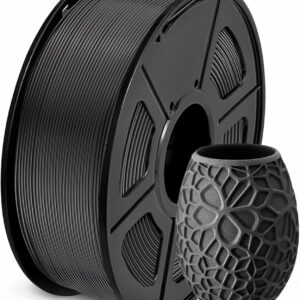
Plain 1.75 mm PLA on a 1 kg spool, with SUNLU’s settings for normal and faster speeds: the filament most of your prints will use.
Which beginner printers can print PETG?
All the filament printers we list. SUNLU’s PETG wants 240–260 °C at the nozzle, inside the maximum of every one of them; the heated bed is where they differ.
| Printer | Max nozzle | Max bed | Worth knowing |
|---|---|---|---|
| Bambu Lab A1 mini | 300 °C | 80 °C | Open frame suited to PLA, PETG and TPU; 180 mm bed |
| Bambu Lab A1 Combo | 300 °C | 100 °C | Open frame; AMS lite for up to four colours; 256 mm bed |
| Flashforge Adventurer 5M | 280 °C | 100 °C | Flexible PEI steel plate; Flashforge lists PETG for the 0.4 mm nozzle |
The enclosed Elegoo Centauri Carbon lists PETG as well, alongside ABS and ASA, if you also want those later.
Bed temperature is the figure to check, because makers don’t agree. SUNLU prints 60–70 °C for this PETG, its general usage guide gives 70–80 °C for PETG as a class, and Prusa recommends 85 °C for the first layer and 90 °C after that on its own printers. The A1 mini tops out at 80 °C: enough for SUNLU’s figures, not for Prusa’s. Go by the label on your spool, and if your bed can’t reach it, choose a PETG whose range it can.
Still choosing a machine? Our ranked list of 3D printers sets out the shortlist, and every printer we list comes with its published specs. If PETG is already on your list, we’d look at the A1 Combo: its 100 °C bed covers every PETG bed figure quoted here, which the A1 mini’s 80 °C bed does not.
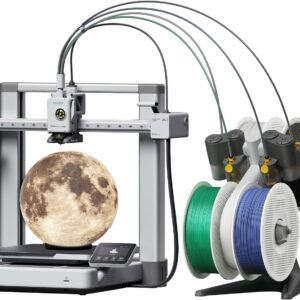
A 300 °C nozzle and a 100 °C bed cover every PETG range quoted here, and the AMS lite adds up to four colours on a 256 mm bed.
How to print PETG on a beginner printer
If PLA already prints well on your machine, you’re most of the way there. Get a first print done, step by step, in PLA before you change material, then make these changes in order.
- Choose a PETG profile and match the label. Select PETG in your slicer, then check the nozzle and bed temperatures against your spool: 240–260 °C and 60–70 °C for SUNLU’s PETG.
- Check the build plate. PETG bonds hard. Prusa warns against printing it on a smooth PEI sheet, as adhesion may be too strong and can damage the sheet. It recommends textured or satin sheets, or a layer of glue stick if you use smooth PEI anyway. Follow your printer maker’s advice for the plate you have.
- Turn the cooling down. SUNLU suggests 30–50 % fan for PETG, whereas PLA needs the fan on. Prusa prints the first few layers with the fan off, then runs it at half power.
- Set retraction from the data sheet. SUNLU publishes 0.8–1.2 mm at 30–40 mm/s for both its PLA and its PETG, so your PLA values are a fair start.
- Orient the part to need little support. Prusa notes PETG supports are hard to remove, and its bridges and overhangs are weak.
- Let the nozzle cool before you touch it. With SUNLU’s PETG it runs at 240 °C or more, hotter than for PLA.
If the first layer lifts or won’t stick, sort out adhesion to the build plate before you change anything else.
For your second spool, SUNLU PETG Filament is the PETG we list. It shares the PLA’s 1.75 mm diameter and ±0.02 mm tolerance, prints at up to 300 mm/s according to SUNLU, and needs a bed the A1 mini can reach.
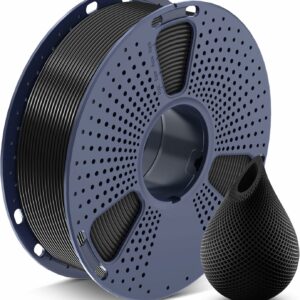
Published settings that every filament printer we list can reach, with a 70 ± 5 °C heat deflection figure for parts that sit somewhere warm.
If PETG strings or blobs: fixes in order
- Dry the spool. SUNLU lists bubbling or popping, more stringing and weaker layer bonding among the signs of damp filament.
- Lower the nozzle temperature within the label’s range. Prusa names lower nozzle temperature and higher retraction as the fixes for PETG stringing.
- Raise retraction a little, staying close to the published range.
- Adjust the fan. SUNLU warns that too little cooling may increase stringing, while too much can weaken layer bonding.
Does PETG work in a 3D pen?
Not with the pens we list: none of them names PETG among its materials. They take PLA, ABS or low-temperature plastic, so see the filaments 3D pens take and how PLA and ABS compare in a pen instead.
How to store PLA and PETG
SUNLU counts both PLA and PETG as hygroscopic: they take on moisture from the air. Keep each opened spool in a sealed bag or dry box with desiccant packs, in a cool, dry place out of direct sunlight.
If a spool starts to pop, bubble or string, dry it. SUNLU gives 50–55 °C for 6–8 hours for PLA and 60–65 °C for 6–8 hours for PETG. A filament dryer such as the SUNLU FilaDryer S2 makes that easier, and the same habits for storing and drying filament apply to every material you add later.
Common questions
Is PETG stronger than PLA?
Tougher rather than much stronger. SUNLU gives 48 ± 10 MPa tensile strength for its PETG and 40 ± 6 MPa for its PLA, so the ranges overlap. The practical difference is how parts fail: Prusa describes PLA as brittle, while PETG’s layer adhesion and flexibility often stop it breaking.
Can I print PETG on a Bambu Lab A1 mini?
Yes. Its 300 °C nozzle and 80 °C bed cover SUNLU’s PETG settings of 240–260 °C and 60–70 °C. An 80 °C bed won’t reach PETG labels that ask for more, such as Prusa’s 90 °C, so check the spool before you buy.
Is PETG harder to print than PLA?
A little. It needs a hotter nozzle, less cooling and a plate it won’t fuse to, and Prusa calls it prone to stringing. Prusa still rates it easy to print, with low warping.
Is PLA biodegradable?
Only in specialised composting facilities where temperatures exceed 80 °C, according to Prusa. It isn’t suitable for a home compost heap.
Sources
- SUNLU PLA – General Filaments — SUNLU
- SUNLU PETG – General Filaments — SUNLU
- Filament Usage Guide — SUNLU
- PLA, material guide — Prusa Knowledge Base
- PETG, material guide — Prusa Knowledge Base
- Flashforge Adventurer 5M — Flashforge