

Keep every opened spool or refill pack in a sealed bag or airtight box with desiccant, somewhere cool, dry and out of direct sunlight. Prusa advises keeping PLA below 30 % relative humidity and PETG below 20 %. If filament starts popping, bubbling or stringing, dry it at the temperature and time its maker publishes, then seal it straight away.
This applies to 3D pen refills as much as to printer spools: standard pen refills are the same 1.75 mm PLA that many printers use. Below: the signs of damp filament, the published storage and drying figures in one table, and how to store and dry it.
Why does filament absorb moisture?
Because most 3D printing plastics are hygroscopic: Prusa explains that they readily attract water molecules from the air. Prusa names nylon, PVA and TPU as filaments that need drying more often than PLA, and SUNLU points out that PETG and even PLA take on moisture. According to Polymaker, that water turns to steam in the hot end and disrupts the flow of plastic.
So a spool left out on the printer, or a pen refill pack left open in a drawer, keeps taking on water from the room.
How can you tell if filament is wet?
Listen to it and look at the first few lines. These are the signs Polymaker, SUNLU and Prusa list:
- Popping, hissing or sizzling while it extrudes: water vapour escaping, according to Polymaker.
- Bubbles and a rough or pitted surface on the print or the pen line.
- More stringing and oozing than usual, because the steam makes the extrusion uneven.
- Weak, brittle layers. SUNLU notes that wet filament often becomes weaker and more brittle, and layers bond less well.
- Uneven flow and, in some cases, a clogged nozzle, according to SUNLU: one of the causes of gappy, under-extruded prints.
Damp plastic is only one cause of stringing in 3D prints, so dry the spool first and look at the other causes only if the strings remain.
In a 3D pen, a little crackle isn’t always a fault. 3Doodler says a slight crackling sound is normal, caused by moisture caught in the strand during manufacture escaping. A pen that keeps popping and lays bubbly, rough lines is another matter: dry or replace the plastic, then check the other causes of bubbles in a 3D pen.
Storage and drying figures at a glance
Prusa publishes a maximum relative humidity (RH) for storage, read on a hygrometer, and drying settings for its Prusament filaments; SUNLU publishes drying settings for its own. Each maker’s figures are for its own plastic, so where they differ, go by the label or data sheet for your spool.
| Material | Store below (Prusa) | Dry at (Prusament) | Dry at (SUNLU) |
|---|---|---|---|
| PLA | 30 % RH; up to 40 % short term | 45 °C for 6 hours | 50–55 °C for 6–8 hours |
| PETG | 20 % RH | 55 °C for 6 hours | 60–65 °C for 6–8 hours |
| TPU | 20 % RH, ideally under 15 % | 60 °C for 4–6 hours | 50–60 °C for 6–8 hours |
| ABS | 30 % RH, ideally under 15 % | Not in Prusa’s table | 75–85 °C for 6–8 hours |
| ASA | 30 % RH, ideally under 10 % | 80 °C for 4 hours | 80 °C for 6–8 hours |
PLA is the most forgiving material in the table. PETG and TPU want drier storage, so they need a sealed box more than PLA does; how PLA and PETG compare covers the other differences. ABS and ASA need far more heat to dry, above the 70 °C ceiling of the dryer we feature below.
Prusa lists TPU among the filaments that need drying more often than PLA, so keep it sealed between prints, all the more if you are printing TPU as a beginner. For the thirstiest plastics, such as nylon, Prusa advises dry storage or drying before every print.
How to store filament so it stays dry
Leave new spools sealed until you need them
Polymaker says it dries its filament before shipping and vacuum seals each spool with a desiccant pack, so it’s ready to print straight out of the bag while the seal is intact. Open a spool when you’re about to load it, not when the parcel arrives.
Use a sealed bag or an airtight box with desiccant
Prusa recommends a closed box with some desiccant in it, or a vacuum bag. SUNLU strongly recommends desiccant packs for PLA, PETG and nylon. Two set-ups work:
- One spool per bag. A resealable or vacuum bag with a desiccant pack inside: compact, and fine for a few spools.
- One box for several spools. A storage box with a sealing lid and several desiccant packs: easier if you swap spools often.
Put a hygrometer in the box
A small digital hygrometer shows the relative humidity inside, so you can compare it with the table. Prusa’s rule for its own dry box: replace or regenerate the silica gel once the reading passes the maximum for the material. It also warns that opening the lid often, or a poor seal, raises the humidity. To regenerate desiccant, follow the instructions on its pack.
A box won’t rescue a damp spool, though. Prusa is clear that its dry box does not dry filament: moist filament has to be dried first.
Pick a cool, dark spot
SUNLU advises a cool, dry place away from direct sunlight, and 3Doodler recommends a cool, dry, dark place for its pen plastic. A closed cupboard away from radiators fits that description; a sunny windowsill, a conservatory, or a steamy kitchen or bathroom doesn’t.
The printer filaments in our shop are SUNLU’s, so the SUNLU column of the table applies to them directly.
How to store 3D pen refills
Standard pen refills are the same PLA in shorter lengths, so the same rules apply. A multi-colour pack is used a few colours at a time, so most of it waits. Keep each opened colour in a resealable bag, and the bags in one lidded box with a desiccant pack. Some packs help: the SCRIB3D PLA Refills come with each colour vacuum packed. Low-temperature PCL refills, such as the Kretrum 32-Colour Refills for 3Doodler Start, come in resealable packaging; keep them sealed too, but don’t use the PLA drying figures for them.
In a hot pen, plastic that has taken on moisture can bubble, and SUNLU lists nozzle clogging among the possible effects. If a pen has already jammed, follow how to clear a clogged 3D pen before you load fresh plastic. Not sure which plastic your pen takes? Our guide to the plastics 3D pens use explains PLA, ABS and PCL.
The Yungden 30-Colour PLA Refills show why: 30 colours at 3 m each, 90 m in total, for standard 1.75 mm pens at 180–210 °C. You’ll draw with a handful of colours at a time, so bag the rest as soon as the pack is open.
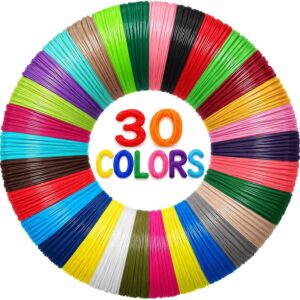
Thirty colours of 1.75 mm PLA, transparent and fluorescent shades included, in 3 m lengths that are easy to bag up colour by colour.
You can compare pack sizes across all the pen refills we list. For a bigger stock, the 3Dmate PLA Refill Kit holds about 110 m of 1.75 mm PLA in standard, transparent, metallic and fluorescent colours, with a silicone mat, a stencil book and four finger guards. Give it a lidded box with desiccant from day one.
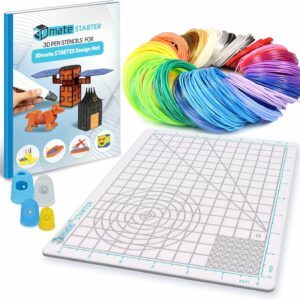
About 110 m of PLA plus the mat, stencils and finger guards: everything but the pen, for families who draw often.
None of the refill packs we list publish drying settings. For PLA refills, use the PLA row of the table, but a dryer is built around a spool: check its manual before you put loose coils in it. With only a few metres per colour, replacing a badly bubbling colour is often simpler.
How to dry filament that has gone damp
Heat it gently at the temperature and for the time its maker publishes, then seal it straight away. Prusa warns that going above the drying temperature makes filament soften and stick together, and that overdrying is a risk too. In order:
- Find the figure for your spool on the label or the maker’s data sheet. If there isn’t one, use the table above for that material.
- Check the spool can take the heat. Plastic spools have limits too: Prusa says its older black spools shouldn’t go above 45 °C unless a reinforcing screw is fitted.
- Tuck the loose end into a hole in the spool rim so it can’t unwind and tangle.
- Set the temperature and timer, never above the published figure.
- Print from the dryer or seal the spool as soon as the cycle ends, so it doesn’t take on water again.
A filament dryer
A dedicated dryer is the most controlled option. The SUNLU FilaDryer S2 heats one spool from 35 to 70 °C on a 1–99 hour timer, shows a live humidity reading and has presets for PLA, PETG, TPU and other common filaments. It also works as a spool holder with a filament outlet, so it can feed the printer while it dries. Its 70 °C ceiling covers the PLA, PETG and TPU figures from both makers, but not SUNLU’s 75–85 °C for ABS or the 80 °C both give for ASA. Set it from your filament’s data sheet rather than the preset.
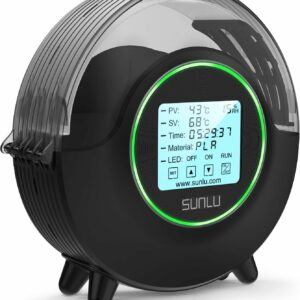
For a printer that mostly runs PLA, PETG or TPU. It takes one spool at a time, so if you print from several, they take turns.
An oven or a food dehydrator
Both can work, with care. Not every maker agrees: Bambu Lab’s data sheets say a kitchen or microwave oven isn’t suitable for drying its filaments and specify a forced-air drying oven, so check your spool’s sheet before you use the kitchen oven.
Prusa points out that home ovens don’t measure temperature precisely, so put an external thermometer next to the spool and check it before you trust the dial. Food dehydrators usually reach only low temperatures, so Prusa suggests checking your filament’s drying temperature before you buy one. For ovens, Polymaker advises a convection oven at a low, stable temperature with airflow.
Common questions
How long can filament be left out of its bag?
There’s no single figure: it depends on the material and how damp the room is. PLA tolerates more than PETG or TPU, and Prusa advises keeping the thirstiest plastics, such as nylon, dry or drying them before every print. If a spool hasn’t been used in a long time, Polymaker says it’s safest to dry it before printing.
Does a new spool need drying?
Not if the maker dried and sealed it and the bag is intact. Polymaker, for example, says its vacuum-sealed spools are ready to print straight out of the bag. If a new spool still pops or bubbles, dry it at the maker’s temperature.
Can you dry filament for too long?
Yes. Prusa advises sticking to the recommended drying times to prevent overdrying, and warns that going above the drying temperature makes filament soften and stick together.
Does a dry box dry filament?
A passive dry box doesn’t. It keeps dry filament dry, and Prusa notes that moist filament must be dried first. A heated filament dryer is a different device: it dries the spool, and some models can feed the printer at the same time.
Sources
- Drying filament — Prusa Knowledge Base
- Prusa USS Drybox — Prusa Knowledge Base
- Filament Usage Guide — SUNLU
- Wet Filament — Polymaker Wiki
- We Dry our Filament Before Shipping — Polymaker Wiki
- Frequently Asked Questions — 3Doodler
- Bambu Filament Technical Data Sheet: PETG Basic — Bambu Lab