

TPU (thermoplastic polyurethane) is the flexible, rubber-like filament for phone cases, bumpers, seals and tyres. Yes, a beginner can print it: choose a 95A grade, use a printer whose maker lists TPU, dry the spool, and print well below your usual PLA speeds, with short or no retraction.
TPU is the spool you buy when a print has to bend, grip or take a knock without cracking. Prusa warns that flexibles bring nozzle clogs, filament tangling in the extruder gears and stringing; following the printer makers’ own guidance on hardness, nozzle and speed is how you avoid them.
For the temperature ranges makers publish for each material, see our filament temperature chart.
What is TPU filament?
TPU stands for thermoplastic polyurethane. Bambu Lab describes it as a highly elastic filament that stretches and returns to its original shape, used for phone cases, shoe soles and toy parts. Prusa adds stamps, RC tyres, belts and spacing washers to the list.
Prusa’s material guide sums up the trade-off. In its favour: flexibility and tenacity, low shrinkage, good layer adhesion and high mechanical and chemical resistance. Against it: high print difficulty, low print speed, very poor bridging and overhangs, difficult support removal, stringing, and a habit of absorbing moisture.
TPU properties at a glance
These figures come from SUNLU’s data sheets for the SUNLU TPU 95A Filament and its standard PLA, so you compare one maker’s flexible and rigid filaments directly. Other brands’ figures will differ a little.
| Property (SUNLU) | TPU 95A | PLA |
|---|---|---|
| Elongation at break | Over 900 % | 10 ± 5 % |
| Tensile strength | 31 ± 3 MPa | 40 ± 6 MPa |
| Density | 1.21 g/cm³ | 1.23 g/cm³ |
| Nozzle temperature, slower band | 190–210 °C at 50–80 mm/s | 200–210 °C at 50–100 mm/s |
| Nozzle temperature, faster band | 210–230 °C at 80–120 mm/s | 210–240 °C at 100–200 mm/s |
| Bed temperature | 50–60 °C | 50–60 °C |
| Retraction | 0.8–1.2 mm at 30–40 mm/s | 0.8–1.2 mm at 30–40 mm/s |
| Drying before printing | A must: 50–60 °C for 6–8 h | Recommended: 50–55 °C for 6–8 h |
What the figures tell you
Stretch is the headline. SUNLU’s TPU stretches past 900 % of its length before it breaks, against 10 ± 5 % for its PLA. That is the property you’re buying: a part that bends and recovers where PLA would snap.
TPU isn’t stronger on paper: its tensile strength is lower. Temperatures and retraction barely differ. What changes is speed and drying: SUNLU’s fastest TPU band tops out at 120 mm/s against 200 mm/s for its PLA, and drying moves from recommended to a must.
What does Shore 95A mean on a TPU spool?
It tells you how hard the filament is. Bambu Lab explains that TPU hardness is given on the Shore scales, Shore A for softer grades and Shore D for harder ones, written as a number and a letter such as 90A, 95A or 77D. A higher number means a harder, less flexible filament. In Bambu Lab’s order from hardest to softest, 77D, 70D, 68D and 55D all sit above 95A, which sits above 90A, 85A, 83A, 80A, 75A and 70A.
Softer means trickier. Prusa puts most TPU between 60A and 90A and warns that the softer the filament, the harder it is to print. Bambu Lab recommends 85A or harder for stable printing, because softer grades bend as they’re fed and can buckle, tangle or extrude unevenly. Its printers don’t support TPU softer than 85A, and the A1 series isn’t compatible with 85A either.
Our rule for a first spool: buy 95A. It’s the hardest Shore A grade in Bambu Lab’s list and the one its tables clear for the most nozzles. The part’s feel also depends on the design: Prusa suggests more infill and perimeters for a firmer part and fewer perimeters to keep it flexible.
The SUNLU TPU 95A Filament is the flexible spool we list, with published settings for slow and faster printing and a ±0.02 mm diameter tolerance on SUNLU’s site.
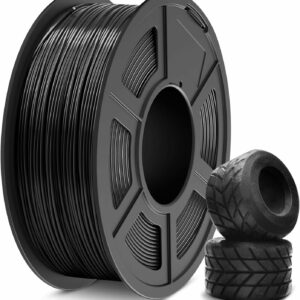
A 95A grade with published slow and fast settings, so you can start at 50–80 mm/s and work up once your first parts come out clean.
Which printers can print TPU?
Any printer whose maker lists TPU, used on that maker’s conditions: often a nozzle size, a hardness limit or a feeder that won’t take it. None of the 3D pens we list names TPU among its filaments, so treat it as a printer material.
Bambu Lab A1 mini
The Bambu Lab A1 mini has an open frame and an 80 °C bed, which suit PLA, PETG and TPU. Bambu Lab lists its own 90A and 95A HF TPUs as compatible with the A1 series and the standard 0.4 mm nozzle. 85A is incompatible, and the 0.2 mm nozzle is ruled out for every TPU.
Two catches. The AMS lite multicolour feeder isn’t compatible with TPU (Bambu Lab’s own TPU for AMS is the one exception), so flexible filament has to feed from an external spool. And Bambu Lab says to turn off flow dynamics calibration before a TPU print.
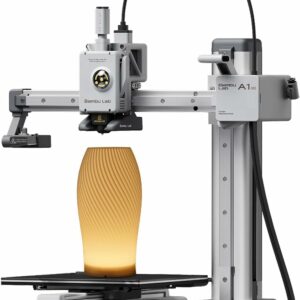
Bambu Lab clears 90A and 95A TPU on the A1 series with the standard 0.4 mm nozzle, and the 80 °C bed covers SUNLU’s 50–60 °C TPU setting.
Flashforge Adventurer 5M
The Flashforge Adventurer 5M has a direct-drive extruder, and Flashforge says its 280 °C nozzle handles flexible filaments. The detail that matters is the nozzle: Flashforge lists TPU for the optional 0.6 mm and 0.8 mm nozzles, while the 0.4 mm nozzle installed at the factory is listed for PLA and PETG only.
The nozzle is quick-release and swaps in about 3 seconds, according to Flashforge, and the flexible PEI steel plate helps when a TPU part grips hard.
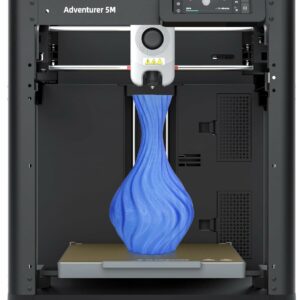
A 220 mm bed and a direct-drive extruder; fit the 0.6 mm nozzle Flashforge lists for TPU before your first flexible print.
Other printers
The Bambu Lab A1 Combo is an A1 too, but its bundled AMS lite can’t feed TPU, so load it as an external spool. The Elegoo Centauri Carbon lists TPU among its materials. For anything else, check the maker’s material list first, and see our ranked list of 3D printers if you’re still choosing.
How to print TPU: settings to start from
Work through these in order. Where your spool’s maker publishes a figure, it beats general advice.
- Dry the spool. SUNLU marks drying TPU as a must, at 50–60 °C for 6–8 hours.
- Fit the right nozzle. The 0.4 mm on the A1 mini for 90A or 95A; the 0.6 mm on the Adventurer 5M. Bambu Lab also advises a new nozzle, or a cold pull on an old one, because residue from fibre-filled filaments adds resistance.
- Start at the slowest published speed. For SUNLU’s 95A that’s 50–80 mm/s at 190–210 °C. If your spool gives no speed, Prusa’s general figure for flexibles is 20 mm/s, with 30–40 mm/s as the most it recommends.
- Keep retraction short. SUNLU gives 0.8–1.2 mm at 30–40 mm/s. Prusa notes that less retraction means less risk of clogs and tangles, and that turning it off entirely is fine.
- Ease the extruder. If your extruder has an adjustable idler, Prusa advises loosening it so the gears push the filament gently. Pressed too hard, TPU can tangle in the gears.
- Set the bed to the spool’s figure. SUNLU gives 50–60 °C. TPU grips the plate hard, so to free a stubborn part Bambu Lab advises lifting one corner, spraying isopropyl alcohol into the gap and peeling slowly, without force.
- Design out supports and bridges. Prusa lists poor bridging, overhangs and support removal among TPU’s weak points. On a printer that can switch filaments, Bambu Lab recommends PLA supports under TPU because they come away more easily.
If your TPU strings
Flexible filament strings more readily than PLA. Bambu Lab’s fixes, in order: print one object at a time to cut travel moves, lower the nozzle temperature by about 5 °C (and the maximum volumetric flow by 0.4 mm³/s to match), add 0.2 mm of retraction, and make sure the filament is fully dry. Our guide to fixing stringing in 3D prints covers the wider causes.
When is TPU not worth the bother?
When the part doesn’t need to flex, grip or absorb knocks. Skip TPU, at least for now, if any of these applies:
- The part should be rigid or precise. Brackets, boxes and figures print faster and more easily in PLA.
- It needs heat or weather resistance rather than flex. That’s a choice between the two rigid basics, which our PLA vs PETG comparison settles.
- You want it multicolour from an AMS lite. TPU can’t go through that feeder.
- It will touch food. Bambu Lab states its TPU filaments are not food-contact grade, so cups, plates and cookie cutters are out.
- The design is all overhangs and supports. TPU bridges poorly and its supports are hard to remove.
- The grade is softer than your printer allows. 85A on an A1 series printer, for example.
- Your printer’s maker doesn’t list TPU. Learn on a printer that does, rather than fighting the feed path.
Storing TPU and printing it safely
Bambu Lab calls TPU highly hygroscopic: damp spools cause stringing, bubbles and weak layer adhesion. Seal the spool with desiccant as soon as a print finishes, keep it below 20 % relative humidity as Bambu Lab suggests, and dry it again after long storage. Our guide to keeping filament dry covers boxes, desiccant and dryers in detail.
For long prints, Bambu Lab suggests feeding from a sealed dry box through its side opening, raised so slack filament stays clear of the bed and nozzle. A dryer that also feeds the printer, such as the SUNLU FilaDryer S2, does both jobs; set it to your spool’s data-sheet temperature rather than the preset.
Bambu Lab’s safety notes for TPU: run the printer in a well-ventilated room or with air filtration or an exhaust, and keep filament and broken fragments away from babies, children and pets, as they’re a choking risk. Let the nozzle cool before you reach in to free a tangle.
Common questions
Is TPU stronger than PLA?
Not in tensile strength: SUNLU rates its TPU 95A at 31 ± 3 MPa against 40 ± 6 MPa for its PLA. TPU’s advantage is stretch and toughness, with elongation at break past 900 % against 10 ± 5 % for the PLA. Choose it for parts that must bend or soak up knocks, not for stiff load-bearing parts.
What is the difference between TPU and TPE?
TPU is a type of TPE (thermoplastic elastomer), the family all flexible filaments belong to. Prusa notes they are sold under several names, such as TPU and TPEE, and that the main difference between TPU and TPE is Shore hardness. Whatever the label, read the Shore figure: the softer the filament, the harder it is to print.
Do I need an enclosed printer for TPU?
No. TPU prints on open-frame machines such as the Bambu Lab A1 mini and the Flashforge Adventurer 5M (fitted with its optional 0.6 or 0.8 mm nozzle), whose makers both list it. Enclosures matter for ABS and ASA, not flexible filament.
Is 3D-printed TPU food safe?
Don’t assume it is. Bambu Lab states that its TPU filaments are not food-contact grade and should not hold or touch food. Unless your spool’s maker explicitly says otherwise, use TPU for grips, bumpers and seals that stay away from food.
Sources
- SUNLU TPU 95A – Functional Filaments — SUNLU
- SUNLU PLA – General Filaments — SUNLU
- Filament Usage Guide — SUNLU
- Flexible materials — Prusa Knowledge Base
- TPU Printing Guide — Bambu Lab Wiki
- Flashforge Adventurer 5M 3D Printer — Flashforge