

Stringing usually comes from one of three things, in this order: damp filament, a nozzle that’s too hot, or retraction that doesn’t pull back far or fast enough. Dry the spool first, then lower the temperature within the filament’s range, then tune retraction, changing one setting per test print.
Stringing is the fine, hair-like plastic left between separate parts of a print. Simplify3D’s troubleshooting guide puts it down to plastic oozing out of the nozzle while the print head moves to a new spot. It’s cosmetic, unlike a first layer that won’t stick, and you can usually fix it from the spool and the slicer. The trick is the order you work in.
For the temperature ranges makers publish for each material, see our filament temperature chart.
Try this first: a quick check before you change anything
- Make sure it’s stringing. Strings span a gap between two parts of the model. Lumps sitting on the surface are blobs, a different fault.
- Go back to the stock profile. Select your printer and the filament’s own preset in the slicer, undoing earlier tweaks. For PETG, Prusa suggests sticking with the slicer’s own profiles rather than adjusting settings by hand. If you’re not sure where these settings live, our beginner’s guide to slicers shows you round.
- Look at the spool. Note how long it has been out of its bag, and watch the nozzle: bubbling or popping as the plastic comes out points to moisture.
- Pick one small test print. A temperature tower, a retraction tower or two thin pillars a few centimetres apart. Reprint the same test after every change.
- Change one setting at a time and write it down. Change two at once and you won’t know which one worked, or which one caused a new fault.
| What you see | Most likely cause | Start with |
|---|---|---|
| Strings appeared suddenly on a spool that used to print cleanly; bubbling or popping at the nozzle | Damp filament | Cause 1 |
| Fine wisps everywhere on a dry spool, temperature near the top of the range | Nozzle too hot | Cause 2 |
| Strings on a dry spool at a sensible temperature | Retraction too short or too slow | Cause 3 |
| Strings mainly where the nozzle crosses open gaps | Travel moves | Cause 4 |
| Strings started when you switched to PETG or TPU | The material | Cause 5 |
What causes stringing? Causes, most likely first
Molten plastic leaking from the nozzle during travel moves. Moisture, heat and too little retraction all make that leak worse, so work through them in this order and stop as soon as the test print comes out clean.
1. The filament has absorbed moisture
Symptom: a spool that printed cleanly starts to string, often with bubbling or popping at the nozzle. Why: filament takes up moisture from the air. SUNLU’s filament guide says damp filament can bubble or pop as it extrudes, string more and bond less well between layers.
Fix: dry the spool before you touch a single setting, or you’ll be tuning around the moisture. Use the temperature and time on the filament maker’s data sheet: SUNLU points out that drying conditions vary from one material to another. Our guide to storing and drying filament covers the method and the storage that stops it coming back.
A heated dryer is the simplest way to do it. The SUNLU FilaDryer S2 holds one spool, heats from 35 to 70 °C on a 1–99 hour timer and shows the humidity inside as it works. It can also feed the printer through its filament outlet while it dries.
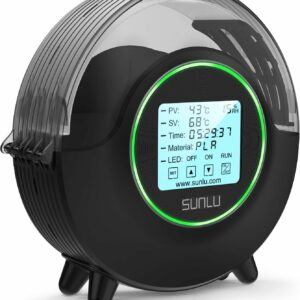
Adjustable 35–70 °C heat, a timer of up to 99 hours and a live humidity reading, so you can dry any common filament at its own data-sheet temperature and print straight from it.
2. The nozzle is too hot
Symptom: fine, wispy hairs all over a print made from a dry spool. Why: hotter plastic is runnier, so it leaks more easily while the nozzle travels. Simplify3D suggests lowering the extruder temperature by 5–10 °C.
Fix: print a temperature tower, which OrcaSlicer builds for you from its calibration menu: one tower, each block at a different temperature. Lower temperatures typically reduce stringing; higher ones improve layer adhesion, so pick the coolest block that still bonds well. Stay inside the range on the spool, and match it to your print speed. SUNLU PLA Filament, for example, lists 200–210 °C at 50–100 mm/s but 210–240 °C at 100–200 mm/s, so a fast printer needs more heat to begin with.
3. Retraction is too short or too slow
Symptom: strings persist on a dry spool at a sensible temperature. Why: retraction pulls the filament back before each travel move to relieve pressure in the nozzle. Too little and the plastic keeps oozing. According to Simplify3D, direct-drive extruders usually need 0.5–2.0 mm, while some Bowden setups, with a tube between the drive gear and the nozzle, may need as much as 15 mm.
Fix: adjust the distance first, in small steps. OrcaSlicer’s retraction test prints a tower with a different length at each notch: by default 0 to 2 mm in 0.1 mm steps for direct drive, and 1 to 6 mm in 0.2 mm steps for Bowden. Use the length from the cleanest section. With low-ooze filaments such as PLA the tower can look clean from the very bottom, and OrcaSlicer says 0.2–0.4 mm should then suffice. Then, only if needed, the speed: Simplify3D puts the useful range at 20–100 mm/s, with oozing if it’s too slow and the filament separating or grinding if it’s too fast. Don’t overdo the distance: OrcaSlicer warns that a length that’s too long can cause clogs or gappy, under-extruded walls.
4. Travel moves cross open space
Symptom: strings concentrate between parts or towers that sit apart on the plate. Why: every jump over empty air is a chance to ooze. Fix: look in your slicer’s travel settings for an option that keeps moves inside the model; Simplify3D calls it “Avoid crossing outline for travel movement”. OrcaSlicer’s wipe while retracting drags the nozzle back along the last line to clean off leaked plastic before the jump. Simplify3D also notes that a faster travel speed leaves the nozzle less time to ooze between parts, and printing fewer separate parts at once cuts the number of jumps.
5. The material strings by nature
Symptom: PLA prints cleanly, but PETG or TPU on the same printer doesn’t. Why: Prusa describes PETG as prone to stringing, and flexible TPU strings more than PLA. Fix: for PETG, Prusa recommends more retraction and a lower nozzle temperature, and says part cooling helps prevent stringing and oozing. For TPU, the SUNLU TPU 95A Filament lists a retraction speed of 30–40 mm/s, so start there and at its slower speed settings; anyone printing flexible TPU for the first time will meet other quirks too. On both materials, a few light wisps are easier to accept than to chase.
The fix order, one change per print
| Order | What to change | Step size | Stop when |
|---|---|---|---|
| 1 | Dry the spool | Maker’s temperature and time | Bubbles and sudden strings are gone |
| 2 | Nozzle temperature | 5–10 °C down, within the spool’s range | Strings stop, or layers start to bond poorly |
| 3 | Retraction distance | 0.1 mm (direct drive), 0.2 mm (Bowden) | The cleanest section of the tower |
| 4 | Retraction speed | Small changes within 20–100 mm/s | No ooze, no ground filament |
| 5 | Travel and wipe | One option at a time | Gaps between parts stay clean |
When to replace parts instead
If a dried spool still bubbles, try a fresh spool of the same material to rule the filament out. If heavy stringing survives drying and tuning, OrcaSlicer suggests checking the nozzle is installed correctly and isn’t leaking. Unplug the printer and let the hotend cool before you touch the nozzle, and follow your printer maker’s manual for anything that means removing parts.
If you’re replacing an older printer anyway, start with the printers we’d shortlist. Our first-printer pick, the Bambu Lab A1 mini, arrives assembled, calibrates itself and suits PLA, PETG and TPU; its 180 mm bed is the trade-off.
Common questions
Should I lower the temperature or increase retraction first?
Temperature, once you know the spool is dry. It’s one number, it changes the whole print, and a temperature tower shows the result in a single test. Tune retraction afterwards, with the temperature fixed, so you can see what each change does.
Does travel speed affect stringing?
Yes. Simplify3D notes that a faster travel move gives the nozzle less time to ooze while it crosses open space. Raise travel speed only within what your printer’s profile allows, and treat it as a finishing touch after drying, temperature and retraction.
Is a little stringing normal?
On some materials, yes: Prusa describes PETG as prone to stringing, and flexible TPU strings more than PLA. PLA oozes little, and OrcaSlicer notes its retraction tower can look clean from the very first section, so on PLA a string-free print is a realistic target.
How do I remove strings from a finished print?
Pull fine wisps off with your fingers or tweezers, and snip thicker strands flush with a pair of side cutters, cutting away from your body. Then fix the cause, so the next print needs less cleaning.
Sources
- Stringing or Oozing — Simplify3D
- Filament Usage Guide — SUNLU
- PETG, material guide — Prusa Research
- Temp Calibration — OrcaSlicer
- Retraction test — OrcaSlicer
- Retraction — OrcaSlicer