

A faint crackle is normal. Steady bubbling or popping usually means the pen is too hot for the filament or the strand is damp: turn the heat down 5–10 °C first, then try a strand from a sealed pack. Thin, stringy lines mean your hand is outpacing the flow: slow down or raise the speed setting.
Bubbles and strings look like one problem, but they come from two different mismatches: heat or moisture in the plastic, and speed against temperature in the line. Find your symptom in the table, then work through the fixes in order, most likely cause first.
Bubbles, popping or strings: match the symptom to the cause
Draw a short test line on paper and listen while it comes out. The table matches what you see and hear to the fix to try first.
| What you see or hear | Most likely cause | Try first |
|---|---|---|
| A faint, occasional crackle; the line is smooth | Moisture from manufacture escaping, which 3Doodler calls normal | Nothing: keep drawing |
| Steady bubbling or crackling, rough or pitted line | Pen too hot for the filament | Fix 1 |
| Popping and bubbles that stay after you turn the heat down | Damp filament | Fix 2 |
| Line thins out, stretches into a thread or snaps | Hand moving faster than the flow | Fix 3 |
| Fine wisps or a tail every time you lift the pen | Plastic oozing after you stop | Fix 4 |
| Thick, slow, dull-looking plastic; the motor strains | Pen too cold | Fix 5 |
| Smoke from the nozzle | Far too hot, or the wrong mode | Stop and switch off |
Try this first: check the mode, then turn the heat down
Heat is the quickest thing to rule out, and it costs nothing. Make sure the pen is set to the mode for the filament you loaded: PLA on the PLA setting, ABS on the ABS setting. On the SCRIB3D P1, the manual says you switch between ABS and PLA by unplugging the pen and plugging it back in.
Then lower the temperature by 5–10 °C, the step SCRIB3D’s manual suggests when plastic bubbles or crackles. Stay inside both the pen’s range and the one on the filament pack. The SCRIB3D P1 publishes 160–210 °C for PLA and the Yungden 30-Colour PLA Refills state 180–210 °C, so with those two you’d work between 180 and 210 °C, and while a P1 is under warranty, SCRIB3D’s own refills keep you inside its terms. Let the pen settle at the new temperature, then draw another test line.
If your pen sets its own temperature, there is nothing to turn down. The LIHUACHEN RPC200B 3D Pen (Button Version), for example, runs at 190–210 °C automatically. Go straight to fix 2.
Smoke means stop. MYNT3D lists smoke, like bubbling, as a sign the temperature is too high. Switch the pen off, unplug it, open a window and check the mode matches the filament. The nozzle stays hot after you switch off: SCRIB3D tells owners never to touch it, and to let it cool completely before the pen is put away.
Bubbles and stringy lines: causes and fixes, most likely first
If one fix makes no difference, move on to the next.
1. The pen is too hot for the filament
Symptom: steady bubbling or a crackling noise, a rough line, and PLA that drips or strings more than usual. Why: MYNT3D’s tips page says that if you see smoke or bubbling in the filament, the temperature is too high. SCRIB3D adds that PLA is prone to oozing, and that turning the temperature down helps.
Fix: lower the heat 5–10 °C at a time and test after each step. MYNT3D’s general tips page suggests 165–190 °C for PLA, and a lower 165 °C for metallic colours. Don’t chase every last bubble: SCRIB3D’s manual says some small bubbling is normal, as long as the filament comes out smooth.
2. The filament has taken on moisture
Symptom: popping, sizzling and bubbles that stay after you turn the heat down, a pitted surface and extra stringing, often from one pack or colour that was left open. Why: Polymaker explains that many plastics absorb moisture from the air, which turns to steam in the hot end and disrupts the flow. Among the signs it lists are pops or sizzling while extruding, bubbling, a rough surface, pitted extrusion and extra stringing.
Fix: reverse the strand out, then load one from a freshly opened or sealed pack. SCRIB3D’s manual says to cut the end flat before you insert a new strand. If the fresh strand runs smooth at the same setting, the old pack is damp: dry it or replace it, and keep opened colours sealed from now on. Drying settings and storage are covered in our guide to keeping filament dry.
3. Your hand is moving faster than the flow
Symptom: the line thins out, stretches into a thread or snaps, and the finished piece is fragile. Why: the pen pushes out plastic at the rate its speed setting allows. Move your hand faster than that and the same plastic is spread over a longer line. 3Doodler calls hand speed the trickiest part of drawing with a 3D pen.
Fix: slow your hand to match the flow, or turn the speed setting up for long, straight lines. 3Doodler suggests drawing on the slow setting until you get the hang of it. Check again after a colour change, because 3Doodler notes that different colours flow at different rates. Any part that still comes out thin can be drawn thicker or retraced, as 3Doodler advises for slim details.
4. Plastic keeps oozing when you stop
Symptom: fine wisps, a tail or a small drip each time you lift the pen. Why: SCRIB3D’s manual says plastic may keep oozing slightly after the pen stops, more so with PLA, much as it does from a glue gun.
Fix: finish each line the way 3Doodler describes: press the feed button once to stop, push down gently to form the end point, wait 2–3 seconds, then pull the pen away. If it still oozes, turn the temperature down slightly and check you’re on the right filament setting, as SCRIB3D suggests.
5. The pen is too cold
Symptom: plastic comes out thick and slow, the colour looks dim and dark, and you can hear the motor struggling. It often follows fix 1 if you turned the heat down too far. Why: MYNT3D and SCRIB3D both read these signs as a temperature that is too low.
Fix: raise the temperature by 5–10 °C, as SCRIB3D’s manual suggests, staying inside the filament’s range. If the pen never reaches its ready state, it’s a heating fault rather than a setting: see what to do about a pen that won’t heat up. If nothing comes out at all, read how to clear a clogged nozzle instead.
When to replace the filament, or the pen
Replace the filament when a fresh strand fixes the problem and the old pack bubbles at every setting. Drying is an option, but short pen refills are often simpler to swap. Pick 1.75 mm PLA with a published temperature range, so you know the window to tune within; our filament refill packs show what each maker publishes. The SCRIB3D PLA Refills come with each colour vacuum packed, so every colour stays sealed until you open it.
For a wide colour range, the Yungden 30-Colour PLA Refills give 3 m of each of 30 colours and, according to Yungden, a ±0.02 mm diameter tolerance. They aren’t for low-temperature pens that use PCL, such as the 3Doodler Start+.
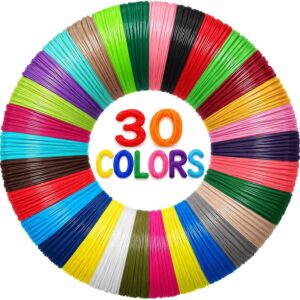
Thirty colours of 1.75 mm PLA, 3 m each, with a stated 180–210 °C printing range to tune within. Keep the colours you’ve opened in a sealed bag.
Contact the seller or the maker instead if the pen still bubbles or smokes with a fresh strand from a sealed pack at the low end of its range, or if changing the temperature makes no difference. If the pen is new, get in touch before you open anything. Unplug it and let it cool before you handle the nozzle, and follow the manual for anything that involves removing parts. SCRIB3D, for one, asks owners to contact its support team before returning a pen to the retailer.
Common questions
Is it normal for a 3D pen to crackle?
A faint crackle, yes. 3Doodler says a slight crackling sound while extruding is normal: it’s moisture caught in the strand since manufacture escaping, and not a cause for concern. Steady popping with bubbly, rough lines is different: turn the heat down first, then try a fresh strand.
What temperature should I use for PLA in a 3D pen?
Use the overlap between the range on the filament pack and the pen’s PLA range; MYNT3D’s general tips page, for example, suggests 165–190 °C for PLA. Start in the middle and adjust 5–10 °C at a time.
Why are my 3D pen lines so thin and weak?
Usually because your hand is moving faster than the plastic is coming out. Slow down or turn the speed setting up, and redraw thin parts thicker. If the plastic also looks dull and comes out slowly, the pen may be too cold.
How do I stop strings when I lift my 3D pen?
Stop the feed, press the tip down gently, wait 2–3 seconds, then pull away, as 3Doodler suggests. If wisps keep forming, turn the temperature down slightly: SCRIB3D notes that PLA tends to ooze after the pen stops.
Sources
- User Manual Scrib3D P1 — SCRIB3D
- Tips + Troubleshooting — MYNT3D
- Frequently Asked Questions — 3Doodler
- How to Draw With a 3D Pen — 3Doodler
- Top Teacher Tips for 3Doodlers — 3Doodler
- Wet Filament — Polymaker Wiki
- Warranty — SCRIB3D