

The costliest 3D printer buying mistakes are choosing on headline speed, buying a bed too small for what you’ll make, skipping the enclosure ABS and ASA need, picking resin for the wrong reasons, and forgetting room, fumes and running costs. Decide what you’ll print first: the right printer follows from that list.
The mistakes below have one thing in common: a printer chosen for a figure on the listing rather than for the things its owner wants to make. They follow the order in which buyers tend to make them, and each ends with what to check instead. This page sticks to the mistakes; how each specification works, from calibration to bed size, is explained in our guide to choosing a first printer.
New to all of this? Start with our beginner’s guide to 3D printing, which takes you from choosing a printer to a first successful print.
The nine mistakes, in the order buyers make them
1. Buying on headline speed
Top speed is the easiest figure to compare, so it tends to decide. But it measures how fast the print head can travel, not how fast a clean print comes out, and filament makers set a slower pace: SUNLU’s settings for its PLA top out at 200 mm/s, well under the rating of any filament printer we list.
Check instead: bed size, frame, calibration and colour, the next mistakes on this list. Let top speed break a tie, nothing more; the first-printer guide explains where the real speed limit sits.
2. Choosing a bed too small for your plans
A bed that looks only a little smaller holds far less: a 256 mm bed has about twice the area of a 180 mm one. Outgrow yours and every large model becomes a job of cutting it into parts and gluing them back together. The reverse mistake costs desk space, since a bed you never fill still has to live somewhere.
Check instead: take the biggest model on your list (mistake 9 explains how to make one), measure its width, depth and height, and buy the smallest bed that clears all three with a few millimetres to spare.
3. Ignoring which materials need an enclosure
An open frame handles the everyday filaments, but it’s the wrong buy if the parts you want call for ABS or ASA. Prusa’s ABS guide says the printer should be inside an enclosure; it lists significant warping among the material’s drawbacks, and parts shrink by around 1–2 % as they cool.
Check instead: decide now whether anything you’ll make needs ABS or ASA. If it does, buy an enclosed printer from the start rather than an open frame you’ll outgrow. Our guide to when a printer needs an enclosure covers the rest.
4. Choosing resin for the wrong reasons
A resin printer cures each layer of liquid resin with light shone through a screen, and resin wins on detail: Anycubic lists an XY resolution of 17 × 17 µm for the Anycubic Photon Mono 4. For miniatures and finely modelled small parts, filament can’t match that.
The wrong reasons are thinking resin is simpler, cleaner or better for big parts. The Photon Mono 4 prints within 153.4 × 87 × 165 mm. Elegoo’s getting-started guide lists nitrile gloves, a mask, safety goggles and an apron, a well-ventilated workspace out of UV light, isopropyl alcohol of 95 % or higher for washing and UV curing at 405 nm. Liquid resin irritates skin, so the printer and its wash station need a room children don’t use.
Check instead: choose resin if detail is the point and you have a ventilated space to give over to it. Otherwise filament is the easier start; our comparison of resin and filament printers covers the rest.
5. Forgetting space, noise and ventilation
The mistake is measuring the shelf for the build volume, which describes only the space the printer can fill. The Flashforge Adventurer 5M, for example, measures 363 × 402 × 448 mm outside with its screen, according to Flashforge, for a 220 mm build volume, and that’s before the spool holder. The first-printer guide covers how moving-bed and CoreXY designs use space, and what’s published on noise and fumes.
Check instead: measure the shelf with the spool on top in mind and, if the bed moves, the room it sweeps through. Then pick a room with a window you can open, where hours of fan noise won’t bother anyone.
6. Forgetting the consumables
The printer is the first purchase, not the last, and the running list differs between filament and resin.
| Running item | Filament printer | Resin printer |
|---|---|---|
| Material | Filament spools, often 1 kg | Resin made for the printer’s light (405 nm on Elegoo’s printers) |
| Cleaning | No washing step | Isopropyl alcohol of 95 % or higher, or water for a water-washable resin |
| Protection | A ventilated room, more so for ABS and ASA | Nitrile gloves, mask, goggles and apron |
| Extra hardware | Nozzles in the sizes your materials need; a closed box with desiccant, or a filament dryer | A wash bucket and a 405 nm UV lamp, or a wash-and-cure station sized to the printer |
Start with the spool itself. The 1 kg SUNLU PLA Filament comes on a spool 19.5 cm across and 5.9 cm wide, with a 6.3 cm hub hole, and spools differ between brands. Check those three figures against your printer’s spool holder, or the feeder if you’re buying multicolour, before you stock up on one brand.
Then keep it dry. Prusa explains that most filaments are hygroscopic, drawing moisture from the air, and that flexible TPU and polyamide need drying more often than PLA. Damp filament shows up as stringing, weak layer adhesion, blobs, or bubbling and smoke at the nozzle; Prusa advises storing spools in a closed box with desiccant. A dryer such as the SUNLU FilaDryer S2 heats from 35 to 70 °C on a timer of up to 99 hours and shows a live humidity reading. It takes one spool at a time, so several spools take turns, and its presets are SUNLU’s starting points: dry at the temperature on your filament’s own data sheet.
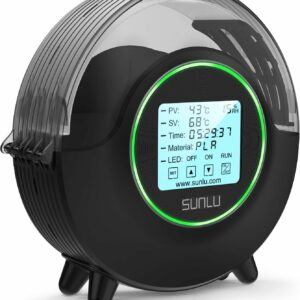
Dries one spool at a time from SUNLU’s presets for PLA, PETG and TPU, and doubles as a spool holder while the printer runs.
Nozzles are the next line. The Bambu Lab A1 mini comes with a 0.4 mm stainless steel nozzle, with 0.2, 0.6 and 0.8 mm available. On the Adventurer 5M, Flashforge lists TPU and the carbon-filled PLA-CF and PETG-CF only for its 0.6 and 0.8 mm nozzles, not the 0.25 or 0.4 mm: if those filaments are on your list, order the larger nozzle with the printer.
For resin, match the wash station to the printer. The Anycubic Wash & Cure 3 fits printers of 7.3 inches and below, including the Photon Mono 4 series, according to Anycubic, so it’s too small for a 10-inch printer such as the Elegoo Saturn 4 Ultra 16K. For that one, the Elegoo Mercury Plus V3.0 Wash & Cure Station takes parts up to 230 × 135 × 260 mm in its basket, and at 41.3 cm tall it needs a shelf with headroom.
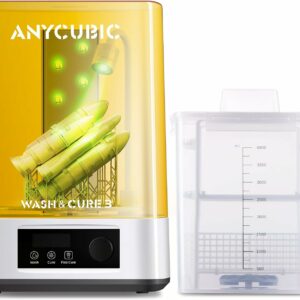
Washing and curing in one compact station, with a two-height basket that saves alcohol and a gooseneck light for touch-up curing.
Water-washable resin, such as Elegoo Water Washable Resin 2.0, swaps the alcohol for water, according to Elegoo, but not the gloves: uncured resin still irritates skin. Whatever you wash in, the used liquid carries uncured resin and must never go down the drain; let rinse water cure in sunlight or under UV first.
Check instead: write the first month’s running list before you order: material on spools your holder takes, a dry box or dryer, any nozzle your filaments need and, for resin, gloves, a wash station sized to the printer and a plan for the used liquid.
7. Assuming multicolour costs nothing extra
Multicolour looks like a free extra on a combo bundle. It isn’t: every colour change purges filament, so a multicolour print takes longer and uses more material than the same model in one colour. The first-printer guide covers how the feeders work and which printers take one.
Check instead: count how many of your planned prints really need more than one colour. If it’s most of them, buy the feeder now; if it’s one or two, start in one colour on a printer that can take a feeder later.
8. Buying an older design with manual levelling
Filament printers that leave the first-layer gap to you, set by eye while a test pattern prints, still turn up on listings. Prusa’s first-layer guide shows the cost of getting it wrong: too high and the print may not stick; too low brings extrusion problems, clogs and poor print quality, or even damage to the hardware. Every filament printer we list levels its own bed.
Check instead: on a first filament printer, look for automatic bed levelling in the specifications, and pass on any listing that doesn’t mention it.
9. Having no plan for what to print
This is the mistake behind all the others. Without a list of first projects, there’s nothing to measure the bed against, no way to know whether you need ABS, and no reason to choose resin or colour, so the headline figure on the listing decides by default.
Before you buy, browse a model library such as Printables, MakerWorld or Thingiverse and save the ten files you’d print first. Mix the useful with the showpieces: a drawer organiser or a replacement knob says more about the printer you need than the most impressive model on the front page. Then note four things for each file.
| Note for each file | What it decides | Mistake it heads off |
|---|---|---|
| Its largest dimension, in millimetres | Bed size | 2 |
| The material, if the designer names one | Open frame or enclosure | 3 |
| Fine detail, such as faces on small figures | Filament or resin | 4 |
| The number of colours | One colour now, or a feeder | 7 |
Then read the list as a whole, not file by file. One or two models that outgrow a bed can be split; a list where most of them do needs the bigger bed. A single file that must be ABS or ASA is enough to put an enclosure first. Detail and colour work the other way round: buy for them only if most of the list needs them, not one showpiece.
Check each model’s licence while you’re there. Some licences rule out commercial use, so if you plan to sell what you make, check before you build your plan around a model.
Check instead: if you can’t yet name ten things you’d print, keep browsing before you order. The list will choose the printer for you.
Our picks, by the mistake they avoid
Each line starts from a near miss. For the printers in order, see our ranked list of 3D printers; to compare every model we list, open our full 3D printer catalogue.
- If you nearly bought the fastest printer on the listing for small PLA prints, look at the Bambu Lab A1 mini, chosen for its setup and size rather than its speed.
- If you nearly bought a multicolour bundle just in case, look at the A1 mini on its own: the AMS lite feeder can be added later.
- If you nearly bought a single-colour printer for name tags and signs in several colours, look at the Bambu Lab A1 Combo, which includes the AMS lite for up to four colours.
- If you nearly bought an open-frame printer for parts in ABS or ASA, look at the Elegoo Centauri Carbon, which comes enclosed.
- If you nearly bought a manual-levelling design for PLA and PETG, look at the Flashforge Adventurer 5M, with one-click automatic levelling.
- If you nearly bought a filament printer for miniatures, look at the Anycubic Photon Mono 4.
- If you nearly bought a resin printer for large models, look at a 256 mm filament printer such as the A1 Combo or the Centauri Carbon.
Instead of a speed headline: Bambu Lab A1 mini
It’s here for what mistakes 7 and 8 ask of a first printer, not for its speed: it arrives assembled, calibrates itself, and leaves colour as a later choice through the AMS lite. Skip it if anything on your list is over 180 mm in any direction, or if you want ABS and ASA.
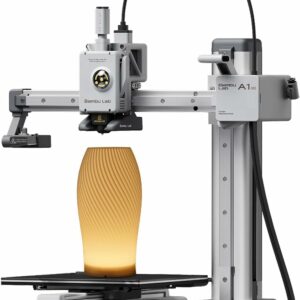
A first printer that does its own levelling and keeps to a compact 180 mm bed, with room to add four-colour printing later if your list starts to need it.
Instead of an open frame for ABS and ASA: Elegoo Centauri Carbon
The answer to mistake 3: an enclosed CoreXY printer, delivered assembled and pre-calibrated, whose materials list runs from PLA, PETG and TPU to ABS, ASA and fibre-reinforced filaments. Skip it if you want multicolour, since it prints in a single colour, or if your table can’t take 17.5 kg.
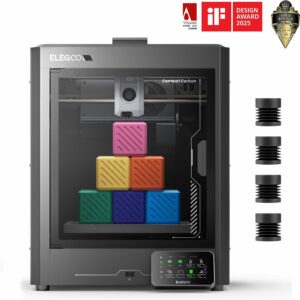
Enclosed from the start, with a hardened-steel nozzle rated to 320 °C, so a project in ABS or ASA doesn’t mean a second printer.
Instead of filament for miniatures: Anycubic Photon Mono 4
If detail really is the point, the Photon Mono 4 is a gentle first step into resin: a 10K mono screen of 7 inches, a laser-engraved build platform and resume after power loss. Skip it if you have no ventilated space, if it would live in a child’s room, or if your models outgrow its platform.
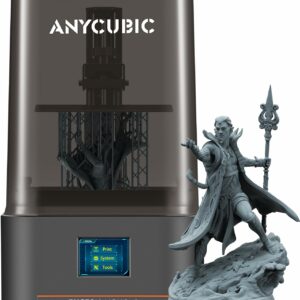
Fine resin detail on a small footprint, for painters of miniatures who have a ventilated room and will wear gloves.
What to avoid: a final check before you order
Once you’ve shortlisted a printer, run through this list. If a line describes your choice, go back to the matching mistake above.
- A printer picked for top speed before you’ve compared bed size, enclosure, calibration and colour.
- A bed smaller than the largest thing on your list, or far bigger than anything on it.
- An open frame when your projects call for ABS or ASA.
- A resin printer bought for convenience, or with nowhere ventilated to put it.
- No measured home: footprint, spool space, noise and a window you can open.
- No running list: spools your holder takes, dry storage, spare nozzles, or a wash station sized to a resin printer.
- A multicolour bundle for prints you’ll rarely make in more than one colour.
- Manual bed levelling on a first filament printer.
- No list of first prints.
Common questions
Is a faster 3D printer worth paying more for?
Rarely, for a first printer. Top speed measures how fast the head travels; the real limit is how much filament the hotend can melt each second, and filament makers publish lower speeds. Calibration, bed size and an enclosure change more about what you can print.
What size build plate do I need for a first 3D printer?
Measure the largest thing you plan to print and allow a few millimetres in each direction. A 180 mm bed suits small models, organisers and toys; a 256 mm bed takes larger parts in one piece. Anything bigger can be split and glued.
Do I need a filament dryer straight away?
Not always. Prusa notes that most filaments draw moisture from the air and that TPU and polyamide need drying more often than PLA. For PLA, storing spools in a closed box with desiccant, as Prusa advises, is a sensible start; a dryer earns its place once you print TPU or see stringing, blobs or bubbling at the nozzle.
Is a resin printer a good first 3D printer?
Only if fine detail is the goal, for example miniatures. Resin needs gloves, goggles, a ventilated room and a wash-and-cure step, and liquid resin irritates skin. For most other first projects, a filament printer is the easier start.
What else do I need to buy with a 3D printer?
For filament, spools in the materials you’ll use, a closed box with desiccant or a dryer, and any nozzle size your materials need. For resin, the resin, nitrile gloves, goggles, isopropyl alcohol unless the resin is water-washable, and a wash-and-cure station or a 405 nm UV lamp.
Sources
- Material volumetric speed limitation — OrcaSlicer
- ABS — Prusa Research
- Flashforge Adventurer 5M 3D Printer — Flashforge
- Get Started in Resin Printing — Elegoo
- Drying filament — Prusa Research
- First layer calibration (i3) — Prusa Research