
For most people, a filament printer is the better first buy. Resin wins on fine detail and loses on nearly everything a beginner meets first: gloves and ventilation, liquid mess, a wash-and-cure step after every print and a smaller build volume. Start with resin only if painted miniatures are the main reason you’re buying.
Resin miniatures look extraordinary, so it’s natural to wonder whether resin is the place to start. Here are the two side by side, using the makers’ published figures, with a simple rule for deciding. If you already lean towards filament, our guide to choosing a first printer takes it from there.
How do filament and resin printers work?
Both build in thin layers: one draws with melted plastic, the other hardens liquid with light. That difference explains almost every row in the table below.
Filament (FDM): melted plastic, one line at a time
A filament printer feeds a strand of plastic, such as 1.75 mm PLA or PETG, through a heated nozzle and draws each layer as a line of molten plastic. The nozzle sets the finest line it can draw: 0.4 mm as standard on the Bambu Lab A1 mini, with a 0.2 mm nozzle available. Layer height sets how visible the steps are, and Prusa’s general guidance is that going below 0.10 mm brings little extra quality for much longer prints. Miniatures printed with a 0.2 mm nozzle are the exception, covered in our miniatures guide. Thinner layers also do nothing for detail across the bed, such as raised lettering lying flat.
Resin (MSLA): light hardens a whole layer at once
A resin printer holds liquid photopolymer in a vat whose floor is a clear, flexible release film (FEP on the Anycubic Photon Mono 4, PFA on the Elegoo Saturn 4 Ultra 16K). Underneath, a monochrome LCD works as a stencil: it shows each slice as a clear shape on black, so the light passes only where the layer should be and hardens the resin there. Resin is matched to that light: Elegoo Water Washable Resin 2.0, for example, is made for 405 nm printers such as both resin machines we list. The cured slice is then peeled off the film and the next one is exposed, so the model grows hanging from the build plate.
Resin vs filament side by side
The figures come from the makers’ published specifications for the printers we list.
| Factor | Filament (FDM) | Resin (MSLA) | Edge |
|---|---|---|---|
| Detail | 0.4 mm nozzle as standard on the Bambu Lab A1 mini; Prusa sees little gain below 0.10 mm layers for everyday prints; a 0.2 mm nozzle allows finer layers for miniatures | 17 × 17 µm pixels on the Anycubic Photon Mono 4, 14 × 19 µm on the Elegoo Saturn 4 Ultra 16K; layers from 0.03 mm on the Photon Mono 4 | Resin |
| Build volume | 180 × 180 × 180 mm on the A1 mini (about 5.8 litres) up to 256 × 256 × 256 mm on the Bambu Lab A1 Combo (about 16.8 litres) | 153.4 × 87 × 165 mm on the Photon Mono 4 (2.2 litres) up to 211.7 × 118.4 × 220 mm on the Saturn 4 Ultra 16K (about 5.5 litres) | Filament |
| Mess | Lift the print off the plate and snap away any supports | Liquid resin on the plate, vat and tools; every print must be washed | Filament |
| Safety | Hot nozzle (up to 300 °C on the A1 mini); print in a ventilated room | Uncured resin irritates skin and can cause an allergy: gloves, eye protection and ventilation every session | Filament |
| Space | The printer and its spool | The printer, a wash-and-cure station (the Anycubic Wash & Cure 3 is 22.5 × 23.5 × 36.5 cm), resin bottles and cleaning liquid | Filament |
| Running consumables | Filament (SUNLU’s PLA comes on 1 kg spools) | Resin, isopropyl alcohol (or water for water-washable resin) and nitrile gloves | Filament |
Don’t compare speeds across the two. Resin makers quote height per hour (up to 50 mm/h on the Anycubic Photon Mono 4 with standard resin, according to Anycubic); filament makers quote nozzle travel (up to 500 mm/s on the A1 mini).
Where resin wins: fine detail at small scale
Resin’s advantage is real, and it shows most on small objects. A filament line is about 0.4 mm wide; the resin printers we list shape their light with pixels of 14 to 19 µm, and the Photon Mono 4 goes down to 0.03 mm layers. That is why faces, chainmail and tiny lettering come out crisp, with far smaller steps for a painter to hide. Resin also suits batches: because each layer cures in one go, Prusa notes that print time doesn’t depend on how many objects share the plate.
If resin is your route, the Anycubic Photon Mono 4 is a gentle first step: a 7-inch 10K screen with 17 µm detail on a 153.4 × 87 × 165 mm platform. Levelling is four-point manual and, according to Anycubic, needed once. The small platform means miniatures and jewellery rather than large models.
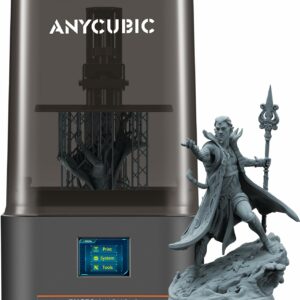
A compact 10K resin printer with 17 µm detail, sized for miniatures and small display pieces, and the right size for the Anycubic Wash & Cure 3.
If you want more room and more help from the machine, the Elegoo Saturn 4 Ultra 16K adds a 10-inch 16K screen, a heated vat and an AI camera that flags failed prints. You’ll find both among the mid-range and resin printers we list.
Where filament wins: everything a beginner meets first
Detail is the only row resin takes. The others decide how often you’ll actually print in the first few months.
Setup and day-to-day mess
A filament print comes off the plate ready to use, apart from any supports you snap away. A resin print comes out wet with uncured resin, and so do the plate and your tools, so gloves and eye protection come out every session. Prusa Research calls resin printing messy for exactly this reason: every model has to be rinsed in isopropyl alcohol and then cured.
Build volume
The resin platforms we list are small. The Elegoo Saturn 4 Ultra 16K, a 10-inch machine, holds about 5.5 litres, a little less than the 5.8 litres of the A1 mini, the smallest filament printer we list. The Bambu Lab A1 Combo offers about three times that. Storage boxes, plant pots and cosplay helmets are filament jobs, ideally on a 256 mm bed.
Parts that get used
For brackets, hooks, clips and repairs, filament is the simpler route. PLA starts to soften at around 55 °C, SUNLU’s heat deflection figure, and the SUNLU PETG Filament is tougher and more heat-resistant. Resin makers do sell tougher blends, often labelled ABS-like; Elegoo describes its own as not brittle, with good impact strength, so that’s the kind to look for if resin parts must take knocks.
For a first filament printer, the Bambu Lab A1 mini arrives assembled, calibrates itself and prints at up to 500 mm/s. The trade-off is its 180 mm bed, and the open frame suits PLA, PETG and TPU rather than ABS.
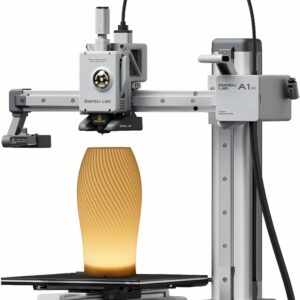
Assembled, self-calibrating and quick, so you spend the first evening printing rather than tuning. Add the AMS lite later if you want up to four colours.
What does the wash-and-cure step involve?
Every resin print is washed and cured before it is finished. Here is the routine in outline, based on Elegoo’s beginner guide:
- Put on nitrile gloves and eye protection before you open the printer.
- Take off the build plate and remove the print.
- Rinse the print in isopropyl alcohol (Elegoo specifies 95 % or stronger) for about 2 to 3 minutes, or in water if you use a water-washable resin such as Elegoo Water Washable Resin 2.0, until the surface is no longer sticky.
- Let it dry completely, about half an hour according to Elegoo, or white marks can appear after curing.
- Cure it under 405 nm UV light; the time depends on the model’s size and shape.
- Never pour the used alcohol or rinse water down the drain: it carries uncured resin.
A combined station does both in one box. The Anycubic Wash & Cure 3 fits printers of 7.3 inches and below, including the Photon Mono 4, while for the 10-inch Saturn 4 Ultra 16K you’d look at the larger Elegoo Mercury Plus V3.0 Wash & Cure Station. The full routine is covered in our walkthrough on washing and curing resin prints.
Resin safety essentials, in brief
Liquid resin irritates skin and can cause an allergic reaction with repeated contact. Elegoo’s guide asks for nitrile gloves, a protective mask, safety goggles and an apron, in a room with good ventilation and away from UV light. Ventilation does the real work: a dust mask doesn’t stop vapour, as our resin printer safety guide explains.
Wear nitrile gloves whenever you touch liquid resin, the vat or an uncured print, and keep resin printers out of bedrooms, kitchens and living rooms. Water-washable resin still irritates skin.
- Give the printer a well-ventilated space away from bedrooms and kitchens, behind a door children and pets can’t open, and keep resin and cleaning liquid there too.
- Leave rinse water in sunlight or under UV until the resin in it has cured before disposal.
Neither kind is emission-free. A NIOSH evaluation of filament and resin printers in 11 school settings detected volatile organic compounds and ultrafine particles during printing, at levels it judged low, and recommended separate, ventilated print spaces. Filament fumes are covered in our guide to 3D printing safety at home, while gloves, ventilation and disposal for resin get the full treatment in our resin printer safety guide.
Who should start with resin, and who shouldn’t?
Start with resin only if all three of these are true:
- Most of what you want to print fits a small resin platform (153.4 × 87 × 165 mm on the Photon Mono 4): miniatures, busts, jewellery.
- You have a ventilated room nobody sleeps or eats in, where liquid resin and cleaning liquid can live.
- You’re happy to glove up, wash and cure every single print.
That is the miniature painter’s profile: sharp faces, many small models per plate and far finer layer lines to hide under paint. If that’s you, the Anycubic Photon Mono 4 is the gentle first step, and the Elegoo Saturn 4 Ultra 16K is the one to choose for whole squads on one plate. Our advice on choosing a printer for miniatures explains which suits you. Either way, you’ll need a way to wash and cure (two lidded tubs and a UV lamp will do; a station is optional).
Everyone else should start with filament: people who want to fix things, print toys and organisers, make cosplay pieces or simply learn. In our view, a filament printer is also the more forgiving place to learn slicing, supports and print orientation. Resin makes a good second printer. Our ranked list of 3D printers puts both kinds in order.
Common questions
Are resin prints as strong as PLA prints?
It depends on the resin and the job. For brackets, clips and repairs, filament is the simpler route, though PLA starts to soften at around 55 °C, SUNLU’s heat deflection figure, so PETG suits parts that get warm. If resin parts must take knocks, choose a tougher blend, often labelled ABS-like, which Elegoo describes as tough and not brittle.
Which is quicker, resin or filament?
The spec sheets can’t settle it: resin makers quote height per hour (up to 50 mm/h on the Anycubic Photon Mono 4 with standard resin, according to Anycubic), filament makers quote nozzle travel. Resin gains on batches, since a full plate takes no longer than one model of the same height. A filament print is ready when it leaves the plate, while a resin print still has to be washed, dried and cured.
Can one printer use both filament and resin?
Not the printers we list. Filament printers melt plastic through a nozzle, while resin printers cure liquid with light through an LCD, so each needs its own machine. If you want both, plan for two printers, and we would start with filament.
Sources
- Introducing Original Prusa SL1 – Open Source SLA 3D Printer by Josef Prusa — Prusa Research
- Layers and perimeters — Prusa Research
- Anycubic Photon Mono 4 — Anycubic
- Get Started in Resin Printing — Elegoo
- ABS-like Photopolymer Resin V2.0 — Elegoo
- Three-Dimensional (3D) Printing in Non-Industrial Spaces: A Summary of Emissions Evaluations in 11 School Settings — NIOSH (CDC)