
For PLA, PETG and TPU, usually not: they print well in the open, and PLA would rather stay cool. For ABS and ASA, yes. A box also helps with long prints in a cold or draughty room, or where children and pets can reach the printer. For ABS, buy a printer with the enclosure built in.
An enclosure is a box around the printer, built in by the maker or added later as a tent or cabinet. It changes how warm and still the air around the print stays, what happens to fumes, who can reach the hot parts, and a little of the noise. How much that matters depends on your plastic and your room, so start there.
Do you need an enclosure for the filament you’ll use?
Only if that filament warps in open air. The table sums up what filament and printer makers publish; the right-hand column is our rule of thumb.
| Material | What the makers say | Enclosure? |
|---|---|---|
| PLA | Needs a lot of print cooling, so Prusa says printing it in an enclosure might not be a good idea. SUNLU gives its PLA a heat deflection temperature of 55 ± 5 °C | No. If your printer has one, let the heat out |
| PETG | Does not shrink or warp, according to Prusa, and also needs print cooling. Bambu Lab lists it for open-frame printers but notes that a cold room can weaken layers, and suggests an enclosure for that reason | No, in a warm room |
| TPU | Rated ideal by Bambu Lab on the open-frame A1 mini | No |
| ABS | Prusa lists significant warping and says the printer should be inside an enclosure | Yes |
| ASA | Named by Prusa, with ABS and PC Blend, among the materials most prone to warping | Yes |
| PC, nylon, fibre-filled | Not recommended on the open-frame A1 mini, says Bambu Lab; listed by Elegoo for the enclosed Centauri Carbon | Yes, on a printer rated for them |
The material settles most cases. Three situations can still tip a PLA or PETG printer towards a box, or at least a cover:
- A cold or draughty room. Prusa warns that an open window or an air-conditioning unit near the printer makes warping more likely. Watch for a garage, a conservatory or a spare room with the window open, and remember that a long print gives a draught more hours to do damage. Move the printer out of the draught first, and check the maker’s operating range too: Elegoo rates the Centauri Carbon for rooms between 5 and 40 °C, and an unheated garage can drop below that in winter.
- Children or pets. On an open frame, the hot nozzle, the heated bed and the moving parts are all within reach; a closed door keeps them out of it, as the section on children below explains.
- Smells in a shared room. A box with a filter helps; a box without one only delays the smell. More on that below.
If none of those apply and you’ll print PLA, PETG or TPU, skip the enclosure and put that budget towards the printer or a few spools of filament.
What actually matters when you choose
Built in or added later, these are the things a box changes, and what to look for in each.
Warping: warm, still air for ABS and ASA
Warping happens when hot plastic meets much cooler air. Prusa puts it down to a sudden temperature difference between the nozzle and the surroundings, which makes the plastic shrink and pull up at the corners. ABS shrinks by 1–2 % as it cools, according to Prusa, so a large flat part in open air is a struggle. An enclosure keeps the air around the print warm and still, which is what Prusa’s ABS guide asks for: a higher ambient temperature and no draught around the print.
The box is only half of it. Prusa suggests a 100 °C bed for ABS, within an 80–110 °C range depending on the size of the object, so a printer whose bed tops out at 80 °C starts at the very bottom of that range. Brims, slower speeds and bed preparation help too, and they’re all in our guide to stopping corners lifting.
Look for: panels on every side including the top, a door that closes fully, and a bed that reaches at least 100 °C.
Heat: why PLA would rather stay out of the box
The warmth that helps ABS works against PLA. Prusa says PLA and PETG need a lot of print cooling, which is harder when the air around them is warm. SUNLU’s 55 ± 5 °C heat deflection figure for its PLA leaves little margin in a warm box.
Heat reaches the printer too. Prusa says printing inside an enclosure can deform the fan shroud and other plastic parts on its own printers. Built-in enclosures are designed around this: the Centauri Carbon adds a chamber temperature regulator fan and an auxiliary part-cooling fan, and its build plate has a PLA-specific side that Elegoo says works at lower bed temperatures.
Look for: a way to let heat out for PLA, such as a chamber fan, a lid you can lift or a door you can leave open. With an add-on box, check your printer maker’s advice before you shut the printer in.
Fumes: an enclosure holds them, a filter cleans them
A box on its own doesn’t clean the air; it holds fumes until you open the door. CLEAPSS’s best solution is a fully enclosed printer with filters: a fan drawing air through a HEPA filter for ultrafine particles and a carbon filter for volatile organic compounds, and time for the enclosure to clear before you open it. Elegoo says the Centauri Carbon’s built-in filter absorbs harmful particles and odours (Elegoo calls it a nano mineral crystal filter, not a HEPA or carbon filter); treat that as a help alongside the well-ventilated room Prusa asks for with ABS, not a replacement. Our guide to printer fumes at home covers materials, placement and ventilation in detail.
Look for: a particle filter and a carbon filter, a top that closes, and replacement filters that are easy to get.
Children and pets: hot parts behind a door
Here an enclosure earns its place even with PLA. According to CLEAPSS, a print can still be hot enough to burn straight after it finishes, and hair, sleeves and fingers can catch in belts and moving parts. It notes that a cabinet prevents access to hot and moving components, and recommends that schools buy desktop printers with one already fitted.
A door that a child can open is a barrier, not a lock: keep the printer where an adult can see it, and the door shut until the print has cooled. With an open-frame printer, put it out of reach and run it while you’re in the room.
Look for: a door that closes fully, a top that covers the print head, and a window or camera so you can check a print without opening it.
Noise: a box helps less than you’d hope
Panels can take the edge off the sound, but a printer’s fans still have to run, so don’t expect silence. Noise figures are hard to compare: Elegoo quotes no more than 55 dB for the Centauri Carbon, while Bambu Lab’s FAQ puts the A1 mini at about 48 dB, but only in silent mode. Where the printer stands is the other lever, so it’s worth knowing how loud 3D printers are before you pick a room.
Look for: a published noise figure, if the printer will share a room with you.
Built-in or add-on enclosure?
A built-in enclosure is designed with the printer: fans, filter, door and bed temperature are matched, and the maker rates the machine for the materials it handles. The cost is size and weight, as the makers’ figures show.
| Specification | Elegoo Centauri Carbon | Bambu Lab A1 mini |
|---|---|---|
| Frame | Enclosed CoreXY, tempered glass door and top cover | Open frame, moving bed |
| Max bed temperature | 110 °C (at 25 °C room temperature) | 80 °C |
| Max nozzle temperature | 320 °C, hardened steel | 300 °C, stainless steel |
| Filaments the maker lists | PLA, PETG, TPU, ABS, ASA, PET, PC, PA, carbon- and glass-fibre filled | Ideal: PLA, PETG, TPU, PVA. Not recommended: ABS, ASA, PC, PA, PET, fibre-filled |
| Air filter | Built in | None listed |
| Size and weight | 398 × 404 × 490 mm, 17.5 kg | 347 × 315 × 365 mm, 5.5 kg |
An add-on enclosure goes around a printer you already own. They come in three broad kinds: folding fabric tents over a frame, rigid cabinets with clear panels, and furniture converted at home. Any of them can steady the air in a cold room or keep small hands away. Check the printer maker’s advice first: Bambu Lab, for one, says it doesn’t recommend enclosing the A1 mini. And no box can change what a printer is rated for: Bambu Lab lists ABS and ASA as not recommended on the A1 mini, and its 80 °C bed stays at the bottom of Prusa’s ABS range.
If you go the add-on route, measure the printer at both ends of its travel, not at rest: on a moving-bed printer, the bed slides back and forth. Leave room for the spool, the power cable and a door wide enough to lift prints out. Choose panels that don’t burn easily, and never cardboard. For the same decision at full size, see our enclosed-versus-open-frame comparison of the Centauri Carbon and the A1.
Our picks by reader profile
You’ll print ABS, ASA or carbon fibre: Elegoo Centauri Carbon
The Elegoo Centauri Carbon is the enclosed filament printer we list, and the one we’d choose for functional parts: brackets, electronics cases and, in ASA, parts that live outdoors. Its tempered glass door and top cover keep the warmth in, its bed reaches 110 °C, and Elegoo rates it for ABS, ASA, PC, nylon and fibre-filled filaments. It arrives assembled and pre-calibrated, with a chamber camera for checking prints without opening the door. Its hardened-steel nozzle is there for carbon-fibre and other fibre-filled filaments, which Bambu Lab lists as not recommended on the A1 mini.
Skip it if you’ll only print PLA, want several colours in one print, or have only a light desk: it weighs 17.5 kg.
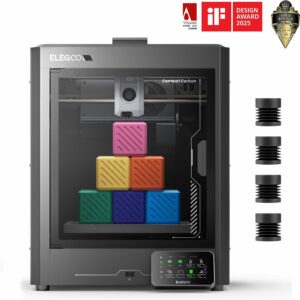
An enclosed CoreXY printer with a 110 °C bed, a built-in nano mineral crystal filter and a chamber fan, rated by Elegoo for ABS, ASA and fibre-filled filaments.
PLA in a home office or family room: Bambu Lab A1 mini
If PLA is what you’ll print, the Bambu Lab A1 mini is our pick, and it needs no box. It arrives assembled, calibrates itself and prints at up to 500 mm/s. Bambu Lab rates PLA, PETG, TPU and PVA as ideal on it, and at 5.5 kg it’s easy to move if one spot turns out too draughty. The trade-off is a 180 × 180 × 180 mm build volume, the smallest of the filament printers we list.
Skip it if ABS or ASA is on your list, or if young children would be near it without an adult: the open frame leaves the hot nozzle and the moving bed within reach.
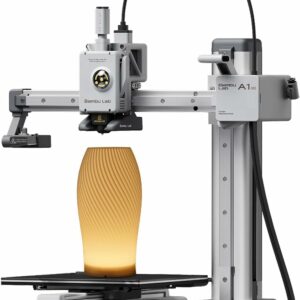
Assembled, self-calibrating and rated by Bambu Lab for PLA, PETG and TPU, which all print well in the open.
Bigger PLA and PETG prints in colour: Bambu Lab A1 Combo
The Bambu Lab A1 Combo keeps the open frame and the automatic calibration, with a 256 × 256 × 256 mm build volume and the AMS lite in the box for up to four colours in one print. Its bed reaches 100 °C, but the open frame is best with PLA, PETG and TPU, so it’s the printer for signs, models and household parts rather than ABS.
Skip it if you need ABS or ASA, or if one colour at a time suits you and the A1 mini’s bed is big enough.
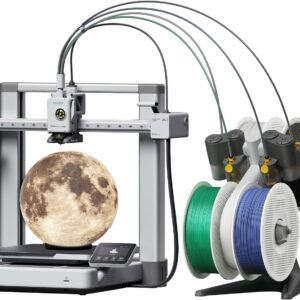
A 256 mm bed and up to four colours with the AMS lite, for PLA, PETG and TPU projects too big for the mini.
Tough parts without an enclosure: SUNLU PETG Filament
Before buying a box for ABS, check whether PETG would do. Prusa says PETG doesn’t shrink or warp and suits indoor and most outdoor uses below 80 °C. SUNLU PETG Filament has a published heat deflection temperature of 70 ± 5 °C, against 55 ± 5 °C for SUNLU’s PLA, and its 240–260 °C nozzle and 60–70 °C bed settings sit within the A1 mini’s limits. For parts in strong sunlight, Prusa notes that ABS has slightly worse UV resistance than ASA, which is worth weighing when you are choosing between ABS, ASA and PETG outdoors.
Skip it if a part has to cope with heat near or above SUNLU’s 70 ± 5 °C heat deflection figure: that’s enclosed-printer territory.
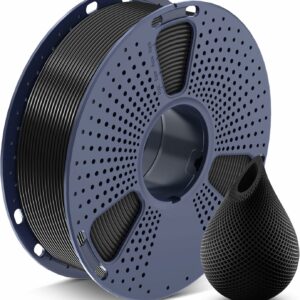
Tougher and more heat-resistant than PLA, with SUNLU’s published 240–260 °C nozzle and 60–70 °C bed settings, and no enclosure needed.
What to avoid
- Shutting PLA in a warm box. PLA needs a lot of cooling. On an enclosed printer, follow the maker’s advice and open the door or lift the lid if heat builds up.
- A DIY box that burns. A hot nozzle and a heated bed don’t belong inside cardboard or anything else that catches fire easily.
- Counting on the box to clear fumes. Without filters it only holds them.
- Using a box to stretch an open-frame printer. It doesn’t raise the bed temperature or change the maker’s material ratings, and Prusa warns that trapped heat can deform plastic parts such as the fan shroud. If ABS is the plan, buy a printer rated for it.
Common questions
Can I put an enclosure on an open-frame printer?
Sometimes. Where schools have no other extraction, CLEAPSS recommends a filtered cabinet over open-frame printers, but some makers advise against it: Bambu Lab doesn’t recommend enclosing the A1 mini. Check your printer maker’s advice first: an enclosure traps heat as well as fumes, and it won’t change which filaments the printer is rated for.
Do you need an enclosure for PETG?
Usually not. Prusa says PETG doesn’t shrink or warp, and like PLA it needs good print cooling, which is harder in a warm box. Bambu Lab rates it ideal on the open-frame A1 mini, so a spot out of the draught is usually enough. Keep the room warm: Bambu Lab notes that low ambient temperatures can weaken PETG’s layer bonding.
Can you print ABS or ASA without an enclosure?
It is a struggle. Prusa says an ABS printer should be inside an enclosure and names ASA with ABS among the materials most prone to warping, and Bambu Lab lists both as not recommended on the open-frame A1 mini. If you only need a few tough parts, PETG on an open printer may do the job.
Can I print ABS in a cold garage?
Only on an enclosed printer, and only within the maker’s operating range. Elegoo rates the Centauri Carbon for rooms between 5 and 40 °C, and Prusa warns that draughts make warping more likely. If the garage drops below the rated range in winter, bring the printer indoors for those months.
Will an enclosure make a 3D printer quieter?
A little. Panels deaden some of the sound, but the cooling fans keep running, so don’t expect silence. If noise is the main worry, compare the makers’ published noise figures and plan where the printer will stand.
Sources
- Warping — Prusa Knowledge Base
- ABS — Prusa Knowledge Base
- PETG — Prusa Knowledge Base
- Elegoo Centauri Carbon — Elegoo
- Bambu Lab A1 mini Technical Specification — Bambu Lab
- A1 mini FAQ — Bambu Lab Wiki
- Filament guide: Printer, Nozzle, AMS, Build Plate, Glue Compatibility and Required Parameters — Bambu Lab Wiki
- 3D Printing in Schools and Colleges: Managing the Risks — CLEAPSS