Start with the filament the pen takes: 1.75 mm PLA and ABS for firm, detailed lines, or a thicker low-temperature plastic for a cooler tip. Then look for a published temperature range and stepless speed control. Battery or mains and auto sleep come next, and the number of colours in the box matters least.
Most 3D pen listings read alike: adjustable speed, adjustable heat, a rainbow of colours, a gift-ready box. The differences that shape your first month of drawing sit lower down the spec sheet, or are missing from it altogether.
This guide ranks the specs by how much they change the experience, matches five pens to five kinds of buyer, and finishes with a checklist to run through before you order.
What actually matters, ranked by how much it changes your drawing
Work down this list in order. If a pen falls short on the first two points, a longer list of extras won’t make up for it.
1. Filament: 1.75 mm PLA and ABS, or 2.5 mm low-temperature plastic
What it changes: almost everything else. The filament decides how hot the tip gets, how fine and firm your lines can be, and which refills you’ll be buying for as long as you own the pen. There are two families, and their refills don’t swap.
- Hot pens take 1.75 mm PLA, and three of the four here take ABS too. PLA is the everyday choice: the SCRIB3D PLA Refills list 160–210 °C, and the Yungden 30-Colour PLA Refills list 180–210 °C. The plastic sets hard, so you can build upright shapes and fine detail. The trade-off is a nozzle hot enough to burn.
- Low-temperature pens such as the 3Doodler Start+ take a thicker strand, about 2.5 mm. The Kretrum 32-Colour Refills for 3Doodler Start are PCL, a plastic that melts at around 55–60 °C. 3Doodler says the Start+ has no external hot parts. The plastic sets softer than PLA, so expect simple models rather than fine detail.
What to look for: the exact diameter and materials the pen accepts, written on the listing. Standard 1.75 mm PLA does not fit the 3Doodler Start+, and 2.5 mm strands won’t feed a standard hot pen. Diameter is only the start: PLA, ABS and PCL behave differently once they leave the nozzle. When you know your family, you can compare filament refill packs by length and colour.
2. A published temperature range for each material
What it changes: how well the pen copes with the filament you actually buy. Brands don’t all give the same printing temperature for their PLA, as the two ranges above show. With too little heat the plastic struggles to flow; with too much it runs and strings. Heat also affects what you breathe: a NIOSH study of children’s 3D pens and printer toys found that nozzle temperature, along with filament type, colour and extrusion speed, significantly influenced particle and VOC emissions.
A printed range is also a quality signal. It shows you can match the heat to your filament, and that the maker is willing to stand behind a figure. The SCRIB3D P1 publishes 160–210 °C for PLA; for ABS, SCRIB3D gives 210–235 °C on its Amazon listing and 200–230 °C in its user manual. The LIHUACHEN RPC200B 3D Pen (Button Version) sets 190–210 °C for PLA automatically, so you don’t choose it. The MYNT3D Super doesn’t publish a range; 3Doodler gives 160–220 °C for the 3Doodler Flow and shows the live nozzle temperature on its screen.
What to look for: separate figures for PLA and ABS, or at least one stated range that covers the materials the pen takes. Then check it against the temperature printed on your refills. ABS needs the higher setting and a well-ventilated room; our side-by-side PLA and ABS comparison covers when ABS is worth the extra care.
3. Speed control: stepless, stepped or a single button
What it changes: how controllable the pen feels in your hand. Speed is how fast plastic leaves the nozzle. Slow flow suits fine lines, joins and curves; faster flow fills a large flat area.
- Stepless: a slider sets any speed between slow and fast, so you can ease off as a line turns a corner. The SCRIB3D P1 and the MYNT3D Super both use one.
- Stepped: a handful of fixed speeds. It works, but you jump between settings rather than easing between them.
- Single button: on the LIHUACHEN RPC200B 3D Pen (Button Version), one button handles heating, feeding, pausing and speed. Quick to learn, with less to fine-tune.
What to look for: a stepless slider if you plan detailed pieces or freehand drawing in the air. For filling in stencils on a first try, simpler controls are fine.
4. Power: battery or mains
What it changes: where you can draw, and for how long. A rechargeable pen goes to the sofa, the garden table or a classroom without a lead; the 3Doodler Start+ is rechargeable, with a charging cable in the box. The MYNT3D Super and the LIHUACHEN RPC200B 3D Pen (Button Version) run plugged in, and the MYNT3D Super has no battery at all. The SCRIB3D P1 has no built-in battery either: it runs from its 5 V 2 A adapter or, according to its manual, a power bank with at least 2 A output.
Mains power isn’t a drawback for a desk hobby: it just means drawing near a socket. The choice between a cordless or mains pen comes down to where you’ll draw.
What to look for: a power supply that suits UK mains. Electrical Safety First advises checking that a product comes with a three-pin UK plug or charger, and it lists non-UK plugs, travel adaptors in the box and a missing rating plate or instructions as warning signs. The product should also carry its maker’s name and a CE or UKCA mark.
5. Auto sleep
What it changes: what happens when you put the pen down to answer the door. Auto sleep stops the nozzle sitting hot while nobody is using it. The SCRIB3D P1 goes to sleep after a few minutes without use (2 minutes on SCRIB3D’s Amazon listing, 5 in its manual), and the 3Doodler Start+ has a stand-by mode. The specs we list for the other three pens don’t mention it.
What to look for: a stated idle time, not just the words “safety features”. If the listing is silent, check the manual before you assume the pen has it. Either way, rest a hot pen on a heat-resistant surface such as a silicone mat, and let the nozzle cool fully before it goes back in its box. Auto sleep is a backstop rather than supervision: if the pen is for a child, the safety rules for children matter more than any feature on the box.
6. The nozzle
What it changes: how often you stop to clear a blockage. The SCRIB3D P1 and the LIHUACHEN RPC200B 3D Pen (Button Version) use ceramic nozzles. The MYNT3D Super uses an ultrasonic nozzle that MYNT3D describes as almost clog-proof. Speciality filaments raise the stakes: wood-fill, which the 3Doodler Flow accepts, is rougher on the nozzle and clogs more easily than plain PLA.
What to look for: a nozzle type named on the listing, and cleaning instructions in the manual. If you plan to use wood-fill, clean the nozzle after every session. If it does block, work through the steps to clear a clogged pen, simplest first.
7. The starter kit, and why the colour count matters least
What it changes: how far you get before your first refill order. The number of colours is the biggest figure on most boxes and the least useful one.
- Filament you can measure. The SCRIB3D P1 ships three colours of PLA, 30 ft (about 9 m) in total. The LIHUACHEN RPC200B 3D Pen (Button Version) ships 12 colours but doesn’t say how much of each.
- Stencils or templates. Something to trace gets a first project off the ground: the SCRIB3D P1 includes a stencil guide, the 3Doodler Flow a stencil sheet (in 3Doodler UK’s Flow Essentials set) and the 3Doodler Start+ an activity guide.
- A finger guard for hot pens. The LIHUACHEN RPC200B 3D Pen (Button Version) includes one.
- A heat-resistant mat. None of the hot pens here lists one in the box. Hot plastic bonds to wood and plastic surfaces, so count a mat as part of the kit.
If your pen arrives without a mat or finger guards, a separate kit fills the gap. The AQTAQ 3D Pen Starter Kit brings a silicone mat rated 220–260 °C, along with finger guards, templates and spare PLA.
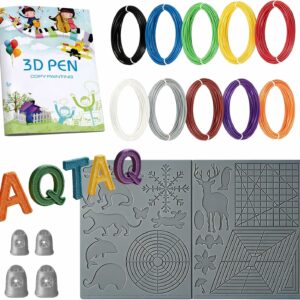
A heat-rated mat, finger guards and spare PLA in one box, for a pen that arrived with none of them. The pen isn’t included.
Our picks by reader profile
Each of these five pens fits a different buyer. This isn’t a ranking: for that, see our ranked list of 3D pens. Below are the published facts side by side, then who each pen suits and who should skip it.
| Pen | Filament | Temperature | Speed control | Power |
|---|---|---|---|---|
| SCRIB3D P1 | PLA and ABS, 1.75 mm | PLA 160–210 °C; ABS 210–235 °C (Amazon listing) or 200–230 °C (manual) | Stepless slider | 5 V 2 A adapter, or a power bank of at least 2 A (manual); no battery |
| MYNT3D Super | ABS and PLA, 1.75 mm | Not published by the manufacturer | Stepless slider | AC adapter, no battery |
| 3Doodler Flow | PLA, ABS and wood-fill, 1.75 mm | 160–220 °C, according to 3Doodler; live reading on the LCD | Check the manual | Check the manual |
| 3Doodler Start+ | 3Doodler Start plastic only | No external hot parts, according to 3Doodler | Check the manual | Rechargeable; charging cable included |
| LIHUACHEN RPC200B 3D Pen (Button Version) | PLA, 1.75 mm | 190–210 °C, set automatically | One button | Corded |
For most first-time buyers: SCRIB3D P1
- PLA and ABS, 1.75 mm, with a published range for each; ages 14 and up, according to SCRIB3D
- Stepless speed slider and a ceramic nozzle
- Auto sleep after a few minutes without use
It clears the top of the list, which leaves room to grow from stencils to freehand pieces without changing pens. Skip it if you’re buying for a child under 14: SCRIB3D rates it 14+, so look at the 3Doodler Start+ below instead. Add a refill pack to the order, as the three starter colours won’t take you past a few small pieces.
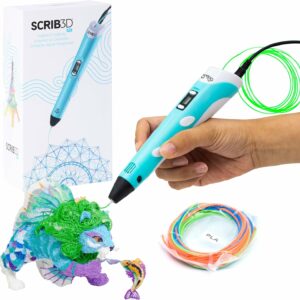
Published PLA and ABS temperature ranges, a stepless speed slider and auto sleep: the spec sheet this guide asks you to look for.
For people who draw often: MYNT3D Super
- ABS and PLA, 1.75 mm
- Ultrasonic nozzle, described by MYNT3D as almost clog-proof
- Stepless flow slider; AC adapter, no battery
The appeal is fine flow control and, by MYNT3D’s account, fewer clogs. Skip it if you want a published temperature range, which MYNT3D doesn’t give, or a pen you can unplug. Its starter filament is ABS, so open a window while you draw, or start with PLA instead.
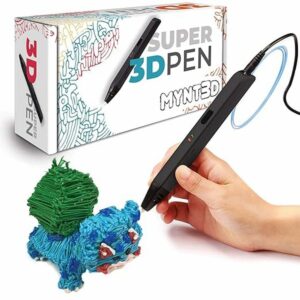
A stepless flow slider plus an ultrasonic nozzle that MYNT3D describes as almost clog-proof, for people who draw often.
For trying more materials: 3Doodler Flow
- 1.75 mm PLA, ABS and wood-fill
- Adjustable 160–220 °C, according to 3Doodler, with the live nozzle temperature on an LCD
- Starter filament and a stencil sheet in 3Doodler UK’s Flow Essentials set
From the brand behind the original 3D pen, the Flow adds wood-fill to PLA and ABS and shows the nozzle temperature as you draw. Skip it if you’ll only ever draw in PLA, because the extra range goes unused. Wood-fill also means more nozzle cleaning.
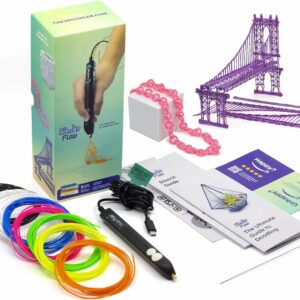
Takes PLA, ABS and wood-fill, with a live temperature reading on screen, for makers who want to try more than one plastic.
For young children: 3Doodler Start+
- Designed for ages 6 to 13, according to 3Doodler UK
- No external hot parts, according to 3Doodler; stand-by mode
- Rechargeable; charging cable, 72 strands of Start eco-filament and an activity guide in the box
It’s the only pen here with no external hot parts, according to 3Doodler, which changes who can use it. Skip it if you want fine detail or standard refills: it takes 3Doodler Start plastic or a compatible 2.5 mm pack, never 1.75 mm PLA. Buying for a child under ten brings its own questions about supervision and which pens suit younger children.
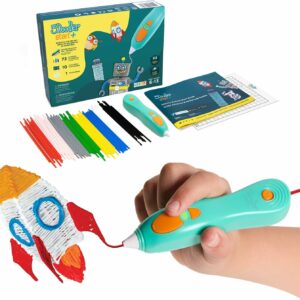
3Doodler says the pen has no external hot parts, and it is rechargeable, so it works away from the table.
For a simple budget start: LIHUACHEN RPC200B 3D Pen (Button Version)
- PLA, 1.75 mm, at 190–210 °C set automatically
- One button; ceramic nozzle; warm-up of about 60 seconds, according to LIHUACHEN
- 12 colours of PLA, a finger guard and drawing templates; age 7 and over, according to LIHUACHEN
One button and a fixed temperature give you the least to learn. Skip it if you want ABS, low-temperature plastic or fine speed control. The ceramic nozzle gets hot, so we’d keep a hot pen for ages ten and up, with an adult beside them. Under ten, choose a pen with no external hot parts, such as the 3Doodler Start+.
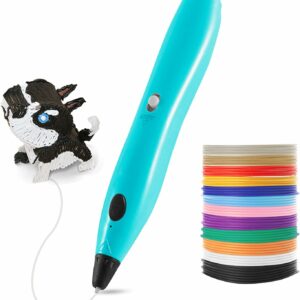
One button, automatic temperature control for PLA and a finger guard in the box: the shortest route from unboxing to drawing.
What to avoid
- Listings with no figures. “Adjustable temperature” without numbers, or a long list of colours without lengths, tells you very little. A stated range for each material and filament measured in metres tell you a lot more.
- Refills of the wrong diameter. 1.75 mm and 2.5 mm strands don’t mix, so check the pen’s manual before you order.
- Non-UK plugs and travel adaptors. Electrical Safety First lists both among the signs that a product may be dangerous.
- ABS in a closed room. A study in Science of the Total Environment measured nine filaments in two 3D pens. ABS gave off the most particles, followed by PLA and then PCL, and ABS released styrene and benzene. The authors urge caution with long sessions, with the nozzle close to the breathing zone, and with children. Open a window and take breaks.
Your 3D pen buying checklist
Run through these in order. A pen that clears the first five is worth a closer look; the rest decide between two good options.
- Filament: 1.75 mm PLA and ABS, or 2.5 mm low-temperature plastic? Are refills in that size easy to find?
- A temperature range published for each material the pen takes.
- Speed control you can fine-tune: a stepless slider if you’ll draw detail.
- Power that fits where you’ll draw, with a three-pin UK plug or charger and a CE or UKCA mark.
- Auto sleep, with a stated idle time.
- A named nozzle type and cleaning instructions in the manual.
- Starter filament stated in metres or feet, not just colours.
- Stencils, a finger guard for hot pens and a heat-resistant mat, in the box or bought alongside.
- A maker’s age rating that matches the person who’ll use it.
- A ventilated spot to draw, especially for ABS.
Common questions
Can I use 3D printer filament in a 3D pen?
Often, if the diameter and temperature match. A hot pen takes 1.75 mm filament, the same diameter as printer filament such as SUNLU PLA Filament, and the Kretrum 12-Colour PLA Refills are sold for most pens and printers that take 1.75 mm. Check that your pen’s range covers the spool’s printing temperature, and check the warranty too: SCRIB3D’s manual ties the P1’s to approved filament. Never feed 1.75 mm filament into a low-temperature pen such as the 3Doodler Start+.
How hot does a 3D pen nozzle get?
Hot pens run at PLA and ABS temperatures: SCRIB3D publishes up to 210 °C for PLA on the P1, and up to 235 °C for ABS on its Amazon listing (230 °C in its manual). 3Doodler gives 160–220 °C for the Flow. Low-temperature pens are a different case: 3Doodler says the Start+ has no external hot parts.
Do I need a mat to use a 3D pen?
It isn’t required, but it protects both your table and your work from hot plastic. Choose a mat rated above your pen’s highest temperature, such as the one in the AQTAQ 3D Pen Starter Kit, rated 220–260 °C.
Which 3D pen is easiest for a complete beginner?
A single-button pen with automatic temperature, such as the LIHUACHEN RPC200B 3D Pen (Button Version), has the least to learn. If you expect to move on to detailed work, the stepless slider and published temperatures of the SCRIB3D P1 give you more room to grow, for ages 14 and up according to SCRIB3D.
Sources
- Particle and organic vapor emissions from children’s 3-D pen and 3-D printer toys — NIOSH, CDC Stacks
- Evaluation of particle and volatile organic compound emissions during the use of 3D pens — Science of the Total Environment, via Europe PMC
- Development of a new poly-ε-caprolactone with low melting point for creating a thermoset mask used in radiation therapy — Scientific Reports (PubMed Central)
- Don’t Be Electricked — Electrical Safety First
- 3Doodler Flow Essentials 3D Printing Pen Set — 3Doodler UK
- Scrib3D P1 User Manual — SCRIB3D