
The battery decides where you can draw and for how long, not how well. A cordless pen suits children and short sessions away from a socket: the 3Doodler Start+ runs up to 45 minutes non-stop per charge, according to 3Doodler. For long sessions and standard PLA, a mains pen such as the SCRIB3D P1 never stops to recharge.
Look for a cordless 3D pen and you soon find the question isn’t only about a cable. In the range we list, the one pen with a battery, the 3Doodler Start+, is also the one pen with no hot external parts, according to 3Doodler. Every pen we list that takes standard 1.75 mm PLA runs from the mains, though one of them can also run from a power bank. So choosing cordless or mains usually means choosing between a low-temperature pen and a hot one, and that choice comes first.
Cordless or mains: the pens we list, side by side
Published figures only. Where a maker doesn’t give a number, the table says so.
| Pen | Power | Run time | Plastic it takes | Nozzle heat |
|---|---|---|---|---|
| 3Doodler Start+ | Built-in rechargeable battery, charging cable included | Up to 45 min continuous, 1 to 1.5 h stop-start, according to 3Doodler | 3Doodler Start plastic only | No hot external parts, according to 3Doodler |
| SCRIB3D P1 | 5 V 2 A adapter, no battery; a power bank of at least 2 A also works, according to SCRIB3D’s manual | No battery limit on the adapter; power-bank run time not published | PLA and ABS, 1.75 mm | PLA 160–210 °C; ABS 210–235 °C (Amazon listing) or 200–230 °C (manual) |
| MYNT3D Super | AC adapter, no battery | No battery limit | ABS and PLA, 1.75 mm | Range not published by the manufacturer |
| 3Doodler Flow | Supplied power adapter | No battery limit | PLA, ABS and wood-fill, 1.75 mm | Shown live on its LCD; 160–220 °C, according to 3Doodler |
| LIHUACHEN RPC200B 3D Pen (Button Version) | Corded | No battery limit | PLA, 1.75 mm | 190–210 °C, set automatically |
Two things stand out. Only one pen has a built-in battery, so only one has a published run time to check. And the heat column splits exactly like the power column: the cordless pen has no hot external parts according to 3Doodler, while the adapter-powered pens heat their nozzles to PLA and ABS temperatures. The SCRIB3D P1 sits in between on power only: it is a hot pen, but its manual says it can run from a power bank.
Should you go cordless? A four-question decision rule
Answer these in order. The first yes settles it.
- Is the pen for a child under ten? Go cordless with the 3Doodler Start+. The battery is a bonus; the real reason is that it has no hot external parts, according to 3Doodler.
- Do you want to use standard 1.75 mm PLA or ABS refills? Go mains. Every pen we list that takes them runs from a plug or adapter; if you also want to draw away from a socket, see question four.
- Will your sessions often run past 45 minutes of steady drawing? Go mains, or plan a break: 45 minutes of continuous use is 3Doodler’s figure for the Start+.
- Will you draw away from a socket, in the garden, on holiday or at a club table with no plug nearby? For a young child, go cordless with the Start+ and its low-temperature plastic. For a teenager or adult using PLA, the SCRIB3D P1 with a power bank of at least 2 A is the option its manual allows.
If none of these applies, a mains pen at a desk is the simpler choice for most teenagers and adults. Power is only one spec, though: our guide on how to choose a 3D pen covers the others, from the nozzle to speed control and the plastics each pen takes.
What actually matters when you compare power
These are the power details worth looking for, and what each one changes.
Published run time
Run time decides whether a project ends when you do or when the battery does. 3Doodler gives two figures for the Start+: up to 45 minutes of continuous use, and 1 to 1.5 hours with stop-start use. The second fits stop-start drawing: a few strands, a pause to look, then a few more.
What to look for: a run time the maker publishes, ideally split like this into continuous and stop-start use. If a cordless pen’s listing gives no run time at all, you’re guessing how long it lasts, and that’s a reason to look elsewhere. Mains pens have no run time to check: they work for as long as they’re plugged in.
Charging: the port, the time and the pause
Three details decide how much a battery gets in your way.
- The cable. The Start+ is rechargeable, and 3Doodler includes the charging cable in the box. Keep it with the pen: a lost or chewed lead means no drawing until you replace it.
- The charging time. 3Doodler’s Start+ page says it charges in as little as 30 minutes; its FAQ page allows 30 minutes to an hour for a full charge. Plan on the hour, and charge between activities rather than in a short break.
- Drawing while it charges. You can’t. 3Doodler says the Start+ cannot be used while charging: the pen is switched off while it charges. With several children and several pens, stagger them so some charge while others draw.
The box list 3Doodler UK gives for the Start+ Essentials set includes the charging cable but no wall plug. 3Doodler’s FAQ adds that some computers’ USB ports don’t supply enough power to charge the pen, and suggests a USB plug in a wall socket instead. Use a UK charger you already own from a reputable brand, not an unbranded one: London Fire Brigade warns that counterfeit chargers are a fire risk.
The power a mains pen needs
Mains pens don’t plug straight into the wall. They run from an adapter that comes in the box: the SCRIB3D P1 ships with a power adapter, the MYNT3D Super with an AC adapter, and 3Doodler lists a power adapter in the 3Doodler Flow set. The rating is often missing from product pages, so look in the manual.
SCRIB3D’s manual for the P1 is a good example of what to look for. It gives the adapter’s output as 5 V and 2 A, and its troubleshooting table describes a replacement as 5 V, 2 A with a 3.8 mm centre-positive barrel plug. The same manual says a third-party power bank with at least 2 A output also works. SCRIB3D doesn’t publish how long the pen runs on a power bank. For the MYNT3D Super and the 3Doodler Flow, the product details we list give no adapter rating, so use the adapter in the box.
Keep the adapter that came with the pen and note the rating on its label. If it fails, get a replacement from the pen’s maker, or one that matches the manual’s figures exactly, rather than any adapter whose plug happens to fit. London Fire Brigade’s general advice is to always use the charger that came with a device.
Check the plug, too. Electrical Safety First says an appliance bought from a UK retailer should have a three-pin UK plug or charger, and lists non-UK plugs and travel adaptors in the box among the tell-tale signs of a problem product.
Heat matters more than the battery
This is the spec that should decide the question for families. 3Doodler says the Start+ works at a low temperature, with no hot external parts. The mains pens we list work differently. The SCRIB3D P1 runs PLA at 160–210 °C and ABS at 210–235 °C according to its Amazon listing, or 200–230 °C according to its manual. 3Doodler gives 160–220 °C for the Flow, and the LIHUACHEN pen sets itself to 190–210 °C.
So don’t read cordless as child-friendly. A battery removes the cable; it doesn’t cool the nozzle. If you come across a pen that pairs a battery with a hot nozzle, it needs the same supervision as a mains pen. Follow the maker’s age rating either way: 3Doodler UK rates the Start+ for ages 6 to 13, SCRIB3D’s product page rates the P1 for 14 and over, and its manual says adult use only. Our guide to the best 3D pen for kids goes through each age.
A cable around children: hazard or safeguard?
A battery’s best argument is the missing cable. With no lead trailing from the table to the wall, there’s nothing for an elbow, a chair leg or the dog to catch, and a child can turn the pen and the model freely to build upright shapes.
For a hot pen, though, the cable has an upside: it keeps the drawing at one table, near one socket, where an adult can see it. If you go mains, sit on the side of the table nearest the socket, run the lead along the back edge rather than across a walkway, and keep the pen’s nozzle away from anything flammable, as SCRIB3D’s manual warns. Teachers weigh the same trade-off across a whole class, and our guide to 3D pens in the classroom covers what changes with a group.
Long sessions and steady drawing
A mains pen’s advantage is simple: it doesn’t stop. For a large model or a long evening of drawing, there’s no countdown and no break to recharge. Pair that with a stepless speed slider, as on the SCRIB3D P1 and the MYNT3D Super, and you can slow down for corners and speed up for filling in without putting the pen down.
Our picks by reader profile
One product per type of reader, the power that suits it and who should skip it. For every pen we list compared on more than power, see our ranked list of 3D pens.
Children aged 6 to 13, drawing anywhere: 3Doodler Start+
The Start+ is our cordless pick and the pen we’d hand a young child. It is rechargeable, has a stand-by mode and, according to 3Doodler, has no hot external parts. 3Doodler UK’s box list for the set gives the pen, the charging cable, 72 strands of Start eco-filament and an activity guide.
- Power: built-in rechargeable battery, charging cable included; a full charge takes 30 minutes to an hour (3Doodler)
- Run time: up to 45 minutes continuous, 1 to 1.5 hours stop-start (3Doodler)
- Plastic: 3Doodler Start plastic only; standard 1.75 mm PLA does not fit
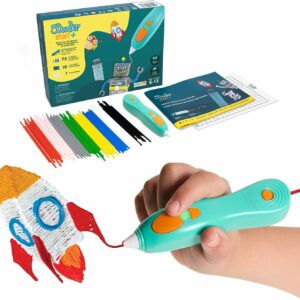
No cable and no hot external parts, according to 3Doodler: the pen for children from six who want to draw at any table, or in the garden.
Skip it if you want standard PLA refills, fine detail or long stretches without a break. Start plastic sets softer, so expect simple models. Refills must be 3Doodler’s own Start plastic or a compatible 2.5 mm pack such as the Kretrum 32-Colour Refills for 3Doodler Start.
Most first-time buyers at a desk: SCRIB3D P1
For a teenager or adult starting out, we’d pick the mains-powered SCRIB3D P1. It takes PLA and ABS at published temperatures, has a stepless speed slider, a ceramic nozzle and a temperature display. Plugged in, it never runs flat halfway through a model, and its manual says a power bank of at least 2 A works when there’s no socket.
- Power: 5 V 2 A adapter, no battery; power bank of at least 2 A also works (SCRIB3D manual)
- Auto sleep: after 2 minutes without use on the Amazon listing, 5 minutes in the manual
- Temperatures: PLA 160–210 °C; ABS 210–235 °C (Amazon listing) or 200–230 °C (manual)
- In the box: 3 colours of PLA (30 ft, about 9 m, in total), power adapter, manual, stencil guide
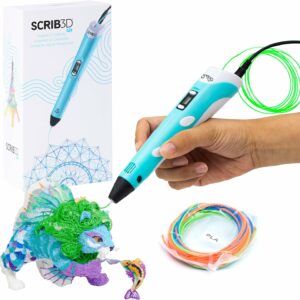
Published PLA and ABS temperatures, a stepless slider and a 5 V 2 A adapter that a 2 A power bank can stand in for, according to SCRIB3D’s manual.
Skip it if the pen is for someone under 14, SCRIB3D’s own age rating, or if you want a pen with a built-in battery. The three starter colours won’t last long, so add a refill pack such as the SCRIB3D PLA Refills early on, and keep ABS for a well-ventilated room.
Long sessions and frequent drawing: MYNT3D Super
If you draw often and for hours, the MYNT3D Super suits you. It runs only from its AC adapter, so there’s no battery to manage, and MYNT3D describes its ultrasonic nozzle as almost clog-proof. A stepless slider sets the flow.
- Power: AC adapter only; the pen does not work unplugged
- Plastic: ABS and PLA, 1.75 mm
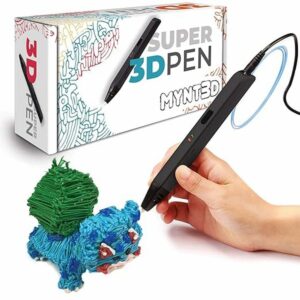
Mains-only, with a nozzle MYNT3D describes as almost clog-proof and a stepless flow slider: a pen for people who draw often.
Skip it if you want published temperature figures: MYNT3D doesn’t publish the range. For ABS, pick a well-aired room.
Teenagers and adults who want more materials: 3Doodler Flow
The 3Doodler Flow is mains-powered too: 3Doodler UK lists a power adapter in the set and designs it for ages 14 and above. It takes 1.75 mm PLA, ABS and wood-fill filament, and its LCD shows the nozzle temperature in real time.
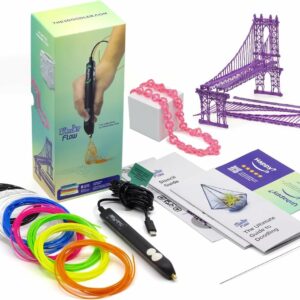
PLA, ABS and wood-fill with a live temperature readout, from the brand behind the original 3D pen.
Skip it if PLA is all you’ll ever draw with, as the wider material range would sit idle. If you do try wood-fill, clean the nozzle after each session.
What to avoid
- A cordless pen with no published run time. Without one, you can’t tell whether it will last a session.
- Buying cordless for the wrong reason. A battery doesn’t make a hot nozzle suitable for a young child; a low working temperature and the maker’s age rating do.
- A mains pen with a non-UK plug and a travel adaptor in the box. Electrical Safety First counts both among the tell-tale signs of a problem product.
- Swapping the adapter for whatever fits. Use the adapter or charger the pen came with, or a replacement that matches the rating in the maker’s manual.
- Mixing refills. Standard 1.75 mm PLA won’t fit the Start+, and 2.5 mm Start plastic won’t fit a standard 1.75 mm pen.
Never cover a cordless pen or its charger while it charges, never charge it on a bed, and unplug it once the charge is complete. If the battery ever swells, London Fire Brigade’s advice is to stop charging, switch the device off and not open the casing.
Common questions
How long does a cordless 3D pen battery last?
It depends on the pen and how you draw. 3Doodler says the Start+ gives up to 45 minutes of continuous use, or 1 to 1.5 hours when you stop and start. Its product page says a charge takes as little as 30 minutes, and its FAQ page allows up to an hour for a full charge.
Can I use a 3D pen while it is charging?
Not the Start+: 3Doodler says it cannot be used while charging and is switched off during charging. Mains pens such as the SCRIB3D P1 and the MYNT3D Super have no battery, so they work whenever they are plugged in.
Can a mains 3D pen run from a power bank?
The SCRIB3D P1 can: its manual says a third-party power bank with at least 2 A output works, and gives the supplied adapter as 5 V and 2 A. The product details we list for the MYNT3D Super and the 3Doodler Flow don’t mention power banks, so use their supplied adapters. The Start+ is rechargeable but can’t be used while it charges.
Is a cordless 3D pen safer for children?
Not because of the battery. The Start+ suits young children because 3Doodler says it has no hot external parts; a hot nozzle stays hot whether a battery or a cable powers it. Follow the maker’s age rating either way.
Does the 3Doodler Start+ come with a plug?
The set includes a charging cable, and 3Doodler’s box list doesn’t include a wall plug. A UK charger from a reputable brand that suits the cable does the job; avoid unbranded or counterfeit chargers.
Sources
- 3Doodler Start+: Our Award-Winning 3D Pen for Kids — 3Doodler
- Frequently Asked Questions — 3Doodler
- 3Doodler Flow Essentials 3D Printing Pen Set — 3Doodler UK
- Scrib3D P1 User Manual — SCRIB3D
- Chargers, batteries and fire safety — London Fire Brigade
- Don’t Be Electricked — Electrical Safety First