

You need a filament dryer if you print moisture-sensitive materials such as TPU, PETG or nylon, or if your prints start stringing, popping or turning rough. If you print mostly PLA and keep spools sealed with desiccant, you can usually skip one. Buy on maximum temperature first, then spool fit and a humidity reading.
Do you need a filament dryer?
You need one if you print the materials that soak up moisture fastest, or if your prints show the signs below and changing settings hasn’t fixed them. Prusa’s knowledge base names polyamide (nylon), polypropylene, PVA and BVOH as highly hygroscopic, and says nylon, PVA and TPU need drying more often than PLA. Polymaker’s wiki puts nylon, PVA, TPU and PETG in its most sensitive group, ABS in the middle and PLA at the low end.
Low sensitivity isn’t the same as none. Polymaker notes that PLA can still pick up moisture over time or in damp conditions, so a spool left open on a shelf through a damp spell can print worse than it did when it was new.
Signs your filament is wet
- Popping, hissing or crackling at the nozzle. Polymaker puts this down to water vapour escaping as the filament melts; Prusa lists bubbling and smoke during extrusion.
- More stringing and oozing than usual, with fine wisps between parts.
- Rough or pitted surfaces. Prusa says poor surface quality is usually the first sign.
- Weak, brittle layers, poor layer adhesion or blobs.
- Uneven extrusion from a printer that ran cleanly with the same filament when it was fresh.
Stringing also comes from temperature and retraction settings, so a dryer isn’t the only fix: our guide to stringing causes and fixes works through them in order. A simple check is to dry one suspect spool and print the same small model again with the same settings. If the popping and wisps disappear, moisture was the problem; if nothing changes, look at your settings instead. The same goes for filament that snaps before it reaches the nozzle: it can have other causes, so dry one spool before you blame the whole batch.
When you can skip a dryer
If you print mostly PLA and get through your spools steadily, a sealed box is often enough. Prusa recommends storing filament in a closed box with desiccant, or in vacuum bags, and suggests giving the more hygroscopic materials priority when space is short. Polymaker adds that its spools arrive vacuum-sealed with desiccant, so a spool whose seal is intact should be dry when you open it. The full routine, from boxes to desiccant, is in our guide to storing and drying filament at home.
If you use a 3D pen rather than a printer, a spool dryer isn’t built for you: pens take short refill strands, and our guide to the filament types 3D pens use covers what to buy and how each one behaves.
Drying temperatures from makers’ data sheets
The table brings together the drying figures SUNLU prints on its technical data sheets and the chart in the Prusa Knowledge Base. SUNLU gives a temperature but no time; Prusa gives both, for its own Prusament filaments. Use the figure on your own filament’s data sheet first. The last column shows whether a dryer that tops out at 70 °C, like the one we recommend below, can reach it.
| Material | Published drying setting | Source | Within a 70 °C dryer? |
|---|---|---|---|
| PLA | 50 °C (no time given) | SUNLU PLA data sheet | Yes |
| PLA / rPLA | 45 °C for 6 hours | Prusa Knowledge Base | Yes |
| PETG | 60–65 °C (no time given) | SUNLU PETG data sheet | Yes |
| PETG (all versions) | 55 °C for 6 hours | Prusa Knowledge Base | Yes |
| TPU 95A | 50–60 °C (no time given) | SUNLU TPU 95A data sheet | Yes |
| TPU | 60 °C for 4–6 hours | Prusa Knowledge Base | Yes |
| ASA | 80 °C for 4 hours | Prusa Knowledge Base | No |
| PC Blend | 85 °C for 5 hours | Prusa Knowledge Base | No |
| PA11 carbon fibre | 90 °C for 6 hours | Prusa Knowledge Base | No |
The two makers don’t agree to the degree, which is why your own spool’s data sheet wins. Prusa warns against going above its temperatures, because the filament can soften and stick together on the spool, and it warns against overdrying too, so stick to the recommended times. SUNLU’s PLA data sheet gives a glass transition temperature of 63 °C, which shows how little headroom PLA has above its 50 °C drying figure.
Check the spool as well as the filament. Prusa, for example, says the plastic sides of its older black spools can loosen from the cardboard core above 45 °C, and gives a fix with a long screw for drying hotter.
What actually matters in a filament dryer
Maximum temperature
This decides which materials you can dry at their makers’ figures. Look for a maximum at or above the highest drying temperature on the data sheets of the filaments you use. A 70 °C ceiling covers every PLA, PETG and TPU figure in the table, but not Prusa’s figures for ASA, PC Blend or PA11 carbon fibre. If you plan to move on to those, buy for the hottest one now.
Spool capacity and fit
Single-spool dryers dry one spool at a time; multi-spool models dry several together. One spool is fine if you print from one spool at a time; if you run several colours or materials, they take turns. Check that the box fits your spools’ diameter and width, since cardboard and plastic spools from different brands vary.
Humidity reading
A built-in humidity sensor shows whether the air in the box is getting drier as the cycle runs. It measures the air around the spool, not the water inside the filament, so read it as a trend: a reading that keeps falling means the dryer is working, and one that climbs again after you close the lid tells you the box isn’t sealing well.
Feeding the printer from the dryer
A filament outlet lets the spool feed the printer while it sits in the warm box, so it can’t pick up moisture during a long print. Polymaker says its most sensitive group often needs to stay in a dryer while printing in humid climates, and Prusa notes that some dryer boxes let you keep the filament inside while you print. For TPU and nylon this matters more than for PLA.
Timer and presets
Prusa’s times for the materials in the table run from 4 to 6 hours, so any timer that runs well past that is enough. Material presets save a few taps, but treat them as starting points and set the temperature from your filament’s data sheet.
Our picks by reader profile
You print PETG or TPU regularly
The SUNLU FilaDryer S2 heats from 35 to 70 °C on a 1–99 hour timer, with a live humidity reading and presets for PLA, PETG, TPU and other common filaments. It holds one spool and is sold to fit most 1 kg spools. While you print, it works as a spool holder with a filament outlet, so a damp-prone spool can stay warm right through a long job. On its product page, SUNLU lists a built-in circulating fan and upper and lower heating plates.
Its 70 °C maximum covers SUNLU’s own figures for SUNLU PETG Filament (60–65 °C) and SUNLU TPU 95A Filament (50–60 °C), the two everyday materials most likely to need drying. If flexible filament is new to you, our guide on whether beginners can print TPU covers the rest of the setup.
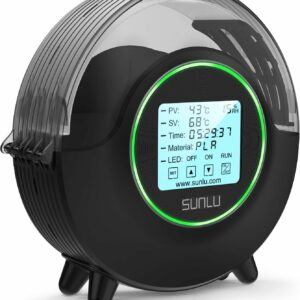
Reaches the published drying temperatures for PLA, PETG and TPU, shows the humidity in the box and feeds the printer while it dries.
Who should skip it: anyone who prints several spools at once and wants them all dried together, and anyone whose filament’s data sheet asks for more than 70 °C. Other printer upkeep kit is in our accessories and tools range.
You print PLA only, in a dry room
Skip the dryer for now. Keep opened spools in a sealed box with desiccant, use them in turn, and buy a dryer only if the signs of wet filament appear and drying a test spool fixes them. PLA has the lowest sensitivity in Polymaker’s grouping, so a dryer earns its place far more often with PETG and TPU.
You print nylon, polycarbonate or ASA
Look for a dryer rated above the highest temperature on your filament’s data sheet; going by Prusa’s chart, that can mean 80–90 °C, above what a 70 °C box reaches. SUNLU’s S2 page mentions PA and PC, but check that particular filament’s data sheet before you rely on 70 °C. These materials also ask more of the printer itself, so if you’re still choosing one, start from our ranked list of 3D printers and compare each one’s maximum nozzle temperature with the data sheet.
What to avoid
- Drying hotter than the data sheet. Prusa warns that filament can soften and stick together above its recommended temperatures.
- Leaving spools in for days to be safe. Prusa warns against overdrying; use the published time and stop.
- Buying for today’s materials only. If ASA or nylon is on your list, a 70 °C dryer won’t reach the makers’ figures.
- Expecting a dryer to fix every flaw. If a dried spool still strings, the cause is in your settings.
- Putting dried filament back on an open shelf. Polymaker advises against leaving filament exposed when you aren’t printing; move it into a sealed box with desiccant.
Common questions
How long does it take to dry filament?
It depends on the material and the maker. Prusa’s chart gives 4 to 6 hours for PLA, PETG, TPU, ASA, PC Blend and PA11 carbon fibre. SUNLU’s data sheets give a temperature without a time, so follow your dryer’s instructions and stop once the symptoms are gone.
Can you over-dry filament?
Prusa says yes and advises sticking to its recommended times. Running hotter than the data sheet is the bigger risk, because the filament can soften and stick together on the spool.
Does brand-new filament need drying?
Not usually, if it arrives sealed. Polymaker says its spools are vacuum-sealed with desiccant, so most can print straight from the bag while the seal is intact. Dry it if it shows the signs of wet filament or has been open for a long time.
Can I print straight from a filament dryer?
Yes, if it has a filament outlet. The SUNLU FilaDryer S2 works as a spool holder with an outlet, so the spool feeds the printer while it stays in the warm box, which helps most with TPU, PETG and nylon.
Sources
- Drying filament — Prusa Knowledge Base
- Wet Filament — Polymaker Wiki
- FilaDryer S2 — SUNLU
- PLA Technical Data Sheet — SUNLU
- PETG Technical Data Sheet — SUNLU
- TPU 95A Technical Data Sheet — SUNLU