The full guide to the 3Doodler Start+
The 3Doodler Start+ Essentials set is a cordless, rechargeable 3D pen that 3Doodler designs for children aged 6 to 13, with no external hot parts. It works with 3Doodler’s own low-temperature Start eco-filament rather than the 1.75 mm PLA most pens use. The trade-off is exactly that: refills are a dedicated format, and the softer plastic suits play and simple models more than fine detail.
Key specifications
| Age | 6 to 13, according to 3Doodler UK |
|---|---|
| Hot parts | No external hot parts, according to 3Doodler |
| Filament | 3Doodler Start eco-filament strands only; not 1.75 mm PLA or ABS |
| Operating temperature | Not published by the maker (“low-heat” filament) |
| Power | Built-in rechargeable battery, 3.7 V (manual); charging cable included, charger plug not included |
| Charger | 5 V USB supply; 3Doodler recommends a regular low-watt charger, not a smart charger |
| Warm-up | About 30 seconds, up to two minutes, according to 3Doodler’s support pages |
| Safety | Stand-by mode: heat cuts off after several minutes without use |
| Controls | On/off switch, forward button, reverse function |
Who it suits — and who should pick something else
- Pick it for a child aged 6 to 13, especially a first pen. No external hot parts and low-heat plastic are the reasons 3Doodler gives for that age range.
- Pick it if you want a pen without a trailing cord: it runs from its built-in battery.
- Pick something else for a teenager who wants crisp, rigid models or to repair things. A 1.75 mm PLA pen such as the SCRIB3D P1 for ages 14 and up gives harder plastic and wider refill choice.
- Pick something else if you already own a cupboard of 1.75 mm PLA: none of it fits this pen.
Our Start+ vs SCRIB3D P1 comparison goes into the choice for a young child in detail.
What’s in the box
According to 3Doodler UK:
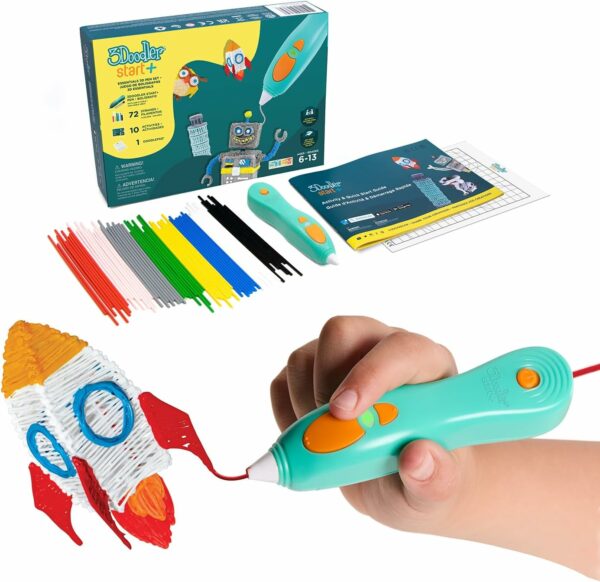
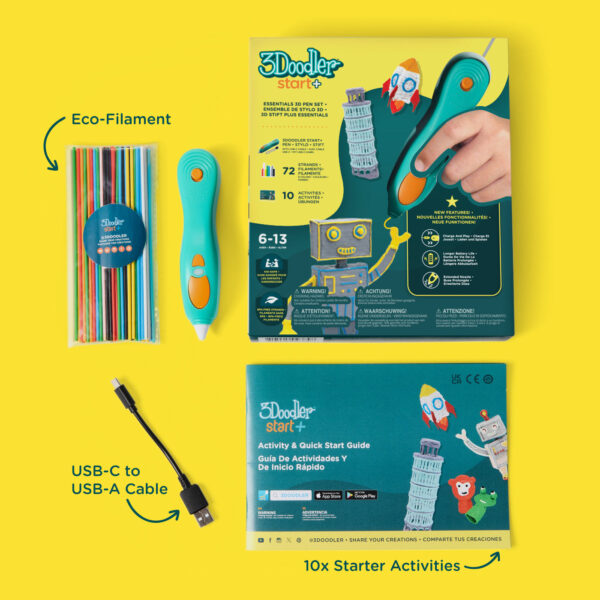
- 3Doodler Start+ 3D pen
- Charging cable
- 72 strands of 3Doodler Start eco-filament
- Activity guide with 10 projects
A wall plug for charging isn’t included, so use a standard USB charger you already own.
How to use it
These steps follow 3Doodler’s Start+ manual.
- Charge the pen first with the power switch off. The light flashes orange while charging and turns solid orange when full.
- Slide the power switch to ON. The light turns solid red while the pen warms up.
- Wait until the light turns solid green.
- Click the forward button once. The light flashes slowly green to show the pen is active.
- Push a strand into the back of the pen until you feel it grip. After a few seconds, filament comes out of the nozzle.
- Press the pen onto the paper to make the line stick. Click the button again to stop.
- To change colour, wait until the light is solid green and use reverse; the manual says the strand backs out for about 10 seconds.
When the battery runs low, the light flashes slowly green and orange. 3Doodler’s manual says rechargeable batteries should only be charged by adults or by children aged at least 8. Shapes to trace are on our free 3D pen templates page.
Refills: what fits and what doesn’t
This is the most important thing to get right before you reorder.
- 3Doodler Start eco-filament is what the pen is designed for. 3Doodler says each strand extrudes up to six times its length: one six-inch (about 15 cm) strand gives over 35 inches (about 89 cm) of line.
- Third-party Start-compatible packs such as the Kretrum 32-colour refills for the Start are sold as fitting the Start and Start+. Be aware that 3Doodler’s FAQ says third-party filament voids any active warranty.
- Standard 1.75 mm PLA or ABS does not fit, whatever the brand. Those refills are for hot pens like the SCRIB3D P1.
Check strands are bendy before use: 3Doodler says brittle filament that snaps easily should be thrown away.
Avoiding jams and keeping it going
- Trim the melted end before reinserting a strand. Reusing untrimmed filament is the most common cause of jams, according to 3Doodler.
- Wait 15 seconds after extrusion stops before reversing a strand out.
- Before putting the pen away, extrude any filament left inside.
- If a strand won’t grip, push it firmly into the port while the pen is feeding forward. On the side-port version, 3Doodler suggests firm pressure and a 90-degree twist.
- If the pen won’t charge, plug the cable into a wall charger rather than a computer; 3Doodler says smart chargers should not be used.
There are two versions of the Start+, with the charging port on the side or on the top. The top-port version can be used while plugged in, with a blue light instead of green. Even with no external hot parts, an adult should set up the first sessions; our guide to 3D pen safety for kids covers house rules.
How it compares
| Published figure | 3Doodler Start+ | LIHUACHEN RPC200B |
|---|---|---|
| Age (maker) | 6 to 13 | 7 and over |
| Filament | Start eco-filament only | 1.75 mm PLA |
| Hot parts | No external hot parts | Ceramic nozzle at 190–210 °C |
| Power | Rechargeable battery | Corded |
The LIHUACHEN RPC200B takes standard PLA, but its nozzle gets hot, so under-tens need an adult beside them.
Common questions
Can the 3Doodler Start+ use PLA filament?
No. The Start+ is designed for 3Doodler’s Start eco-filament, a low-heat plastic in short strands. Standard 1.75 mm PLA and ABS will not fit or work in it.
What age is the 3Doodler Start+ for?
3Doodler UK sells it for ages 6 to 13. The manual also carries a choking warning for under-threes because of small parts, and the manual says only adults or children aged 8 or over should charge it.
Does the Start+ get hot?
3Doodler designs it with no external hot parts and low-heat filament. The extruded plastic is warm for a few seconds, which is when you can mould it before it hardens.
Will third-party refills work in the Start+?
Some packs are sold as Start-compatible, and they are designed to fit. 3Doodler’s FAQ says using third-party filament voids any active warranty, so its own Start eco-filament is the default choice.
Why won’t the Start+ heat up?
3Doodler suggests charging it for 30 minutes to an hour, then switching on. The light should go from red to green in about 30 seconds, up to two minutes. If it has sat idle, it may be in stand-by: click the button or switch it off and on.
Specifications as published by 3Doodler on its official pages, checked November 2026. Where a figure isn’t published, we say so.