

Usually, yes: if your pen takes 1.75 mm filament and the spool’s printing temperature sits inside the pen’s published range, ordinary PLA, and ABS in pens that list it, draws like a refill. Read the maker’s warranty terms first. Low-temperature pens such as the 3Doodler Start+ are the exception: they take their own plastic only.
Four checks before you feed a spool into a pen
Pen refills and printer filament are often the same plastic in the same diameter. The Kretrum 12-Colour PLA Refills, for instance, are sold for pens and printers that take 1.75 mm filament. Run through these four checks in order and stop at the first “no”.
- Diameter. The spool must match your pen. Every hot pen we list takes 1.75 mm; some pens use thicker 2.85 mm strands instead, according to 3Doodler, and low-temperature pens use their own plastic.
- Material. The material must be on your pen’s list. The SCRIB3D P1 lists PLA and ABS; the LIHUACHEN RPC200B 3D Pen (Button Version) takes PLA only.
- Temperature. The spool’s printing temperature must overlap the pen’s range for that material. Set the pen inside the overlap.
- Warranty. SCRIB3D’s manual says the P1 should be used only with PLA or ABS filament approved by SCRIB3D, and that non-approved plastics void the warranty. 3Doodler, by contrast, says the 3Doodler Flow is designed for 1.75 mm spooled filament, including other brands.
Here is check three with real figures. SUNLU publishes 200–210 °C for its SUNLU PLA Filament at slower printing speeds of 50–100 mm/s; its 210–240 °C band is for printers running at 100–200 mm/s. The P1’s PLA range is 160–210 °C, so the overlap is 200–210 °C: set the pen there. The LIHUACHEN pen sets itself to 190–210 °C, which overlaps as well.
Printer filaments at a glance: published temperatures and verdicts
Spool temperatures come from SUNLU’s published settings and Prusa’s material guides; pen ranges come from the pen makers.
| Material | Published printing temperature | Against pen ranges | In a 1.75 mm pen? |
|---|---|---|---|
| PLA | 200–210 °C at 50–100 mm/s (SUNLU) | Inside the P1 (160–210 °C), the Flow (160–220 °C) and the LIHUACHEN pen (190–210 °C) | Yes |
| ABS | Varies by brand: read the label | The P1’s ABS range is 210–235 °C on SCRIB3D’s Amazon listing, 200–230 °C in its manual | Yes, in pens that list ABS, with ventilation |
| Wood-fill | Varies by brand: read the label | Only the 3Doodler Flow lists it | Flow only; clean the nozzle after use |
| PETG | 240–260 °C (SUNLU) | Above the top of the P1’s ABS range and the Flow’s 220 °C | No |
| TPU 95A | 190–210 °C at 50–80 mm/s (SUNLU) | Temperature fits, but no pen we list names flexible filament | No |
| Nylon | 285 °C recommended (Prusa) | Far above every pen range we list | No |
| Carbon- or glass-filled | 240–285 °C (Prusa) | Above pen ranges; Prusa says use a hardened nozzle | No |
PLA is the place to start: every hot pen we list accepts it, and SUNLU’s label overlaps all three published pen ranges. If you’re weighing PLA against ABS for a project, our PLA and ABS comparison covers how they differ in the hand. For the plastics themselves, including the low-temperature kind, see our guide to 3D pen filament types.
Which 3D pens take printer filament?
Every hot pen we list takes 1.75 mm filament, but the makers differ on whether you should load a spool.
| Pen | Takes | Published temperature | Spool filament? |
|---|---|---|---|
| SCRIB3D P1 | 1.75 mm PLA, ABS | PLA 160–210 °C; ABS 210–235 °C (Amazon listing) or 200–230 °C (manual) | Fits; warranty tied to SCRIB3D-approved filament |
| 3Doodler Flow | 1.75 mm PLA, ABS, wood-fill | 160–220 °C, according to 3Doodler | Yes: designed for spooled filament |
| MYNT3D Super | 1.75 mm ABS, PLA | Not published by the manufacturer | Fits; stick to ABS and PLA |
| LIHUACHEN RPC200B 3D Pen (Button Version) | 1.75 mm PLA | 190–210 °C, set automatically | PLA spools whose label reaches 190–210 °C |
| 3Doodler Start+ | 3Doodler Start+ Eco-Filament | No external hot parts, according to 3Doodler | No |
The SCRIB3D P1 is the easiest pen to check against a spool label, because SCRIB3D publishes a range for each material and the screen shows the set temperature. The catch is the warranty: if that matters to you, use SCRIB3D’s own refills while it runs, or ask SCRIB3D which filaments it approves.
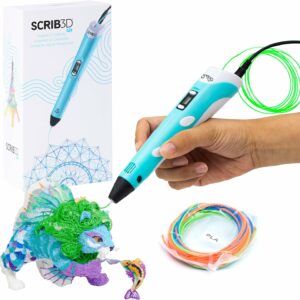
SCRIB3D publishes a temperature range for each material, PLA 160–210 °C among them, so you can match a spool’s label to a setting. Its manual ties the warranty to approved filament.
The 3Doodler Flow is the pen built for this job. 3Doodler says it takes its own refills or your favourite brand of 1.75 mm spooled filament, as long as it melts within the Flow’s 160–220 °C range. 3Doodler adds that it can’t guarantee the quality, safety or compatibility of third-party filament, so the label check still applies.
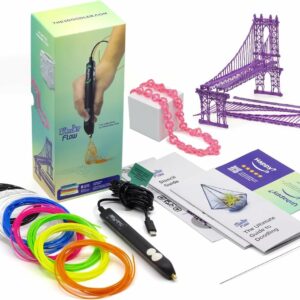
3Doodler says the Flow is designed for 1.75 mm spooled filament, other brands included, within 160–220 °C. It also takes ABS and wood-fill.
Still choosing a pen? Our ranked list of 3D pens sets out the full shortlist.
The exception: low-temperature pens
A low-temperature pen can’t use printer filament. 3Doodler says the 3Doodler Start+ is designed for its Start+ Eco-Filament, developed for drawing at lower temperatures; that other brands or types of filament can’t be used; and that third-party filament voids the warranty.
The strands are thicker than printer filament too: compatible Start packs are about 2.5 mm, so 1.75 mm PLA won’t fit. And SUNLU’s printer PLA wants 200–210 °C, while 3Doodler says the Start+ has no external hot parts. That is the point of the pen, which 3Doodler UK says is designed for ages 6 to 13.
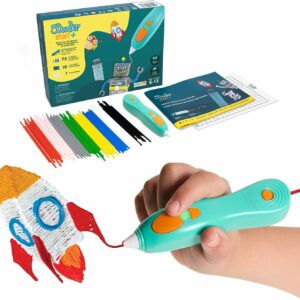
No external hot parts and designed for ages 6 to 13, according to 3Doodler. It takes Start+ Eco-Filament only, so keep printer spools for a hot pen or the printer.
How to cut and feed spool filament into a pen
These steps follow SCRIB3D’s manual for the P1. Buttons differ from pen to pen, so check yours alongside.
- Cut a working length from the spool and secure the loose end so the rest doesn’t unwind. Pen refill packs hold 3 m to about 4.9 m per colour (Yungden and SCRIB3D), a handy length to copy.
- Straighten the first few centimetres by hand. SCRIB3D’s manual asks for a straight end before loading.
- Snip the tip flat with side cutters. SCRIB3D says the end needs a flat surface to push the previous filament through, and an uncut end can jam.
- Switch on, choose the material and set the temperature inside the overlap. On the P1, the temperature light turns from red to green when the pen is ready.
- Hold the feed button and push the filament in gently until you feel the drive pull it.
- Watch the first strand. Bubbling or crackling means it’s too hot; a dim, dark colour and a struggling motor mean it’s too cool. SCRIB3D suggests adjusting by 5–10 °C.
- To change filament, use the reverse button and withdraw the strand fully. SCRIB3D warns that a part-withdrawn strand can swell and jam: cut off the swollen part before reloading.
With the 3Doodler Flow, you can feed straight from the spool instead: stand it on a holder beside you so it unwinds freely. If a pen still refuses the strand, unplug it, let it cool, and work through why a pen won’t feed filament in order.
Which printer filaments to keep out of a pen
Anything your pen’s manual doesn’t list stays out, even when the temperature looks close. Three groups get a firm no.
PETG, nylon and other hot materials
SUNLU’s PETG wants 240–260 °C. That is above the top of the P1’s ABS range (235 °C on SCRIB3D’s Amazon listing, 230 °C in its manual) and the Flow’s 220 °C. Prusa recommends 285 °C for nylon. None of the published pen ranges reaches those figures, and SCRIB3D’s manual links a dim strand and a struggling motor to a temperature that’s too low.
Flexible filament (TPU)
SUNLU’s TPU 95A prints at 190–210 °C at slow speeds, which looks pen-friendly; Prusa’s guide gives 230–245 °C for flexible filaments, depending on hardness and brand, so labels vary. The real problem is softness. Prusa explains that the softer the filament, the harder it is to print, and that soft filament can get tangled in the drive gears if they grip too hard. No pen we list names flexible filament, so leave TPU for the printer.
Filled and abrasive filaments
Prusa calls carbon-, glass- and Kevlar-filled filaments highly abrasive, recommends 240–285 °C and a hardened nozzle, and notes a higher risk of clogging. Some glow-in-the-dark filaments are abrasive too: Prusa describes its own glow PETG as the most abrasive material it has made. If you want glow in a 1.75 mm pen, pick a glow PLA whose label sits inside your pen’s PLA range, and keep glow-in-the-dark filament for small details such as eyes and stars rather than fills.
Wood-fill is the one exception, and only in the 3Doodler Flow, which lists it. Clean the nozzle after each wood-fill session.
Storage and safety with spool filament
A spool left open beside the printer may have taken on moisture. Prusa describes flexible filament and nylon as hygroscopic and says damp nylon bubbles; damp filament can do the same in a pen. Since SCRIB3D links bubbling to too much heat as well, lower the temperature first; if it still bubbles, suspect damp filament. SCRIB3D advises storing filament sealed and dry: a bag or box with a desiccant sachet does the job.
ABS needs fresh air. SCRIB3D’s manual warns that styrene-based filaments such as ABS can expose you and others in the room to styrene, and says to always use the pen in a well-ventilated area. Follow your pen maker’s age rating. Let the nozzle cool completely before you put the pen away.
If you don’t own a printer, there’s no need to buy a 1 kg spool for a pen. Packs on our filament refills shelf carry 1.75 mm PLA in pen-sized lengths across many colours.
Common questions
Will printer filament void my 3D pen warranty?
It can. SCRIB3D’s manual says non-approved plastics void the P1’s warranty, and 3Doodler says third-party filament voids the Start+ warranty. 3Doodler designed the Flow for other brands’ 1.75 mm filament but doesn’t guarantee its quality or safety.
Can I use 2.85 mm printer filament in a 3D pen?
Only in a pen built for that diameter. Every hot pen we list takes 1.75 mm, so a thicker strand won’t go in. 3Doodler says some of its pens use 2.85 mm strands, so check your manual before you buy a spool.
Can I use PETG in a 3D pen?
Not in any pen we list. SUNLU publishes 240–260 °C for its PETG, above the top of the SCRIB3D P1’s ABS range and the 3Doodler Flow’s 220 °C. Keep PETG for the printer.
Why does printer filament bubble in a 3D pen?
Usually heat or moisture. SCRIB3D links bubbling and crackling to a temperature that’s too high, so lower it by 5–10 °C first. If it still bubbles, the filament may be damp: store it sealed with a desiccant.
Sources
- FAQs — 3Doodler
- Scrib3D P1 User Manual — SCRIB3D
- Flexible materials — Prusa Knowledge Base
- Composite materials (filled with carbon, kevlar or glass) — Prusa Knowledge Base
- Polyamide (Nylon) — Prusa Knowledge Base
- Prusament PETG Ultraglow troubleshooting — Prusa Knowledge Base