
Usually it’s mechanical, not a clog: reverse the strand out, cut a clean flat end and check it’s the diameter your pen takes (1.75 mm for every hot pen we list). Then reload with the pen fully heated and push gently until the gear grips it. If the motor makes no sound at all, contact the maker.
Your pen heats up, then refuses the strand, or takes it and pushes nothing out. The usual causes sit at the back of the pen, not in the nozzle: a chewed or swollen strand end, the wrong diameter, a bent or damp strand, or a gear that can’t get a grip.
Try this first: a two-minute diagnosis
Two questions sort most feed faults: does the motor turn when you press feed, and is the strand the diameter your pen takes? Wait until the pen says it’s fully heated, press feed once and listen. 3Doodler’s troubleshooting guide uses the same test: if the drive gear is silent, the filament may not be seated correctly.
| What you notice | Likely cause | Start with |
|---|---|---|
| The pen never says it’s ready | A heating fault, not a feed fault | The note under this table |
| It was ready, then stopped responding after a pause | Sleep mode | Wake it and let it reheat |
| The motor runs, the strand doesn’t move | The gear isn’t gripping | Causes 1 and 2 |
| The strand won’t go into the back of the pen | Wrong diameter, or a lumpy or bent end | Causes 1, 3 and 4 |
| The motor sounds as if it’s straining | Swollen or deformed filament inside | Cause 1 |
| Right mode, strand goes in, nothing comes from the tip | A clog | Cause 8 |
| No motor sound, with a fresh strand seated | Electronics or motor | When to replace |
If the pen never reaches its ready state, you have a pen that won’t heat up instead. If it stopped mid-session, it may have gone to sleep: SCRIB3D says the SCRIB3D P1 enters sleep mode after a few minutes without use. Click any button to wake it, and let it heat again before you press feed.
Then run the quick fix, in this order:
- Check that the mode matches the filament you loaded, PLA or ABS.
- Wait until the pen says it is fully heated.
- Press reverse and pull the strand gently out of the back.
- Cut off any melted, swollen or chewed section with scissors, leaving a flat end.
- Check the strand’s diameter against your manual.
- Insert it, press feed and push gently until the gear grips it.
3Doodler’s instructions for the 3Doodler Flow describe that last step the same way. If loading is new to you, our step-by-step first session walks through it.
Why won’t the filament feed? Causes, most likely first
Most often because the drive gear can’t grip the strand. Each cause below gives the symptom, the reason and the fix. Before you touch the nozzle or anything near it, unplug the pen and let it cool, unless your manual tells you to work on it hot.
1. The strand end is chewed, swollen or melted
Symptom: the motor runs or strains but the strand doesn’t advance, often after you reload a used strand. Why: SCRIB3D’s troubleshooting page for the P1 describes filament that has stripped: the drive system has taken a chunk out of it and can’t push it any more. A strand pulled from a hot pen also comes out with a melted, misshapen end.
Fix: reverse it out, cut off the damaged section and reload. For a struggling motor, SCRIB3D gives the same advice: cut off any swollen or deformed parts and cut a new end. It asks for a flat end on the strand going in, so cut straight across, not at an angle.
2. The strand isn’t seated in the drive gear
Symptom: the gear whirs, but the strand only moves while you push it. Why: a strand that stops short of the gear just sits in the feed port.
Fix: with the pen hot, press feed and push gently until you feel it gripped. If a piece inside is too short to grip, 3Doodler suggests pushing it down into the gear system with another strand.
3. The filament is the wrong diameter
Symptom: the strand won’t enter the pen, or slides in loosely and never catches. Why: each pen is built for one diameter. Every hot pen in our catalogue takes 1.75 mm. The low-temperature 3Doodler Start+ takes only 3Doodler Start plastic or a compatible 2.5 mm pack, and standard 1.75 mm PLA doesn’t fit it.
Fix: check the manual, then the pack. Our guide to which filament your pen takes sets out diameters and temperatures, and if the strand came off a printer spool, read about printer filament in a pen first. A pack with a published diameter tolerance takes one guess out: Yungden states ±0.02 mm for its Yungden 30-Colour PLA Refills.
4. The strand is bent, kinked or brittle
Symptom: the strand catches at the feed port, or snaps when you bend it. Why: 3Doodler’s troubleshooting guide notes that brittle or warped filament often fails to feed correctly.
Fix: cut off the kinked section or try a fresh strand. If every strand from one pack behaves the same way, suspect the pack, not the pen.
5. The mode doesn’t match the filament
Symptom: the pen says it’s ready, but the strand barely moves, often just after a switch between PLA and ABS. Why: SCRIB3D lists a temperature that isn’t high enough, or the wrong mode, among the reasons nothing comes out of the P1, whose published PLA range is 160–210 °C; ABS needs a hotter setting, 210–235 °C on SCRIB3D’s Amazon listing and 200–230 °C in its user manual. 3Doodler says jams typically happen when the setting doesn’t match the filament.
Fix: select the mode for the plastic you loaded. If you adjust the temperature by hand, stay inside both the pen’s range and the one on the pack.
6. The filament is damp
Symptom: bubbling or popping at the tip, and blobby lines. Why: Prusa Research lists bubbling during extrusion among the effects of moisture in filament. It also notes that PLA changes less with humidity than polyamide (nylon) or TPU, so damp PLA is rarely the whole story when nothing feeds. Smoke is different: MYNT3D reads smoke as a temperature that is too high, so switch off, unplug, air the room and check the mode before you try again.
Fix: try a strand from a freshly opened pack. Prusa recommends storing filament in a closed box or vacuum bag with desiccant inside.
7. Dust or crumbs in the feed port
Symptom: a flat-cut strand of the right diameter still slips. Why: dust and plastic crumbs collect where the strand goes in.
Fix: unplug, let the pen cool, then wipe the feed port with a soft, dry brush, as 3Doodler suggests. Go further inside only if your manual shows how: SCRIB3D’s warranty doesn’t cover pens that have been opened, unless its customer service told you to.
8. It really is a clog
Symptom: the strand goes in and the motor turns, but nothing, or a thin dribble, comes from the tip. Why: plastic has set inside the nozzle, which is a different job. Fix: work through our fixes for a clogged nozzle, starting with the free heat-and-reverse routine.
When should you replace the pen? Motor, gear and the warranty
When the motor is silent with a fresh strand seated, or the gear won’t grip a new, flat-cut strand of the right diameter. SCRIB3D puts no motor noise down to a possible fault with the electronics or the motor, and its fix is to contact customer service, not to open the pen.
Read the warranty before you reach for a screwdriver. SCRIB3D covers its pens for one year from purchase, but not if the pen has been opened or tampered with, or used with filament SCRIB3D hasn’t supplied or approved. Wear and tear from normal use is excluded too, so a feed gear worn down by long use may fall outside it.
In the UK, your legal rights sit alongside that: Citizens Advice says a warranty adds to them rather than replacing them. Using your legal rights is usually easier within the first six months, and they last up to six years (five in Scotland) if there’s a fault. Its page covers England, with separate versions for Scotland, Wales and Northern Ireland. Elsewhere, check the consumer rights that apply in your country.
If the pen is past saving, our ranked list of 3D pens sets out the alternatives; the SCRIB3D P1 is the one we’d suggest to most first-time buyers. If you own a P1, that warranty clause settles the refill question: the SCRIB3D PLA Refills are the maker’s own 1.75 mm PLA, with each colour vacuum packed against damp. For other pens, compare diameter, temperature and tolerance across the refill packs we list.
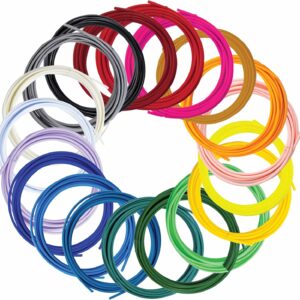
SCRIB3D’s own 1.75 mm PLA in 20 colours, about 4.9 m each, with a published 160–210 °C range and every colour vacuum packed.
Common questions
Why does my 3D pen motor run but the filament won't move?
Usually the gear can’t grip the strand: the end is chewed or swollen, or it hasn’t gone in far enough. Reverse it out, cut a flat end and reload while pushing gently. If a fresh strand still slips, check the diameter.
Should I cut 3D pen filament at an angle?
Follow your pen’s manual. For the SCRIB3D P1, SCRIB3D asks for a flat end on the strand going in, so cut straight across. Either way, remove any melted or deformed part first.
Can I use any 1.75 mm filament in a 3D pen?
Only if its printing temperature sits inside your pen’s range and your warranty allows it. SCRIB3D’s warranty, for example, doesn’t cover pens used with filament it hasn’t supplied or approved.
Will opening the pen void the warranty?
For SCRIB3D pens, yes, unless its customer service told you to. Other makers set their own terms, so read yours before you remove anything the manual doesn’t describe. Citizens Advice notes that a warranty adds to your legal rights rather than replacing them.
Sources
- SCRIB3D P1 Troubleshooting — SCRIB3D
- Warranty — SCRIB3D
- PRO Troubleshooting Guide — 3Doodler
- Flow – Getting Started — 3Doodler
- Drying filament — Prusa Research
- Tips + Troubleshooting — MYNT3D
- Claim using a warranty or guarantee — Citizens Advice