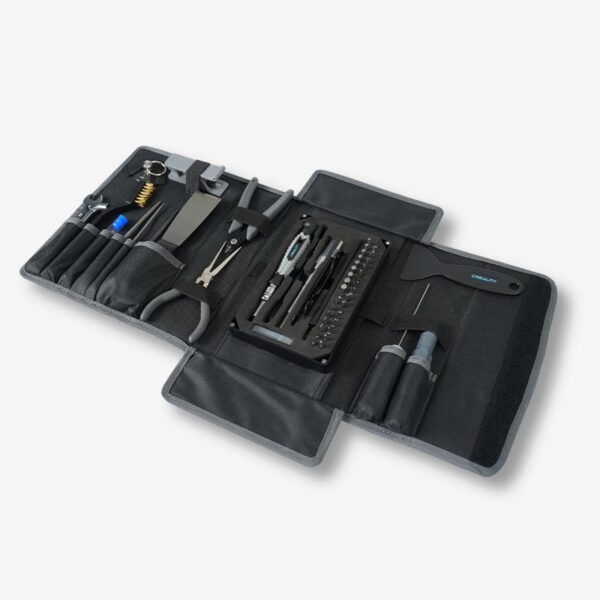

The full guide to the Creality Tool Kit Pro
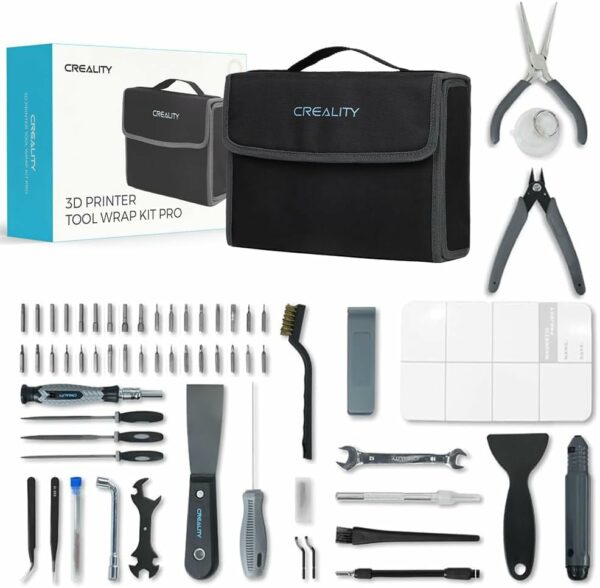
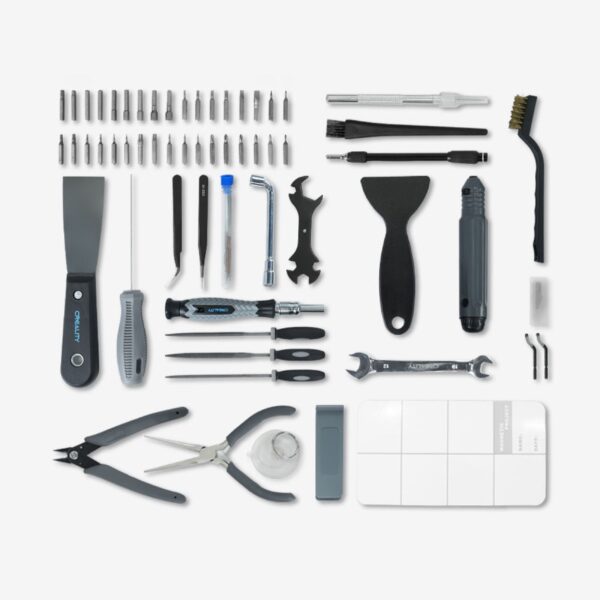
The Creality 3D Printer Tool Kit Pro gathers the hand tools a filament printer owner ends up needing: spatulas to lift prints, nippers, a deburring blade and files to tidy them, needles for a part-blocked nozzle, and 34 screwdriver bits for maintenance. It suits a first-time printer owner who would otherwise buy these one at a time. The trade-off is that the 74-piece count leans on small parts: the bits and the ten spare needles make up 44 of the 74.
Key specifications
| Pieces | 74, according to the listing (Creality’s own store page doesn’t give a count) |
|---|---|
| Storage | Fold-out fabric tool wrap with pockets, elastic loops and a moulded tray for the bits; Creality’s store sells it as the 3D Printer Tool Wrap Kit Pro |
| Removal | Plastic and metal spatulas |
| Finishing | Deburring tool with a 360° rotating blade, engraving knife, files |
| Nozzle care | One 1.5 mm needle, ten 0.38 mm needles, metal brush, L-shaped hex key |
| Maintenance | 34 chromium-vanadium screwdriver bits, pliers, nippers, wrenches, tube cutter |
| Also included | Straight and bent tweezers |
| Packed size | 264 × 85 × 197 mm, 1,300 g gross, according to Creality’s trade store |
| Bit sizes | Not published by the maker |
Who it suits — and who should pick something else
- A good fit if you have just bought a filament printer and own few small tools. Most of what a first month of printing asks for, from lifting a stubborn part to snipping supports and clearing a nozzle, is in one wrap.
- A good fit as a present for someone who already prints, because the tools work on any filament printer rather than one brand.
- Skip it if you already keep a precision screwdriver set, flush cutters and a craft knife: much of the kit would duplicate them, and a single spatula and needle set may be all you lack.
- Keep it away from children’s craft boxes. The blades, needles and metal spatula are sharp, so this is an adult’s kit.
What’s in the box
- Tool wrap with separate pockets
- Plastic spatula and metal spatula
- Deburring tool with a 360° rotating blade
- Engraving knife
- Files
- One 1.5 mm nozzle needle and ten 0.38 mm nozzle needles
- Metal brush
- L-shaped hex key
- 34 chromium-vanadium screwdriver bits
- Pliers, nippers, wrenches and a tube cutter
- Straight and bent tweezers
Which tool does which job
Creality’s store page describes the kit only in broad terms, so here is how each group fits a normal print, from removal to maintenance.
- Lifting the print. Let the plate cool, then start with the plastic spatula, which is kinder to coated build plates. Keep the metal spatula for parts that won’t budge, hold it flat and push away from your hand. Our guide to prints not sticking to the bed covers the opposite problem.
- Removing supports. Snip support towers with the nippers, pull small pieces with the pliers or tweezers, and shave the scars with the deburring blade. The rotating blade follows curved edges without you changing grip. Our article on removing supports cleanly shows where each cut goes.
- Finishing. Use the files for flat faces and the engraving knife for detail, always cutting away from your fingers.
- Clearing the nozzle. The 0.38 mm needles are just finer than a standard 0.4 mm nozzle opening; the 1.5 mm needle is closer to the 1.75 mm filament path. Brush burnt plastic off the nozzle with the metal brush. Clear a nozzle only in the way your printer’s manual describes: the needles are for clearing, not forcing.
- Maintenance. The bits, hex key and wrenches handle the screws, nuts and nozzle changes your manual calls for. The tube cutter gives a clean, square end on feed tubing.
Safety and storage
Switch the printer off and let the hot end cool before you put a brush, needle or tweezers near it, unless your printer’s manual tells you to clear the nozzle while it is hot. The deburring blade, knife and needles are sharp, and the needles are thin enough to lose in a carpet: count them back into their tube after use. Put each tool back in its own pocket so blades don’t rub against each other, and keep the rolled wrap on a high shelf if children share the room. Our guide to a clogged 3D printer nozzle sets out when to clear and when to replace.
How it compares
We list no other tool kit, so the useful comparison is with the printers you are likely to use it on.
- Bambu Lab A1 mini: it ships with a 0.4 mm stainless steel nozzle, which the 0.38 mm needles suit. Bambu Lab also offers a 0.2 mm nozzle, and the needles are too thick for that one.
- Flashforge Adventurer 5M: its quick-release nozzle swaps in about 3 seconds, according to Flashforge, so you may swap a blocked nozzle rather than clear it. The removable magnetic PEI plate means the spatulas are mainly for small or stubborn parts.
Common questions
Does the Creality tool kit work with any 3D printer?
The hand tools work on any filament printer. The screwdriver bits cover common screw heads, but Creality doesn’t publish the exact sizes, so check the screws your printer uses before relying on the kit for a repair.
Which nozzle sizes do the cleaning needles suit?
The ten 0.38 mm needles fit through a 0.4 mm nozzle, the size most filament printers ship with. They are too thick for a 0.2 mm nozzle. Follow your printer’s manual on whether to clear the nozzle hot or cold.
Is there a spare nozzle in the kit?
No. The kit contains tools for clearing and changing nozzles, but no nozzle. Buy spares that match your printer’s model and nozzle type.
Is it a hard case?
No. Creality sells it as a tool wrap: a fabric roll that folds out flat, with pockets, elastic loops and a moulded tray for the bits. It protects the tools from each other rather than from being dropped.
Can you use it on a resin printer?
The spatulas and knife can help with resin parts, but the kit is aimed at filament printing. If you use any tool on uncured resin, wear the gloves your resin’s maker specifies and clean the tool before it goes back in the wrap.
Specifications as published by Creality on its official pages, checked November 2026. Where a figure isn’t published, we say so.