
Start with a 3D pen if you want to make things by hand straight away, with no computer and almost no space. Start with a 3D printer if you want accurate, repeatable parts from digital files and you’re happy to learn some software. For a child under 14, a pen rated for their age is the place to begin.
A 3D pen and a 3D printer both melt plastic, but they’re two different hobbies. With a pen, you draw in the air and the result is as steady as your hand. With a printer, you choose a file on a computer and the machine builds it, layer by layer, while you do something else.
New to all of this? Start with our beginner’s guide to 3D printing, which takes you from choosing a printer to a first successful print.
The quickest way to choose is to picture the first thing you want to make.
- If it’s a drawing, a decoration or a model you’d shape by hand, start with a pen.
- If it has measurements, such as a hook, a clip, a box or a spare part, start with a printer.
- If it’s for a child under 14, start with a pen rated for their age, and keep any printer as a project an adult runs.
3D pen vs 3D printer: the figures side by side
The table compares the two pens and the printer we’d point a beginner to, using the makers’ published specifications and manuals.
| Spec | 3Doodler Start+ | SCRIB3D P1 | Bambu Lab A1 mini |
|---|---|---|---|
| How it makes things | Freehand, in your hand | Freehand, in your hand | From a digital file, layer by layer |
| Maker’s age guidance | Designed for ages 6 to 13, according to 3Doodler UK | 14 and over on SCRIB3D’s product page; the manual says adult use only | None given on Bambu Lab’s specification sheet |
| Hot parts | No external hot parts, according to 3Doodler | Ceramic nozzle, 160–210 °C for PLA | Nozzle up to 300 °C, bed up to 80 °C |
| Plastic | 3Doodler Start plastic only | 1.75 mm PLA and ABS | 1.75 mm filament; PLA, PETG and TPU rated ideal, ABS not recommended |
| Power | Rechargeable; charging cable in the box | 5 V 2 A adapter, or a power bank of at least 2 A | Mains, 150 W maximum; about 57 W on average while printing |
| Space | Hand-held | Hand-held | 347 × 315 × 365 mm and 5.5 kg, plus about 390 mm for the bed to travel |
| Computer needed | No | No | To prepare your own files; prints start from a microSD card |
Two rows decide it for most households. The printer needs a desk of its own, with room for the bed to slide, while a pen needs a drawer. And the heat runs from no external hot parts to a 300 °C nozzle, which is why age comes first.
Where a 3D pen wins
Younger makers can start sooner
For a young child, a pen is the way in. 3Doodler rates the 3Doodler Start+ as designed for ages 6 to 13 and says it has no external hot parts. A hot pen is a different tool: SCRIB3D rates the SCRIB3D P1 for 14 and over, and the warnings in its manual say adult use only.
With a hot pen, SCRIB3D tells you not to touch the nozzle, to warn others in the room that it’s hot, and to let it cool completely before you put it away. For burns, house rules and first aid, see our guide to 3D pen safety for children.
No software, no desk
A pen needs no files and no set-up. On the P1 you choose PLA or ABS mode, wait for the temperature light to turn from red to green, and draw; the learning curve is hand control, built up with a stencil under the pen. It lives in a drawer, too. The Start+ is rechargeable, with a charging cable in the box, and the P1 runs from its adapter or, according to SCRIB3D’s manual, a power bank of at least 2 A.
Small, simple refills
You buy plastic many times, but in small amounts. The P1 comes with three colours of PLA in the box and takes 1.75 mm refills such as the SCRIB3D PLA Refills. The Start+ needs 3Doodler Start plastic or a compatible 2.5 mm pack: standard PLA won’t fit it.
Where a 3D printer wins
Accurate parts, and the same part again
A printer works from a file, so you can make the same part again whenever you need it. You prepare each print in a slicer, Bambu Studio for Bambu Lab printers, where you pick the printer, the filament and the layer height. Bambu Lab says a 0.20 mm layer is the norm for most prints, and that thinner layers take longer.
Useful things, not only decorations
Because the machine follows measurements, a printer suits things that have to fit: hooks, clips, boxes, cable tidies, spare parts. The Bambu Lab A1 mini prints pieces up to 180 × 180 × 180 mm, and Bambu Lab rates PLA, PETG and TPU as ideal on it: PLA for everyday prints, PETG for parts that face more warmth, TPU for flexible ones.
The machine does the building
Once a print starts, the printer builds it layer by layer, with no hand control needed. The A1 mini levels its bed automatically, and Bambu Lab says there shouldn’t be a need to level it by hand. You don’t have to design anything to begin: model libraries such as MakerWorld, Printables and Thingiverse host ready-made files, and a design app such as Tinkercad lets you draw your own later.
What a printer asks of you that a pen doesn’t
Space, time and some software
Bambu Lab asks for about 390 mm of clear space for the A1 mini’s bed to move front to back, a room between 10 and 30 °C, and puts the noise at about 48 dB in silent mode. The printer runs for the whole length of each print, so choose a room where a steady hum won’t bother anyone.
The learning curve sits on the computer. You import a file into Bambu Studio (it opens .stl and .3mf, among others), choose presets, then slice and send it; the printer can also start a file from its microSD card with no internet connection. None of this is hard, but your first prints will teach you about supports, bed adhesion and stringing.
Supervision and fresh air
The A1 mini’s specification sheet gives no age rating. It has a 300 °C nozzle, a heated bed that moves, and Bambu Lab doesn’t recommend enclosing it, so the hot parts stay within reach. We’d treat it as an adult’s machine that children use alongside you.
Ventilation matters with both tools. A study of particle emissions from a desktop printer found that a hotter nozzle raised emissions, that ABS at its highest temperature produced the most particles, and that PLA, PET and TPU printed at lower temperatures produced the least; the authors advise good ventilation. SCRIB3D’s manual says the same of its pen: always use it in a well-ventilated area.
Filament by the kilo
A printer runs on spools, such as the 1 kg SUNLU PLA Filament, rather than packs of short strands. Colour costs material too: with the optional AMS lite the A1 mini prints up to four colours, but every colour change purges filament.
Who should choose which
| If you’re choosing for… | Start with | Why |
|---|---|---|
| A child under 6 | Neither yet | Neither pen here is rated that young |
| A child aged 6 to 13 | 3Doodler Start+ | Designed for ages 6 to 13, with no external hot parts, according to 3Doodler |
| A teenager of 14 or over, or an adult who wants to draw | SCRIB3D P1 | Rigid PLA models, with temperature and speed shown on a display |
| Anyone who wants useful parts or several copies | Bambu Lab A1 mini | Prints from files and calibrates itself |
| A family with children of different ages | A pen for the children, a printer an adult runs | Each tool used within its maker’s guidance |
The 3Doodler Start+ for children aged 6 to 13
It’s the gentle way in: one plastic, no external hot parts according to 3Doodler, and a battery, so it isn’t tied to a socket. The plastic stays softer than PLA, so it suits play pieces and simple models more than fine detail.
Who should skip it: teenagers and adults who want rigid models.
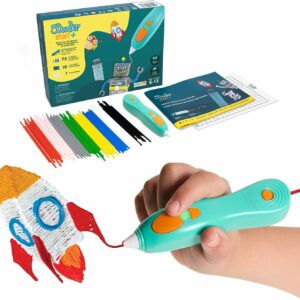
3Doodler says it has no external hot parts and designs it for ages 6 to 13: the way to try making in 3D before any hot tool.
The SCRIB3D P1 for teenagers and adults who want to draw
A hot pen with a ceramic nozzle, adjustable temperature and speed shown on its screen, and published temperatures for PLA and ABS. Keep to PLA at first, on a heat-resistant mat, in a ventilated room. To compare it with other pens, see our ranked list of 3D pens, and for the specs worth weighing, read how to choose a 3D pen.
Who should skip it: anyone under 14, and anyone whose real goal is parts that must fit.
The Bambu Lab A1 mini if you want to make parts
It arrives assembled, calibrates itself and, at 347 × 315 × 365 mm and 5.5 kg, fits on an ordinary desk. The trade-off is the bed: at 180 mm, it’s the smallest of the printers we list. To weigh it against bigger or enclosed machines, see our ranked list of 3D printers and choosing your first 3D printer.
Who should skip it: anyone who needs larger pieces in one go, or wants to print ABS or ASA, which need an enclosure.
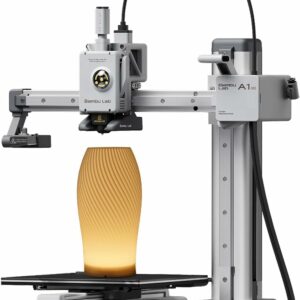
Arrives assembled, levels its own bed and prints PLA, PETG and TPU: a short route from a downloaded file to a finished part.
Can you start with one and add the other later?
Yes, and they sit well together: the pen trains your hand, the printer your eye for 3D models on a screen. The P1 and the A1 mini both take 1.75 mm filament, though SCRIB3D’s manual says to use the PLA or ABS it approves, so check before you feed the pen from a printer spool. The Start+ can’t share in either direction.
Common questions
Is a 3D pen easier to use than a 3D printer?
Easier to start, yes: there’s no software and no file, so you can draw as soon as the pen is hot. The hard part is hand control, which takes practice. A printer takes longer to learn on the computer, but the machine then does the precise work.
Do I need a computer for a 3D printer?
You need one to prepare your own files: Bambu Studio, the slicer for Bambu Lab printers, runs on Windows, macOS and Linux. Once a file is on the microSD card, the A1 mini can start it without an internet connection, according to Bambu Lab.
What age is right for a 3D printer?
Bambu Lab’s specification sheet for the A1 mini gives no age rating. The printer has a nozzle that reaches 300 °C, a heated bed and moving parts, and Bambu Lab doesn’t recommend enclosing it. Treat it as an adult’s machine that children use alongside you.
Can a 3D pen make the same things as a 3D printer?
Not in the same way. A pen builds shapes freehand, so the result is only as accurate as your hand: it suits drawings, decorations and models you shape yourself. A printer follows the measurements in a file, so it suits parts that have to fit and several copies of the same piece.
Sources
- SCRIB3D P1 3D Printing Pen — SCRIB3D
- User Manual Scrib3D P1 — SCRIB3D
- Bambu Lab A1 mini Technical Specification — Bambu Lab
- A1 mini FAQ — Bambu Lab Wiki
- Bambu Studio Quick Start Guide — Bambu Lab Wiki
- Parameters Influencing the Emission of Ultrafine Particles during 3D Printing — International Journal of Environmental Research and Public Health