

For most 3D pen drawing, PLA is the better default: it runs cooler (160–210 °C on the SCRIB3D P1), warps less and gave off fewer particles than ABS in a study of 3D pens. Choose ABS when a model must survive knocks or heat, and give it a hotter setting and a well-ventilated room.
PLA vs ABS: the properties at a glance
Pen temperatures come from the SCRIB3D P1, the only pen we list whose maker publishes a range for each plastic. Strength and heat figures come from Polymaker’s data sheets for its PolyLite printer filaments.
| Property | PLA | ABS | Source |
|---|---|---|---|
| What it is | Plant-based polyester from corn, sugar cane or sugar beet | Acrylonitrile butadiene styrene, a styrene plastic | Prusa; SCRIB3D |
| Pen temperature (SCRIB3D P1) | 160–210 °C | 210–235 °C on SCRIB3D’s Amazon listing; 200–230 °C in the user manual | SCRIB3D |
| Printer nozzle temperature | 190–230 °C | 245–265 °C, in a closed chamber | Polymaker |
| Heat deflection temperature (0.45 MPa) | 60 °C | 100 °C | Polymaker |
| Tensile strength | 52.3 MPa | 33.4 MPa | Polymaker |
| Stiffness (Young’s modulus) | 3,426.9 MPa | 2,246.6 MPa | Polymaker |
| Elongation at break | 6.3 % | 17.9 % | Polymaker |
| Notched Charpy impact strength | 3.3 kJ/m² | 18.0 kJ/m² | Polymaker |
| Warping | Not prone to significant warping | Significant; parts shrink around 1–2 % as they cool | Prusa |
| Main chemicals given off in 3D pens | Lactide | Styrene and benzene | Science of the Total Environment study |
Read the strength rows as a direction, not a promise: they are typical values for test bars made on a printer, and a model drawn by hand won’t match them. The pattern still holds: PLA is stiffer, ABS tougher.
Because these are printer filaments, putting printer filament in a 3D pen raises questions of its own. Pens also take low-temperature plastics such as PCL and the other pen filaments; this page sticks to the two hot ones.
PLA or ABS: a quick decision rule
Stop at the first line that fits.
- Your pen has no ABS setting: PLA. The LIHUACHEN RPC200B 3D Pen (Button Version), for example, takes PLA only.
- Children are drawing or sitting nearby, or the room is hard to air: PLA, in a pen rated for the person holding it. For a child, we’d wait until about ten for any hot pen.
- The model is decorative, flat or detailed: PLA. It’s stiffer and curls less as it cools.
- The model must take knocks, flex, or live near heat, such as a radiator or a car dashboard: ABS, if your pen has an ABS setting and you can ventilate.
- Still unsure: PLA. Every hot pen we list takes it.
How do PLA and ABS compare in the pen?
PLA is the easier plastic to draw with: it needs less heat, curls less and suits more pens. ABS asks for a hotter setting, more care on flat pieces and fresh air.
Temperature and flow
The SCRIB3D P1 manual tells you to pick the PLA or ABS mode to match your plastic, and warns that the wrong mode makes for a poor experience and can damage the pen. Pen ranges run lower than printer ranges, so set a pen by its own manual, not a printer data sheet. The same manual notes that PLA is more prone to oozing after the pen stops; turning the temperature down a little helps.
Warping on flat pieces
Prusa calls PLA not prone to significant warping and lists significant warping as a drawback of ABS. In a pen drawing, that shows most on long, flat ABS panels, so build them in shorter sections and keep PLA for flat work on paper templates.
Fumes: fewer with PLA, not none
PLA gives off fewer particles than ABS, but it still gives some off. A study of nine filaments in two 3D pens, published in Science of the Total Environment, found the particle emission rate highest for ABS, then PLA, then PCL. Of the filaments tested, 83 % of the ABS and 33 % of the PLA exceeded the maximum allowable particle emission rate set for 3D printers.
SCRIB3D’s manual says to always use the pen in a well-ventilated area, and the study’s authors single out long sessions, the pen’s closeness to your breathing zone and use by children. Fresh air, breaks and keeping the nozzle away from your face are good habits for drawing indoors with a 3D pen, whichever plastic you load.
How do PLA and ABS compare in the finished model?
ABS makes the tougher model and copes with more heat; PLA makes the stiffer one, but it snaps on impact and softens sooner.
Strength: stiff PLA, tough ABS
In Polymaker’s data, PLA resists a straight pull better and bends less under load, but ABS stretches nearly three times as far before it breaks and absorbs more than five times the impact in a notched Charpy test. Prusa describes the same split: PLA breaks along layers or into shards on impact, while ABS offers high tenacity. A PLA figure that falls off a shelf is the one likely to snap; an ABS hook or clip is more likely to flex and survive.
Heat: where PLA gives up first
Prusa says PLA gets soft and deforms above 60 °C, matching the 60 °C heat deflection temperature Polymaker gives PolyLite PLA. PolyLite ABS reaches 100 °C on the same test. Keep PLA models away from radiators and out of parked cars.
Finish and gluing
ABS has the edge after drawing. Prusa notes that ABS can be smoothed in acetone vapour for a glossy finish and glued with acetone; for PLA, it suggests wet sanding and superglue. If you try acetone, follow the safety advice on its label.
Which pens and printers take PLA and ABS?
Every hot 3D pen we list takes 1.75 mm PLA; only some take ABS.
| Pen | PLA | ABS | Published temperature |
|---|---|---|---|
| SCRIB3D P1 | Yes | Yes | Separate ranges for each (see above) |
| MYNT3D Super | Yes | Yes; starter filament is ABS | Not published by the manufacturer |
| 3Doodler Flow | Yes | Yes, plus wood-fill | 160–220 °C, according to 3Doodler |
| LIHUACHEN RPC200B 3D Pen (Button Version) | Yes | No | 190–210 °C, set automatically |
| 3Doodler Start+ | No | No | Start plastic only; no external hot parts, according to 3Doodler |
For both plastics, the SCRIB3D P1 is the clearest choice: separate PLA and ABS modes, a temperature display and a stepless speed slider. SCRIB3D rates it for ages 14 and over on its product page, and its user manual says adult use only. It has no built-in battery: it runs from the 5 V 2 A adapter in the box or, according to the manual, a power bank with at least 2 A output, and it sleeps after a few minutes without use.
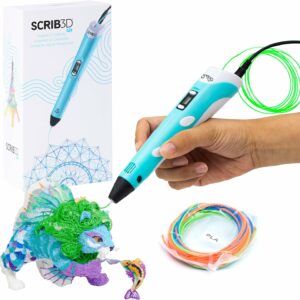
Separate PLA and ABS modes, each with a published temperature range, plus a temperature display and a stepless speed slider. SCRIB3D’s product page says 14+; its manual says adults only.
If you’ll draw mostly in ABS, the MYNT3D Super ships with three colours of ABS and takes PLA too. MYNT3D describes its ultrasonic nozzle as almost clog-proof. It has no battery, so it works only when plugged in, and since the plastic in the box is ABS, open a window before you start.
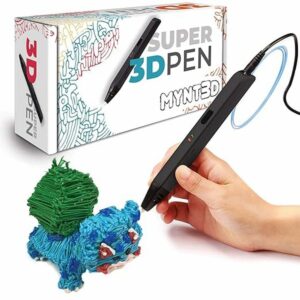
Three colours of ABS in the box, PLA support, a stepless flow slider and an ultrasonic nozzle MYNT3D describes as almost clog-proof.
For children, start with the maker’s age rating, then add a margin. LIHUACHEN rates the LIHUACHEN RPC200B 3D Pen (Button Version) for ages 7 and over, but its nozzle gets hot, so we’d keep it, like any hot pen, for ages ten and up, with an adult beside them. Under ten, choose a pen with no external hot parts, such as the 3Doodler Start+: 3Doodler UK says it designs it for ages 6 to 13, and it takes low-temperature Start plastic, not PLA or ABS. Our ranked list of 3D pens compares them all.
For printers, Prusa says an ABS printer should be inside an enclosure. Of the filament printers we list, the enclosed Elegoo Centauri Carbon names ABS among its materials; the open Bambu Lab A1 mini, Bambu Lab A1 Combo and Flashforge Adventurer 5M are best kept to PLA, PETG and TPU.
How to get good results with PLA and ABS
These steps follow the SCRIB3D P1 manual; your own pen’s manual has the final say.
- Choose the mode for your plastic before you load it. To change the P1 from ABS to PLA, unplug it and plug it back in.
- Snip the end of the strand flat before inserting it, so it pushes the previous plastic through. An uncut tip can cause jams.
- Use the reverse button only to change filament, and withdraw the strand fully: a partly withdrawn strand can swell and jam the pen.
- For flat drawing, hold the pen at 65° or more to the surface.
- If the plastic bubbles or crackles, lower the temperature by 5–10 °C. If it oozes a lot, check the mode matches your plastic and turn the temperature down a little.
- If the strand looks dim and dark and the motor struggles, raise it by 5–10 °C.
- For ABS, open a window first and draw long, flat pieces in shorter sections.
Storage and safety for PLA and ABS
Store both plastics in a sealed, dry place, as SCRIB3D’s manual recommends; damp strands can bubble at the nozzle. For P1 owners, the SCRIB3D PLA Refills share the pen’s 160–210 °C PLA range, with each colour vacuum packed. None of the packs on our filament refills shelf is ABS, so if you buy ABS elsewhere, check its temperature against your pen’s ABS range.
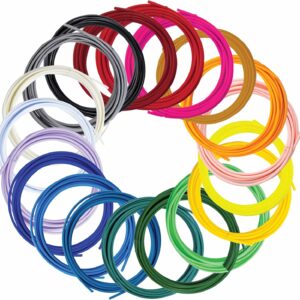
About 100 m of 1.75 mm PLA in 20 colours, each vacuum packed and rated 160–210 °C, the same range as the SCRIB3D P1’s PLA mode.
The hot nozzle is the same risk with either plastic. SCRIB3D’s manual says not to touch it, to keep it away from flammable materials, to let it cool completely before storing the pen and to unplug the pen when you’re not using it. Draw on a silicone mat rather than straight onto the table.
Draw with ABS only in a well-ventilated room. SCRIB3D’s manual warns that styrene filaments such as ABS can expose you and others in the room to styrene.
Common questions
Is ABS stronger than PLA?
It depends on the kind of strength. In Polymaker’s data sheets, PLA has the higher tensile strength, 52.3 MPa against 33.4 MPa. ABS absorbs more than five times the impact, so it copes better with knocks that can snap PLA.
Can any 3D pen use ABS?
No. Load only the plastics your pen’s manual lists: the LIHUACHEN RPC200B 3D Pen (Button Version) takes PLA only, and the 3Doodler Start+ takes 3Doodler Start plastic only. SCRIB3D’s manual warns that the wrong temperature or unapproved plastics may damage the pen or injure you.
Does PLA give off fumes?
Yes. In the Science of the Total Environment study, PLA had a lower particle emission rate than ABS and gave off lactide rather than styrene and benzene. A third of the PLA filaments tested still exceeded the particle limit used for 3D printers, so ventilate with either plastic.
Can I switch between PLA and ABS in the same pen?
Yes, if your pen has a mode for each. On the SCRIB3D P1, unplug the pen and plug it back in to change from ABS to PLA, then pick the PLA mode. Snip the end of the new strand flat before you feed it in, so it pushes the old plastic through instead of jamming.
Sources
- PLA — Prusa Knowledge Base
- ABS — Prusa Knowledge Base
- PolyLite PLA — Polymaker Wiki
- PolyLite ABS — Polymaker Wiki
- Scrib3D P1 User Manual — SCRIB3D
- Evaluation of particle and volatile organic compound emissions during the use of 3D pens — Science of the Total Environment, via Europe PMC