
For most prints, keep the 0.4 mm nozzle your printer came with. Fit 0.2 mm for miniatures and fine text if you can accept slower prints and more clogs; choose 0.6 mm for faster, stronger functional parts and 0.8 mm for big prints where visible lines don’t matter. Whatever the size, keep layer height under about three-quarters of it.
Below: what each size changes, with figures published by Bambu Lab and Prusa, a simple rule for when a swap pays off, one pick for each kind of maker, and how to change sizes on the Bambu Lab A1 mini.
What actually changes when you change nozzle size?
Four things change: the detail you get across the part, the layer heights that work, how much plastic the printer can lay down per second, and which filaments flow through without clogging. Strength and how easily supports come off follow from those four.
Line width: the detail across the part
Nozzle size is the diameter of the opening at the tip, and Bambu Lab explains that it dictates the width of the extruded line. Prusa adds a useful distinction: nozzle diameter affects detail almost only in the horizontal plane. Text on the top face of a part, thin ribs and small holes get sharper with a smaller nozzle; the curves on the sides of a model don’t.
Prusa shows what this looks like in practice. With a 0.4 mm nozzle, parts of small letters can disappear during slicing because they’re narrower than one line; with a 0.25 mm nozzle they print. That gives you a quick test before buying anything: if the slicer preview drops strokes of your text or thin walls, the feature is narrower than your line, and a smaller nozzle is the fix.
Layer height: the range each nozzle allows
Layer height is a separate setting. It controls the visible steps on curved and sloping sides, while the nozzle controls detail across the part. But the nozzle caps it. Bambu Lab’s nozzle guide gives a working range of 25–75 % of the nozzle diameter (25–60 % for the 0.2 mm), while its Bambu Studio layer-height page is a touch more cautious at 20–70 %, or 0.08–0.28 mm on a 0.4 mm nozzle. Prusa puts the ceiling at 80 %: about 0.32 mm on a 0.4 mm nozzle and 0.48 mm on a 0.6 mm one.
| Nozzle | Layer heights, per Bambu Lab’s nozzle guide | Bambu Lab suggests it for | What it costs you |
|---|---|---|---|
| 0.2 mm | 0.05–0.12 mm | Miniatures, jewellery, intricate prototypes | Slow, weaker parts, high clog risk |
| 0.4 mm | 0.1–0.3 mm, 0.2 mm standard | General printing: enclosures, brackets, prototypes | Some clog risk with fibre-filled filament |
| 0.6 mm | 0.15–0.45 mm, 0.3–0.4 mm common | Large models and functional parts such as jigs and fixtures | Softer edges, more filament used, poorer bridging |
| 0.8 mm | 0.2–0.6 mm, 0.4–0.5 mm typical | Large prototypes, structural parts, vase-mode prints | Rough surface, supports hard to remove, more filament used |
One rule follows from the table: a thicker layer needs a bigger nozzle. If you want 0.4 mm layers to save time, a 0.4 mm nozzle can’t give them to you, but a 0.6 or 0.8 mm one can.
Flow: why bigger nozzles print faster, but not proportionally
Bambu Lab measures flow as volumetric speed: layer height × line width × print speed, in mm³/s. Its own example is a 0.4 mm nozzle laying a 0.45 mm line at 0.2 mm layers and 200 mm/s, which works out at 18 mm³/s. Double both the line width and the layer height and every millimetre of travel carries four times as much plastic.
The hotend can only melt so much, though. Bambu Studio caps every move at the filament’s maximum volumetric speed and slows the toolhead when a line would need more. So a bigger nozzle is faster, but not four times faster. Prusa’s figure for a 0.6 mm nozzle is up to twice as fast, with holders or plant pots done in about half the usual time. In one of its examples, a lamp needed two 0.6 mm walls instead of three 0.4 mm ones and finished nearly nine hours sooner.
There’s a catch for vases: Prusa points out that a single-wall vase at the same layer height takes almost the same time with a bigger nozzle, because the toolhead follows the same path. You only gain if you raise the layer height too. We look at the wider balance of how print speed trades against quality separately.
At the other end, Bambu Lab says about 2 mm³/s works for most filaments in a 0.2 mm nozzle, and advises caution above that. That’s a ninth of its 0.4 mm example, and it also slows colour changes and the start-up calibration.
Strength: wider lines bond better
Bambu Lab states that larger nozzles give stronger parts, and that most prints from a 0.2 mm nozzle are weaker than the same model from a 0.4 or 0.6 mm one, because very thin layer lines bond less well. Prusa measured it with an impact test: parts from a 0.6 mm nozzle absorbed up to 25.6 % more energy than parts from a 0.4 mm nozzle, while parts from a 0.25 mm nozzle absorbed 3.6 % less. For hooks, clips and brackets that take a load, that points to 0.6 mm.
Clogs, and the filaments each size accepts
Bambu Lab sums it up: as the diameter goes up from 0.4 to 0.6 to 0.8 mm, detail goes down and so does the risk of clogging. The 0.2 mm nozzle is the sensitive one. A speck of dust can block it, so Bambu Lab advises cleaning the extruder regularly and keeping filament somewhere dust-free.
It also narrows your filament choice. Bambu Lab says the 0.2 mm works best with PLA, PETG, ABS and ASA, and that anything with particles inside should stay out: glow-in-the-dark, sparkle, galaxy, carbon fibre and glass fibre. Carbon fibre particles are usually larger than 0.2 mm. Its filament guide also marks wood-fill PLA as not compatible with the 0.2 mm, though fine from 0.4 mm upwards.
Size isn’t the only question with abrasive filaments. The A1 mini’s standard nozzle and Bambu Lab’s 0.2 mm are stainless steel, which isn’t abrasion resistant, and for fibre-filled filaments Bambu Lab’s first choice is a 0.6 mm hardened steel nozzle. Our guide on when a hardened steel nozzle matters covers the material side.
Supports and surface finish
Prusa points out that the nozzle directly sets the width of support walls: smaller nozzles give thinner supports that come off easily and leave almost no marks, while larger ones give sturdier supports that are harder to remove. Bambu Lab lists hard support removal and heavy surface marks among the 0.8 mm’s drawbacks, along with a rough, textured surface.
That support effect matters for miniatures. In Prusa’s comparison, a 0.25 mm nozzle improved miniatures less than expected, and the biggest gain was cleaner support marks; on models without supports, the difference was close to nothing. Bambu Lab, for its part, names tabletop miniatures as a very common use for its 0.2 mm nozzle.
When is a nozzle swap worth it?
Only when the project in front of you needs it. Ask these questions in order; the first yes decides:
- Does the slicer preview drop small text, thin ribs or holes at 0.4 mm? Fit 0.2 mm.
- Is it a figure with lots of supports where marks matter? Try 0.2 mm, or consider resin.
- Is it a functional part (bracket, holder, jig) with no fine text? Fit 0.6 mm.
- Is it big, and are visible layer lines acceptable? Fit 0.8 mm and raise the layer height.
- None of the above? Stay on 0.4 mm.
One limit overrides the list: particle-filled filament (wood-fill, glow, sparkle, fibre) never goes through a 0.2 mm nozzle. Step up to 0.4 mm or larger, and for abrasive filaments Bambu Lab specifies a hardened steel nozzle.
If you only add one size to the 0.4 mm, Prusa’s own vote goes to the 0.6 mm: noticeably shorter print times while still printing reasonably detailed models.
Our picks by reader profile
One pick per kind of maker. The printer advice centres on Bambu Lab’s A1 printers, because Bambu Lab makes its A-series nozzle in all four sizes and lists the A1 mini and A1 among the printers it fits.
Most prints: keep the 0.4 mm on a Bambu Lab A1 mini
The Bambu Lab A1 mini arrives with a 0.4 mm stainless steel nozzle, and Bambu Lab sells 0.2, 0.6 and 0.8 mm nozzles for it, so you can add a size when a project calls for one rather than up front. It calibrates itself, has a maximum nozzle temperature of 300 °C and prints at up to 500 mm/s. If it’s your first printer, start with your first print, step by step before changing any hardware.
Skip it if most of your parts are bigger than its 180 × 180 × 180 mm build volume, or if you want to print ABS or ASA, which need an enclosure.
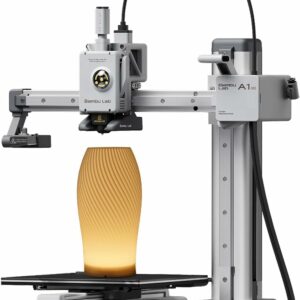
Ships with the all-rounder 0.4 mm nozzle, and Bambu Lab sells 0.2, 0.6 and 0.8 mm nozzles that swap in a few minutes.
Miniatures and fine text: 0.2 mm with a clean, consistent PLA
A 0.2 mm nozzle is only as reliable as the filament you feed it. Bambu Lab lists sensitivity to impurities and diameter variation among its drawbacks, so plain PLA with no particles and a tight tolerance is the safe choice. The SUNLU PLA Filament is plain 1.75 mm PLA with a ±0.02 mm diameter tolerance, according to SUNLU, and a published 200–210 °C setting for speeds up to 100 mm/s. You’ll stay near the slow end: a line about 0.2 mm wide at 0.1 mm layers and 100 mm/s already reaches Bambu Lab’s 2 mm³/s.
Skip this route if you’re printing figures with faces and fine sculpting: check whether resin or filament suits miniatures better before you buy a nozzle.
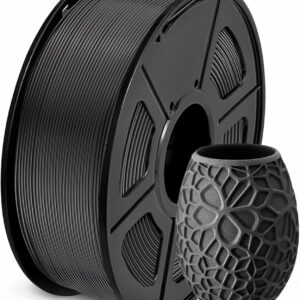
Plain PLA with no particles and a ±0.02 mm tolerance, according to SUNLU: what a fine nozzle needs to stay clear.
Brackets, jigs and tough parts: 0.6 mm with PETG
If you’re fitting a 0.6 mm nozzle for stronger functional parts, it makes sense to print them in a tougher filament too. The SUNLU PETG Filament has a published heat deflection temperature of 70 ± 5 °C, against 55 ± 5 °C for SUNLU’s PLA, and a tensile strength of 48 ± 10 MPa, according to SUNLU. It prints at 240–260 °C, within the A1 mini’s 300 °C.
Skip it if your part carries small lettering or tight detail: the 0.6 mm’s softer edges will show.
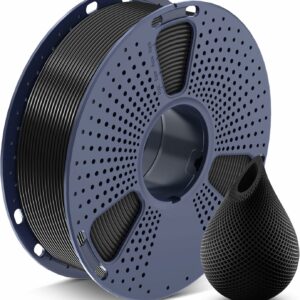
Tougher and more heat-resistant than PLA, for brackets and holders that take knocks or sit somewhere warm.
Big props, planters and drafts: 0.8 mm on a Bambu Lab A1 Combo
A 0.8 mm nozzle is about big parts, and big parts need a big bed. The Bambu Lab A1 Combo has a 256 × 256 × 256 mm build volume, a 1-clip quick-swap nozzle, and takes the same A-series nozzles as the A1 mini. Its AMS lite adds up to four colours.
Skip it if your parts fit in 180 mm or the surface finish matters more than the hours saved.
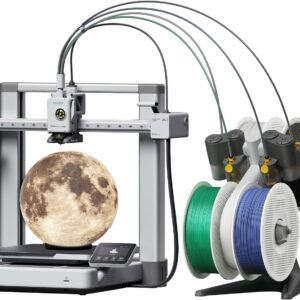
A 256 mm cube of build space to make the most of a big nozzle, with four-colour printing included.
How do you change nozzle size on the A1 mini?
You lift the whole hotend out of the toolhead and clip a new one in, without tools, in a few minutes. Follow Bambu Lab’s hotend replacement guide for the A1 series for the photos; the steps are:
- Turn the printer off, unplug it and let the nozzle cool completely.
- Press the filament lever on the right of the toolhead to release and cut the filament.
- Pull the front cover off from its bottom right corner.
- Remove the silicone sock from the nozzle.
- Unlock the nozzle buckle and pull the hotend out, holding it by the heatsink.
- Insert the new hotend tilted slightly towards the back, press it flush and lock the buckle.
- Refit the silicone sock and press the cover on until it clicks.
- On the printer screen, go to Settings, then Maintenance, then Nozzle, and enter the new size and material.
Step 8 matters: Bambu Lab has made the nozzle field in Bambu Studio display-only, so the change has to be made on the printer. Then choose the profile for the new size in your slicer before slicing; our beginner’s guide to slicers shows where profiles live.
Store spare nozzles clean. For a 0.4 mm or larger nozzle, a kit with fine needles helps clear the tip when your printer’s manual calls for one; the Creality 3D Printer Tool Kit Pro includes ten 0.38 mm needles. They’re too thick for a 0.2 mm opening, though: Bambu Lab says a regular pin won’t go through and recommends its hot hex-wrench method followed by a few cold pulls. Our guide to clearing a clogged nozzle goes through the order to try things.
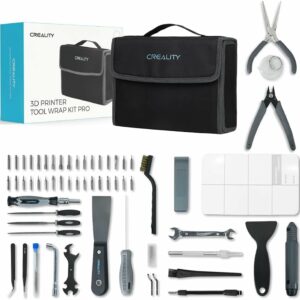
Seventy-four tools in one case, including ten 0.38 mm nozzle needles, a metal brush and spatulas for getting prints off the plate.
What to avoid
- Layers taller than the nozzle allows. 0.4 mm layers through a 0.4 mm nozzle are double Bambu Lab’s standard and above Prusa’s 0.32 mm ceiling. Fit a bigger nozzle instead.
- Particle-filled filament in a 0.2 mm nozzle. Bambu Lab advises against wood-fill, glow, sparkle and fibre-filled filaments in it: particles block the tiny opening.
- Abrasive filament in a stainless steel nozzle. It wears quickly, whatever the size.
- Expecting a 0.8 mm nozzle to be four times faster. The hotend’s melting limit sets the real speed, and single-wall vases gain nothing unless you raise the layer height.
- Forgetting to tell the printer. On the A1 mini, update the nozzle setting on the screen after every swap.
- A torch on a blocked nozzle. Bambu Lab warns that overheating a 0.2 mm nozzle with a torch can damage the hotend beyond repair.
Common questions
Do I need a higher temperature with a bigger nozzle?
Not as a first step. Bambu Lab says that when you print close to a filament’s maximum flow, raising the nozzle temperature by 5–10 °C can give a little extra headroom, but it calls this a last resort. Check for gaps in the walls or weak layers first, and stay within the range on the filament’s own label.
Can a 0.2 mm nozzle print PETG or TPU?
PETG, yes: Bambu Lab lists PLA, PETG, ABS and ASA as the filaments that work best in its 0.2 mm nozzle. TPU is a different story: Bambu Lab’s filament guide marks every TPU it lists as not recommended for the 0.2 mm nozzle and compatible from 0.4 mm upwards.
Does a bigger nozzle use more filament?
Usually, yes. Bambu Lab lists higher material consumption among the drawbacks of its 0.6 and 0.8 mm nozzles, because every line is wider. If you only need the same wall thickness, print fewer walls: Prusa notes that two 0.6 mm walls match three 0.4 mm ones, which saves time rather than filament.
Is a 0.2 mm nozzle enough for tabletop miniatures?
It can be: Bambu Lab names tabletop miniatures as a very common use for it. For faces and fine sculpting, resin draws far finer detail: the Elegoo Saturn 4 Ultra 16K works with 14 × 19 µm pixels, against a filament line about 0.2 mm wide.
Sources
- Introduction to Bambu Nozzles — Bambu Lab Wiki
- Printing with 0.2mm nozzles – Frequently Asked Questions — Bambu Lab Wiki
- Volumetric speed and how it impacts 3D printing — Bambu Lab Wiki
- Filament guide – Printer, Nozzle, AMS, Build Plate, Glue Compatibility and Required Parameters — Bambu Lab Wiki
- Hotend Replacement for A1 Series — Bambu Lab Wiki
- Everything about nozzles with a different diameter — Prusa Research