
For tabletop miniatures, resin is the better choice: a resin printer draws with pixels 14–19 µm across, while a filament nozzle lays lines about 0.2–0.4 mm wide, so faces and blade edges come out sharper. Our pick is the Elegoo Saturn 4 Ultra 16K. A filament printer with a 0.2 mm nozzle is enough for terrain and larger models.
For miniatures, resin has a clear edge over filament. Below, you’ll find what the numbers on a spec sheet mean on a figure that fits between your fingers, a simple rule for when filament is enough, and one printer for each kind of hobbyist. If you’re weighing the two technologies for everything else you might print, our resin vs filament comparison covers the wider picture.
What actually matters on a miniature printer?
Four things decide how your figures look: XY resolution, layer height, nozzle size (on filament) and plate size. Two more decide whether you’ll enjoy printing them: how much the machine does for you, and whether you have room for the resin routine. Here are the published figures for our three main picks.
| Published figure | Elegoo Saturn 4 Ultra 16K | Anycubic Photon Mono 4 | Bambu Lab A1 mini |
|---|---|---|---|
| Technology | MSLA resin, 10-inch 16K mono screen | MSLA resin, 7-inch 10K mono screen | Filament (FDM), open frame |
| Smallest unit across the model (XY) | 14 × 19 µm pixel | 17 × 17 µm pixel | A line about as wide as the nozzle: 0.4 mm fitted, 0.2 mm available |
| Layer height | Not listed on Elegoo’s product page | 0.03–0.15 mm | 0.04–0.14 mm with a 0.2 mm nozzle, by Bambu Lab’s guideline |
| Build volume | 211.7 × 118.4 × 220 mm | 153.4 × 87 × 165 mm | 180 × 180 × 180 mm |
| Set-up help | Automatic levelling, heated vat, AI camera | Four-point manual levelling, needed once according to Anycubic | Automatic calibration |
XY resolution: the detail across a face
On a resin printer, XY resolution is the size of one screen pixel: the smallest patch of light the printer can switch on or off. You can check the maths yourself. The Saturn’s plate is 211.7 mm wide and its screen has 15,120 pixels across, so each pixel is 0.014 mm (14 µm); the Photon Mono 4 spreads 9,024 pixels over 153.4 mm, which gives 17 µm.
A filament printer draws with a bead of plastic instead. Bambu Lab explains that the extruded line is almost the same width as the nozzle, and recommends keeping it between 0.75 and 1.5 times the nozzle diameter. So even a fine 0.2 mm nozzle draws a line about a dozen resin pixels wide. That is why eyes, belt buckles, chainmail and the edge of a sword look crisp in resin and softer in filament.
Don’t over-read the micron figures, though. The pixel is the grid the printer draws on, not the smallest detail that survives. Formlabs makes the same distinction for its own laser resin printers: the minimum feature size can’t be smaller than the spot that draws it, and it also depends on factors such as the resin’s chemistry.
Layer height: the steps on curved surfaces
Layer height is the vertical resolution. Bambu Lab puts it simply: the lower the layer height, the less obvious the lines between layers, and the longer the print. Bambu Studio’s variable layer height lets you use thinner layers only where they help, such as a rounded head or helmet, and keep the rest of the print quicker.
Resin printers work with very thin layers: Anycubic lists 0.03–0.15 mm for the Photon Mono 4. For filament, Bambu Lab’s guideline is a layer height of 20–70 % of the nozzle diameter, which means 0.08–0.28 mm with the standard 0.4 mm nozzle and 0.04–0.14 mm with a 0.2 mm one. On layer height alone, a fine nozzle gets close to resin. The gap that remains is across the model, in XY.
Thin layers cost time. In Bambu Lab’s own example, the same model took 1 h 19 min at 0.08 mm layers and 36 min at 0.2 mm, more than twice as long.
Nozzle size, if you go filament
Bambu Lab says a very common use for its 0.2 mm nozzle is printing tabletop miniatures. It comes with trade-offs that are worth knowing before you buy one:
- It’s stainless steel, so it isn’t abrasion resistant. Avoid glow-in-the-dark, sparkle and galaxy filaments, and anything with carbon or glass fibre.
- It clogs more easily: a speck of dust can block it, so Bambu Lab advises keeping the extruder clean and the filament in a dust-free place.
- It’s slow. Bambu Lab says a maximum flow of 2 mm³/s works with most compatible filaments and advises caution above it.
- Most prints come out weaker, because very thin layer lines bond less well than those from a 0.4 or 0.6 mm nozzle.
PLA, PETG, ABS and ASA work best with it, according to Bambu Lab; on an open-frame printer such as the A1 mini, stick to PLA and PETG, as ABS and ASA want an enclosure. These are the same trade-offs you weigh whenever you choose a nozzle size: a finer line buys detail and costs speed and strength.
Plate size: how many figures, and how big
Plate area sets how many figures you can print in one go; height sets the tallest model. The Saturn’s 211.7 × 118.4 mm plate has nearly twice the area of the Photon Mono 4’s 153.4 × 87 mm, and 220 mm of height against 165 mm. That matters if you print whole squads, large monsters or busts. Filament beds are broader: 180 × 180 mm on the A1 mini and 256 × 256 mm on the Bambu Lab A1 Combo, which suits wide pieces such as buildings.
Help from the machine
Resin likes warmth. Elegoo says the Saturn’s heated vat keeps the resin at 30 °C for better flow and layer adhesion, which helps in an unheated spare room in winter. Anycubic lists vat temperature control as not supported on the Photon Mono 4.
Elegoo adds automatic levelling, a tilt-release vat that it says makes peeling each layer quicker and easier, an AI camera that alerts you to an empty plate or a warped model, and a sensor that detects residue in the vat before it can damage the screen. The Photon Mono 4 keeps things simple: four-point manual levelling, which Anycubic says you need to do once.
Room for the resin routine
Every resin session means gloves on, a ventilated room, and a wash and cure for each figure, so plan where the printer and bottles will live. Our resin safety guide covers the precautions in full, including disposal. A station is optional: our guide to washing and curing resin prints shows how to do both by hand. If you do buy one, match it to the printer: the Anycubic Wash & Cure 3 suits the 7-inch Photon Mono 4, while the 10-inch Saturn needs the larger Elegoo Mercury Plus V3.0 Wash & Cure Station.
When is a filament printer with a 0.2 mm nozzle enough?
It’s enough when the detail you care about is wider than a line of plastic. Our rule: if the part you’d paint most carefully is narrower than about 0.2 mm, the width of a fine-nozzle line, it needs resin. In our view, eyes, fingers and weapon edges on tabletop-scale figures fall on the resin side; walls, crates and scenic bases don’t.
| What you mostly print | Better tool | Why |
|---|---|---|
| Infantry and character figures | Resin | Eyes, hands and blade edges are finer than any filament line |
| Busts and display pieces | Resin with a taller plate | Fine detail, plus the 220 mm height of the Saturn |
| Buildings, ruins and walls | Filament, 0.4 mm nozzle | Broad surfaces, and filament beds are broader |
| Scatter terrain: crates, barrels, fences | Filament, 0.2 mm nozzle | Small parts with chunky detail, printed slowly and finely |
| Bases, tokens and objective markers | Filament | Flat parts, and colour without painting on a multicolour printer |
Large monsters and vehicles sit in between. Resin gives the sharper finish but the plates are small, so big models are printed in parts; filament fits more in one piece and shows its layers more. If you want both figures and a full table, the sensible split is resin for the figures and filament for the scenery.
Our picks by reader profile
For painters who want the sharpest squads: Elegoo Saturn 4 Ultra 16K
The Elegoo Saturn 4 Ultra 16K is our pick for most miniature painters. Its 10-inch 16K screen gives 14 × 19 µm pixels on a plate big enough for a full squad or a tall bust, and it does a lot of the fiddly work for you: automatic levelling, a heated vat and an AI camera with a light. Elegoo quotes speeds of up to 150 mm/h.
Skip it if you have nowhere ventilated to put a resin printer, or if you mostly print terrain. If you only want a few figures at a time, the Photon Mono 4 does the same job on less desk space.
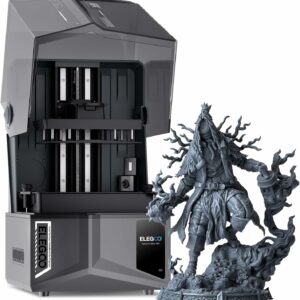
Fine pixels on a plate big enough for a squad, plus a heated vat for cold rooms and an AI camera that flags an empty plate or a warped model.
For a first resin printer on a small desk: Anycubic Photon Mono 4
The Anycubic Photon Mono 4 is the gentle way into resin. Its 7-inch 10K screen gives 17 × 17 µm pixels, and Anycubic lists standard, water-washable, ABS-like and plant-based resins among the types it takes. Anycubic quotes up to 50 mm/h with standard resin at 0.1 mm layers.
Skip it if you want to print busts or big monsters in one piece, as the 153.4 × 87 × 165 mm volume is small. It also has no heated vat, which matters in a cold room, and Anycubic’s activated carbon air purifier is sold separately.
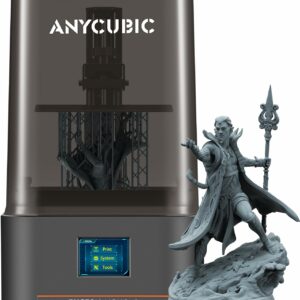
Fine 17 × 17 µm pixels in a compact body, sized for infantry and characters rather than large models, with simple one-time levelling.
You’ll find both resin printers among the mid-range and resin printers we list. If you’re torn between them, plate size, the heated vat and how much you want automated are what decide the Saturn 4 Ultra versus the Photon Mono 4.
For terrain and larger models: Bambu Lab A1 mini
With no resin to handle, the Bambu Lab A1 mini is the filament route: it calibrates itself and prints at up to 500 mm/s, and a 0.2 mm nozzle is available for finer scenery. The standard 0.4 mm nozzle handles buildings, ruins and larger models at speed, and there’s no wash or cure after each print.
Skip it if crisp faces on tabletop-scale figures are the goal: no nozzle closes the gap with resin there. The 180 mm bed also means large buildings come in sections. If this would be your first printer of any kind, our guide to choosing a first 3D printer walks through the basics.
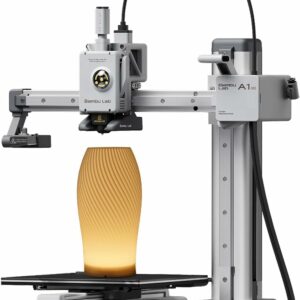
Turns out buildings and ruins quickly on the 0.4 mm nozzle, with a 0.2 mm nozzle available for finer scatter terrain.
For big terrain pieces and coloured tokens: Bambu Lab A1 Combo
The Bambu Lab A1 Combo suits the gamer building a whole table. Its 256 × 256 × 256 mm volume takes larger buildings in one piece, and the included AMS lite prints up to four colours in one go, handy for tokens, objective markers and coloured bases.
Skip it if you mainly want figures. Every colour change also purges filament, so multicolour prints take longer and use more material.
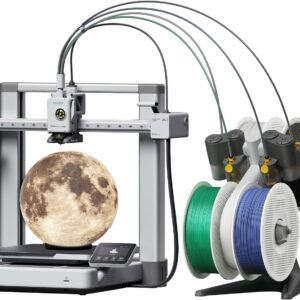
A 256 mm bed for large scenery and four colours from the included AMS lite, for tokens and markers you don’t need to paint.
What to avoid
- Judging a resin printer by its K number. The K counts pixels across the screen, not their size. The Saturn’s 16K screen is also bigger, so its pixels come out at 14 × 19 µm: finer than the Photon Mono 4’s 17 × 17 µm in one direction and coarser in the other. Between these two, the higher K mostly buys a bigger plate.
- Buying resin without a place for it. You need a ventilated room that nobody sleeps or eats in, with space to wash and cure prints and to store bottles of resin and cleaning liquid.
- Buying a station that’s too small. The Anycubic Wash & Cure 3 fits printers of 7.3 inches and below, so it’s too small for the 10-inch Saturn.
- Expecting resin faces from a 0.4 mm nozzle. The standard nozzle draws lines about 0.4 mm wide, more than 20 times the width of a Photon Mono 4 pixel. Use it for terrain, or fit a 0.2 mm nozzle and accept longer prints.
Common questions
Can a filament printer print D&D miniatures?
Yes, within limits. Bambu Lab names tabletop miniatures as a very common use for its 0.2 mm nozzle, and the bigger the model, the less the line width shows. On small player characters, though, it shows on faces and hands, where resin stays sharper.
Can I print terrain on a resin printer?
Yes, and small scatter pieces suit it, but the plates are small: 211.7 × 118.4 mm on the Saturn 4 Ultra 16K and 153.4 × 87 mm on the Photon Mono 4. Large buildings have to be printed in parts, and every part needs washing and curing. A filament printer handles broad scenery with less handling.
Which filaments work in a 0.2 mm nozzle?
Bambu Lab says PLA, PETG, ABS and ASA work best. Avoid filaments with particles in them, such as carbon or glass fibre, sparkle, galaxy and glow-in-the-dark, which can clog or wear the nozzle. Keep the spool clean and free of dust.
How many miniatures can I print at once?
It depends on the size of the bases and how you arrange them, so there’s no single number. Compare plate areas instead: the Saturn 4 Ultra 16K’s plate covers about 250 cm², against about 133 cm² on the Photon Mono 4, so it holds roughly twice as many figures of the same size in one run. If you mostly print one character at a time, the smaller plate is plenty.
Sources
- Saturn 4 Ultra 16K — Elegoo
- Anycubic Photon Mono 4 — Anycubic
- What Does Resolution Mean in 3D Printing? — Formlabs
- Printing with 0.2mm nozzles – Frequently Asked Questions — Bambu Lab Wiki
- Layer height — Bambu Lab Wiki
- Line width — Bambu Lab Wiki