

Warping is plastic shrinking as it cools and pulling the corners of the print up off the plate. Fix it in this order: a clean plate, the bed temperature your filament maker gives, first layers with the fan off and the nozzle low enough, a brim, then no draughts. For ABS and ASA, add an enclosure.
The print starts well, then the corners curl up while the middle stays down. Prusa Research puts warping down to the gap between the hot nozzle and the cooler air around the part: the plastic shrinks as it cools and pulls on the layers below. It hits high-temperature materials such as ABS and ASA hardest, and Prusa gives ABS a shrinkage of around 1–2 %. PLA and PETG corners can lift too.
Is it warping, or a different fault?
| What you see | What it is |
|---|---|
| Corners and edges curl up; the middle stays down | Warping: read on |
| The first lines drag, or the whole part slides off | Poor bed adhesion |
| Layers step sideways partway up | Layer shifting |
| Fine hairs between separate parts of the model | Stringing |
If nothing sticks at all, start with our fixes for a print that won’t stick, which include the full plate-washing routine. Layers that step sideways are layer shifting, a separate fault. Fine hairs between parts are stringing, and we cover how to stop stringing on its own page. This guide assumes the first layer goes down and the corners lift later.
Try this first: the fixes in order
Reprint the same part after each change, so you know which one worked. Switch the printer off and let the bed cool before you lift the plate, since an ABS bed runs at around 100 °C, and never touch the nozzle until it has cooled.
- Wipe the plate with isopropyl alcohol and keep your fingers off the printing surface.
- Set the bed to the temperature your filament maker gives, not a generic profile.
- Leave the part-cooling fan off for the first layers and check the nozzle isn’t set too high.
- Add a brim, or brim ears at the corners.
- Keep the printer away from open windows and air conditioning, and use your slicer’s draft shield on an open printer.
- For ABS and ASA, print inside an enclosure.
Why do the corners lift? Causes, most likely first
Because the shrinking plastic pulls harder than the plate grips. Each cause below either weakens that grip or makes the part cool faster and less evenly.
1. Grease on the plate
Symptom: the corners let go early, on a plate that used to hold. Why: grease from your fingers weakens the grip. Fix: Prusa’s warping guide says to wipe the surface with 90 % or stronger isopropyl alcohol before every print, though Prusa also notes that a surface you haven’t touched with your hands or dirty tools doesn’t need cleaning. If a wipe no longer works, wash the plate as our adhesion guide describes and hold it by its edges.
2. The bed is too cool for the filament
Symptom: the part holds for a while, then the corners rise as it grows. Why: a bed below the maker’s range leaves the base cooler, widening the temperature gap Prusa blames for warping. Fix: use the maker’s figure for your reel. For ABS, Prusa gives a range and suggests the higher end for larger parts.
| Material | Bed temperature, maker’s figure | Enclosure, according to Prusa |
|---|---|---|
| PLA (SUNLU PLA Filament) | 50–60 °C | Usually not: PLA needs a lot of cooling |
| PETG (SUNLU PETG Filament) | 60–70 °C | Usually not: PETG needs moderate cooling |
| ABS (Prusa) | 100 °C; 80–110 °C depending on the part’s size | Yes: the printer should be inside one |
| ASA (Prusa) | 105 °C for the first layer, 110 °C after | Yes, and necessary for large parts |
Then check your printer’s limit. The Bambu Lab A1 mini tops out at 80 °C and the Bambu Lab A1 Combo at 100 °C, so both cover PLA and PETG but not ASA. Elegoo lists 110 °C for the Centauri Carbon, at a room temperature of 25 °C. If a large part still lifts, move up within the filament maker’s range, never past your printer’s maximum.
3. The first layers go down too cool, too high or too fast
Symptom: the corners curl within the first few layers. Why: the first layers anchor the whole part, so a fan blowing on them or a nozzle sitting too high weakens the anchor. Fix: OrcaSlicer‘s documentation says turning the part-cooling fan off for the first few layers improves adhesion and reduces early-layer warping; the setting is “No cooling for the first” layers. Prusa suggests lowering the first-layer nozzle height slightly to increase adhesion, but not so far that you over-squish the layer; your printer’s manual explains how to adjust it. Prusa also says a slower print speed helps layers melt together and can help a lot with high-warping materials.
After the first layers, PLA wants its normal, strong cooling: if its corners lift, Prusa says to check the print fan is on and try a higher fan speed. PETG wants less (SUNLU suggests 30–50 %), so check the fan is running at your profile’s setting rather than at full. For ABS, Prusa suggests a low fan speed of 10–20 % if steep overhangs and small parts warp, and warns that too much fan can lift the whole object.
4. Sharp corners with too little grip
Symptom: the lift starts at the sharp corners of a wide, flat part. Why: corners let go first, so that’s where extra grip pays off. Fix: add a brim, which OrcaSlicer describes as useful for models prone to warping. A wider brim grips better but uses more filament. Brim ears, or mouse ears, put small patches of brim at corners and sharp features with less material. If that isn’t enough, Prusa suggests adding a small shape, such as a tiny cylinder, at the problem corner. For complex models or materials, OrcaSlicer suggests considering a raft.
For ABS, Prusa recommends a smooth or powder-coated PEI sheet with a glue stick. A thin layer of glue stick both helps adhesion and acts as a separating layer, according to Prusa.
5. Draughts and a cold room
Symptom: the same file prints flat one day and lifts the next. Why: Prusa says an open window or an air-conditioning unit near the printer makes warping more likely, and high-temperature filaments need a stable room temperature. Fix: move the printer out of the draught. On an open printer, turn on the draft shield, a printed skirt wall that holds warm air around the part; PrusaSlicer has it as an option. Prusa adds that printing several objects at once helps keep the heat in, and suggests placing problem areas towards the centre of the bed.
Don’t confuse draughts with ventilation: Prusa says ABS and ASA release fumes that could pose a health risk, so you want a well-ventilated room with no draught across the print. Our guide to fumes, enclosures and printer placement covers the set-up.
6. ABS or ASA on an open printer
Symptom: ABS or ASA parts still lift after every fix above. Why: Prusa says an ABS printer should sit inside an enclosure with a higher ambient temperature, and calls one necessary for large ASA parts. On our list, the open-frame A1 mini and A1 Combo and the Flashforge Adventurer 5M, which has no enclosure, are best with PLA, PETG and TPU (TPU on the 5M with its optional 0.6 or 0.8 mm nozzle). Fix: give the part a warm, still chamber, either by adding an enclosure to your printer or by moving to a printer that comes enclosed.
For regular ABS or ASA, we’d start with the Elegoo Centauri Carbon: an enclosed CoreXY printer with a tempered glass door and top cover that lists ABS and ASA among its materials. Its bed reaches the 110 °C Prusa gives for ASA, according to Elegoo. It weighs 17.5 kg, so it needs a sturdy surface.
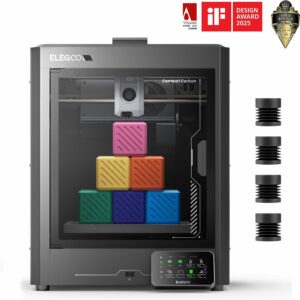
An enclosed CoreXY printer with a 110 °C bed, according to Elegoo, that lists ABS and ASA among its materials and arrives assembled and calibrated.
When to change the printer, not the settings
On PLA and PETG, work through the settings above before you think about hardware. Change the printer when you print ABS or ASA often on an open frame, since Prusa’s guidance for both calls for an enclosure, or when your filament needs a hotter bed than yours reaches: ASA’s 105–110 °C is above both Bambu beds. If you’re choosing with those materials in mind, start with an enclosed model and see how it compares in our ranked list of 3D printers.
Common questions
Why do my PLA prints warp at the corners?
Usually a greasy plate, a bed below the reel’s range (50–60 °C for SUNLU PLA) or a first layer laid down with the fan on or the nozzle too high. Prusa also says PLA needs a lot of cooling, so check the fan is on after the first layers.
Is a brim or a raft better for stopping warping?
Try a brim first: OrcaSlicer describes it as useful for models prone to warping, and brim ears put the extra grip at the corners with less filament. OrcaSlicer suggests a raft for complex models or materials.
Should I turn the cooling fan off to stop warping?
For the first few layers, yes: OrcaSlicer says it improves adhesion and reduces early warping. After that, PLA needs a lot of cooling and PETG a moderate amount, while too much fan can lift a whole ABS part.
Can I print ABS without an enclosure?
Prusa’s guidance is that the printer should be inside one; without it, Prusa suggests the draft shield to keep warmer air around the part. Print in a well-ventilated room, away from draughts, as ABS releases fumes that could pose a health risk.
Sources
- Warping — Prusa Research
- ABS — Prusa Research
- ASA — Prusa Research
- Brim — OrcaSlicer Wiki
- Material Cooling — OrcaSlicer Wiki
- Elegoo Centauri Carbon — Elegoo
- Filament Usage Guide — SUNLU