

Choose the Elegoo Saturn 4 Ultra 16K if you want room for big batches, a heated vat, an AI camera, automatic levelling and Wi-Fi. Choose the Anycubic Photon Mono 4 if you print miniatures and small parts, have little space and want the simplest machine. Detail is close: 14 × 19 µm pixels against 17 × 17 µm.
The Elegoo Saturn 4 Ultra 16K and the Anycubic Photon Mono 4 are both MSLA resin printers that cure each layer through a monochrome LCD. The real split is size and help: the Saturn is big and does a lot of the watching for you, while the Photon Mono 4 is small and simple and leaves more to you.
A quick way to choose:
- If your models fit on a 153 × 87 mm plate and stand under 165 mm, the Photon Mono 4 is enough.
- If you want a whole squad on one plate, or a tall bust, you need the Saturn’s 211.7 × 118.4 × 220 mm.
- If the printer will live in a cold garage or shed, the Saturn’s heated vat earns its place.
- If desk space is tight, the Photon Mono 4 takes about half the footprint and a quarter of the weight.
Saturn 4 Ultra 16K vs Photon Mono 4: the figures side by side
| Spec | Elegoo Saturn 4 Ultra 16K | Anycubic Photon Mono 4 |
|---|---|---|
| Screen | 10-inch 16K mono LCD | 7-inch 10K mono LCD |
| Pixels | 15,120 × 6,230 | 9,024 × 5,120 |
| XY pixel size | 14 × 19 µm | 17 × 17 µm |
| Build volume | 211.7 × 118.4 × 220 mm | 153.4 × 87 × 165 mm (2.2 litres) |
| Light source | COB with a Fresnel collimating lens | LighTurbo matrix |
| Release | Tilt release, PFA film | FEP film |
| Maker’s top speed | 150 mm/h | 50 mm/h with standard resin, 70 mm/h with high-speed resin |
| Heated vat | Yes, holds the resin at 30 °C | No |
| Camera | AI camera with light | None listed |
| Levelling | Automatic | 4-point manual |
| File transfer | USB and dual-band Wi-Fi | USB only |
| Slicer | Elegoo SatelLite or Chitubox | Anycubic Photon Workshop |
| Printer size and weight | 327.4 × 329.2 × 548 mm, 16.1 kg | 230 × 235 × 391 mm, 4 kg |
All figures are the makers’ own. Two things stand out. The Saturn’s platform has almost twice the floor area, about 250 cm² against 133 cm², and 55 mm more height. And the help (heating, a camera, automatic levelling, Wi-Fi) is on one side only.
Does 16K mean sharper prints than 10K?
Not by much. “16K” and “10K” count the pixels across the whole screen, not how small each one is. According to Elegoo, each of the Saturn’s pixels is 14 × 19 µm. According to Anycubic, each of the Photon Mono 4’s is 17 × 17 µm.
The Saturn’s pixel is finer one way, coarser the other, and covers about 8 % less area (266 µm² against 289 µm²). The Saturn has about twice as many pixels mainly because its screen is about twice the size. On paper, one small figure gets much the same pixel grid on either printer: the 16K label mostly buys you more area at that detail.
Fine detail also depends on the light source, the exposure time and the resin. The Saturn lets you set the exposure time section by section, and Anycubic suggests printing its RERF test file to find the right exposure for a new resin. For what XY resolution and layer height mean on a tabletop model, and when filament is enough, see our guide to printers for miniatures.
Where the Saturn 4 Ultra 16K wins
More room per print
The Saturn builds up to 211.7 × 118.4 × 220 mm, about 5.5 litres, against 2.2 litres on the Photon Mono 4: two and a half times the volume. That means more miniatures on the plate in one run, and taller pieces such as busts or scenery without splitting them into parts.
A heated vat for cold rooms
Cold resin can make a print fail. Elegoo’s wiki shows exactly that in a room at about 10 °C, and its fix: switch on tank heating in the settings and print again. The vat warms the resin to 30 °C before printing starts, which took about 30 minutes in that example, and a preheat option holds it at 30 °C for 24 hours. Elegoo says the warmer resin flows and bonds better, with fewer bubbles and layer separations.
The Photon Mono 4 has no heated vat: Anycubic lists temperature control as not supported. In a warm room that matters less. In an unheated garage or shed through a cold winter, the Saturn has the edge.
A camera and sensors that watch the print
The Saturn’s AI camera has its own light, sends alerts when the build plate comes up empty or a model warps, and records time-lapses. A mechanical sensor checks the vat for leftover cured resin to protect the LCD, and alarms flag a resin shortage or a failed levelling. If the light source’s LEDs pass 80 °C, the printer pauses and alerts you. Elegoo adds that AI detection results vary with the room, the model and the resin.
The Photon Mono 4 lists none of this. Anycubic says it has no Wi-Fi module and can’t be operated remotely, so you check on a print by looking at it.
Levelling and file transfer done for you
The Saturn levels itself, runs a one-tap self-test and takes files over USB or Wi-Fi. The Photon Mono 4 uses four-point manual levelling, with levelling paper in the box; Anycubic says you need to do it only once. Files go in on a USB stick.
Faster, by the makers’ own figures
Elegoo quotes up to 150 mm/h with its tilt release, and 5.5 seconds a layer in fast mode with Chitubox’s default settings. Anycubic quotes up to 50 mm/h with standard resin and 70 mm/h with high-speed resin, at 0.1 mm layers. Each maker measures its own way, so read the gap as a direction rather than a promise.
Where the Photon Mono 4 wins
It fits on a shelf
The Photon Mono 4 measures 230 × 235 × 391 mm and weighs 4 kg. The Saturn is 327.4 × 329.2 × 548 mm and 16.1 kg, so it needs twice the desk area and a lot more headroom. If the printer has to share a desk or move between rooms, the Photon Mono 4 is far easier to live with.
Less to set up and learn
With no network, camera or heater to configure, the Photon Mono 4 is a short routine: level it once, slice in Photon Workshop, carry the file over on the USB stick, print. The Saturn’s extras each bring settings and alarms to learn. For a first resin printer that will mostly make small figures, simple has real value.
Smaller resin batches and smaller accessories
The Photon Mono 4’s vat holds up to 0.39 litres. Anycubic advises filtering the resin back into its bottle if the printer won’t be used for 48 hours, and a small vat means less to pour back. It’s the budget option of the two, and its accessories are compact: the Anycubic Wash & Cure 3 fits printers of 7.3 inches and below, including the Photon Mono 4, according to Anycubic.
Who should choose which
Choose the Saturn 4 Ultra 16K if…
You want several miniatures or a tall model in one go, the printer will sit in a cool room, or you’d like the machine to level itself, warm its resin and flag a failed print. It’s the mid-range choice and a bigger commitment of space: plan for a 548 mm-tall printer and a wash station big enough for its parts, such as the Elegoo Mercury Plus V3.0 Wash & Cure Station, whose basket takes parts up to 230 × 135 × 260 mm.
Skip it if you print one figure at a time on a small desk: you’d be giving up a lot of space for platform area and features you won’t use.
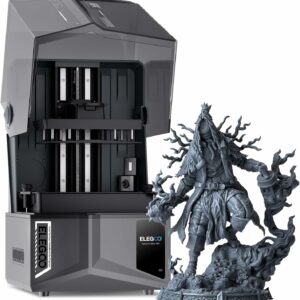
Almost twice the platform area at a similar pixel size, plus a heated vat, an AI camera and automatic levelling: the one to choose if you print a lot, or in a room that gets cold.
Choose the Photon Mono 4 if…
Your prints are miniatures, jewellery-sized pieces or small parts, space is tight, and you’re happy to level the plate by hand once and check on prints yourself.
Skip it if the printer will live in an unheated room in winter, or you already know you want bigger models: a 153 × 87 mm plate can’t grow later.
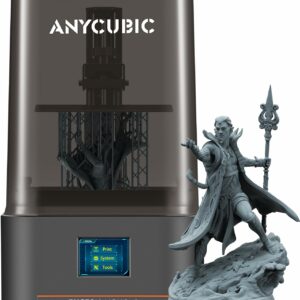
A 7-inch 10K screen with 17 × 17 µm pixels on a small, 4 kg machine: plenty of detail for miniatures, with very little to set up.
What either printer needs before the first print
Before the first print, set up the room: liquid resin irritates skin and can trigger a skin allergy, so keep either printer in a ventilated room nobody sleeps or eats in. Elegoo puts gloves and a mask in the box and Anycubic includes protective equipment, but it’s ventilation, not a mask, that protects you from vapour. Neither printer has a built-in air filter: both makers list an activated carbon purifier as an optional add-on. Our resin safety checklist covers gloves, ventilation and disposal, so go through it before you open a bottle.
Every part then needs washing and curing, and the routine is the same on both machines: our step-by-step washing and curing guide walks you through it.
Plan for the release film, too. The Saturn prompts you to replace its PFA film after 60,000 uses, and the Photon Mono 4 counts prints and layers and prompts you when its FEP film reaches its replacement cycle. If prints start coming away from the plate, work through our fixes for prints that won’t stick, in order.
Common questions
Does the Anycubic Photon Mono 4 have Wi-Fi?
No. Anycubic says the Photon Mono 4 has no Wi-Fi module, can’t be operated remotely and doesn’t work with the Anycubic app. You slice files in Photon Workshop and carry them over on the USB stick that comes in the box.
Does the Photon Mono 4 work in a cold room?
It can’t warm its own resin: Anycubic lists a temperature-controlled vat as not supported, and its product page and FAQ give no minimum room temperature. So it relies on the room staying warm: keep it somewhere you heat in winter. If the only space is an unheated garage or shed, the Saturn 4 Ultra 16K and its heated vat suit it better.
Can I use other brands of resin in these printers?
Usually, with some tuning. Anycubic recommends its own 405 nm resin for the Photon Mono 4 and says other brands cure differently, so you adjust the exposure time; its RERF test file helps you find the right setting. Elegoo says its Water Washable Resin 2.0 works with most 405 nm MSLA printers.
Which is easier for a first resin printer?
The Saturn automates more: it levels itself, tests its own parts and raises alarms. The Photon Mono 4 has fewer features to learn, but you level it by hand, once according to Anycubic. The wash, cure and safety routine is the same for both.
Sources
- Elegoo Saturn 4 Ultra 16K — Elegoo
- Anycubic Photon Mono 4 — Anycubic
- Introduction to Resin Preheating Function — ELEGOO Wiki
- Photon Mono 4 FAQ — Anycubic Wiki
- Photon Mono 4 Series Maintenance Suggestions — Anycubic Wiki
- Product Safety Information — Elegoo