Choose your first 3D printer by what you’ll make and where it will live, not by headline speed. Look for automatic calibration, a bed bigger than your largest planned part, an enclosure only if you want ABS or ASA, and multicolour only if you’ll use it. For most beginners printing PLA, a self-calibrating open-frame printer is the easy start.
Printer listings lead with speed: 500 mm/s here, 600 mm/s there. For a first machine, that figure tells you the least. Whether a printer gets used every week or ends up in the loft depends on how it sets itself up, what it can fit, and whether it suits your materials and your room.
Which specs actually matter in a first 3D printer?
Six things matter more than speed: calibration, bed size, footprint and noise, the frame, colour, and filament or resin. Speed comes last, for reasons explained below.
Setup and calibration: what “automatic” replaces
Every filament printer has to hold its nozzle a tiny, exact distance above the bed for the first layer. Prusa’s first-layer guide explains why: too high and the plastic doesn’t stick, too low and you risk clogging, poor quality or even damage to the print sheet. On a printer without automatic calibration, you set that gap yourself while a test pattern prints.
Automatic calibration hands that job to sensors and, depending on the model, adds bed levelling, vibration compensation and flow. Without vibration compensation, the OrcaSlicer documentation explains, you print a test tower and judge the ringing marks by eye; some printers measure their own resonance with a built-in accelerometer instead.
Here is what is published for the printers we list:
- The Bambu Lab A1 Combo calibrates its Z-offset, bed levelling, vibration compensation and flow automatically, and the smaller Bambu Lab A1 mini calibrates itself too.
- The Elegoo Centauri Carbon arrives fully assembled and pre-calibrated, with automatic bed levelling, vibration compensation and pressure advance.
- The Flashforge Adventurer 5M has one-click automatic levelling, and Flashforge says it’s ready to print about 10 minutes after unboxing.
- The Anycubic Photon Mono 4, a resin printer, uses 4-point manual levelling, needed once according to Anycubic.
Our rule: for a first printer, treat automatic bed levelling as the minimum, and count automatic Z-offset, vibration compensation and flow calibration as a bonus where the maker lists them. Levelling takes over the adjustment that decides whether your first layer sticks.
Build volume: measure what you want to make
Build volume is the largest box a printer can fill, given as width × depth × height. The filament printers we list run from 180 × 180 × 180 mm on the Bambu Lab A1 mini, through 220 × 220 × 220 mm on the Flashforge Adventurer 5M, to 256 × 256 × 256 mm on the Bambu Lab A1 Combo and the Elegoo Centauri Carbon.
The gaps are bigger than the numbers suggest. A 256 mm bed has about twice the area of a 180 mm bed, and the full 256 mm cube holds nearly three times the volume. A 220 mm bed sits in between, with about one and a half times the A1 mini’s area.
To choose, list the three things you most want to print and measure the largest in every direction. If it fits with a little room to spare, the smaller bed will do and saves desk space. If not, you can often split a model and glue the parts, but a bed that takes your usual projects in one piece is less work.
Footprint, noise and where the printer will live
The build volume is only the inside. Flashforge gives the Adventurer 5M’s outer size as 363 × 376 × 413 mm, excluding the screen and spool holder, for a 220 mm build volume. Add room for the spool, the cable and your hands.
How the printer moves changes the space it needs. The Bambu Lab A1 Combo and A1 mini have a moving bed that slides back and forth, so they need clear space in front and behind. The Centauri Carbon and Adventurer 5M are CoreXY printers, which move the print head across the top instead, so the frame is the footprint. Weight counts too: the Centauri Carbon weighs 17.5 kg and needs a sturdy table rather than a shelf.
No printer is silent: fans and motors are audible for the whole print, which can run for hours. Not every maker publishes a noise figure (Flashforge’s specifications give none for the Adventurer 5M), so pick a room where long prints won’t bother anyone.
Air matters as much as noise. NIOSH, the US workplace safety institute, reports that most emissions from desktop printers are nanoparticles, and lists local exhaust ventilation and HEPA air cleaners among the controls. Prusa advises printing ABS in a well-ventilated room, without a draught across the print. Pick a room you can air, and think about fumes and where to put a printer before you settle on a spot.
Open frame or enclosure: let the materials decide
Decide on materials first; the frame follows. PLA, PETG and TPU suit an open frame such as the A1 mini’s, with its 80 °C bed. ABS and ASA are different. Prusa’s ABS guide lists significant warping as a major drawback and says the printer should be inside an enclosure.
Flashforge states that ABS filaments are not compatible with its open-frame Adventurer 5M. The Elegoo Centauri Carbon comes enclosed and takes ABS, ASA and carbon- or glass-fibre filaments as well as the everyday three.
Heat resistance is one reason to look beyond PLA. SUNLU PLA Filament has a heat deflection temperature of 55 ± 5 °C, according to SUNLU, so a PLA part can soften in a hot car or near a heater; SUNLU PETG Filament is rated at 70 ± 5 °C. If PETG covers your hottest use, an open frame is enough. If a project, or a guide you’re following, calls for ABS or ASA, choose an enclosed printer.
Single colour or multicolour
Multicolour printing uses a feeder that holds several spools and swaps between them mid-print. The Bambu Lab A1 Combo includes the AMS lite feeder for up to four colours; the A1 mini takes the same feeder, sold separately or in a combo bundle. The Centauri Carbon and Adventurer 5M print one colour at a time.
The trade-offs are published ones. Each swap purges the old colour, which costs time and filament on every change: worth it on a two-colour sign, wasted on a bracket you’d print in grey anyway. Four colours is the ceiling on the A1 Combo, which connects to a single AMS lite. And flexible TPU is best fed from a plain spool holder, unless the feeder’s maker says it takes TPU.
Our rule: buy multicolour now if you already know you want signs, badges, toys or name tags in several colours. If you’re unsure, a printer that can add a feeder later, like the A1 mini, keeps the choice open, and single-colour prints can always be painted.
Filament or resin
Filament printers melt a plastic strand layer by layer; resin printers harden liquid resin with light through a screen. Resin wins on detail: Elegoo lists an XY resolution of 14 × 19 µm for the Elegoo Saturn 4 Ultra 16K, and Anycubic 17 × 17 µm for the Photon Mono 4. The cost is handling. Resin printing needs gloves, ventilation and a wash-and-cure step in isopropyl alcohol and UV light, and liquid resin is a skin irritant, so it doesn’t belong in a child’s room. For most first printers, filament is the easier start, and if detail is your priority, the trade-offs between resin and filament deserve a closer look.
Headline speed: the figure that matters least
Maximum speed is how fast the print head can move, not how fast a good print comes out. The filament printers we list are rated at 500 mm/s (Bambu Lab A1 mini, Bambu Lab A1 Combo, Elegoo Centauri Carbon) or 600 mm/s (Flashforge Adventurer 5M). Filament data sheets tell a different story: SUNLU gives its PLA settings for 50–100 mm/s and 100–200 mm/s, its PETG for up to 300 mm/s, and its TPU for up to 120 mm/s.
The slicer, the software that turns a 3D model into printer instructions, caps the rest. OrcaSlicer’s documentation explains that print speed is limited by the maximum volumetric speed: the volume of filament the hotend can melt and push out each second. So 500 against 600 mm/s on paper rarely decides anything for a beginner: treat speed as a tie-breaker.
Our picks by reader profile
These are matches, not a ranking: each printer suits a different first-time buyer. If you’d rather see them in order, our ranked list of 3D printers does that, or you can browse every 3D printer we list. Here is how the filament printers compare on the specs above, with speed left out on purpose.
| Printer | Build volume | Frame | Calibration | Colours |
|---|---|---|---|---|
| Bambu Lab A1 mini | 180 × 180 × 180 mm | Open, moving bed | Automatic | 1, or up to 4 with the optional AMS lite |
| Bambu Lab A1 Combo | 256 × 256 × 256 mm | Open, moving bed | Automatic Z-offset, levelling, vibration and flow | Up to 4, AMS lite included |
| Elegoo Centauri Carbon | 256 × 256 × 256 mm | Enclosed CoreXY | Automatic levelling, vibration compensation, pressure advance | 1 |
| Flashforge Adventurer 5M | 220 × 220 × 220 mm | Open CoreXY | One-click automatic levelling | 1 |
For a small desk and a first go: Bambu Lab A1 mini
The Bambu Lab A1 mini is the one we’d start most beginners on. It arrives assembled, calibrates itself and handles PLA, PETG and TPU. Its 180 mm bed is the smallest we list, which is also why it fits where the others don’t.
Skip it if your planned projects are bigger than 180 mm in any direction, or you want ABS or ASA.
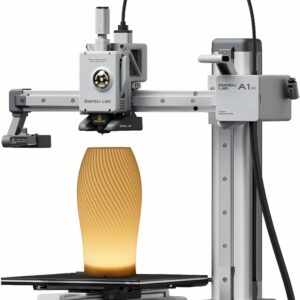
For a first go on a small desk: no assembly, no manual levelling, and a 180 mm bed that keeps it compact. Add the AMS lite later if you want colour.
For colour from the first week: Bambu Lab A1 Combo
The Bambu Lab A1 Combo pairs the full-size A1 and its 256 mm bed with the AMS lite feeder for up to four colours. Its bed reaches 100 °C, against 80 °C on the A1 mini.
Skip it if you rarely want more than one colour, since purging adds time and filament, or your desk can’t take a moving 256 mm bed plus the feeder. If you’re torn between the two sizes, compare the A1 mini and the full-size A1 against what you plan to print.
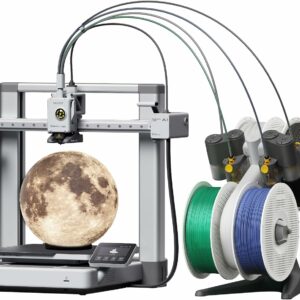
Four colours and the larger 256 mm bed in one box, with calibration that covers Z-offset, levelling, vibration and flow.
For ABS, ASA and fibre-filled filaments: Elegoo Centauri Carbon
The Elegoo Centauri Carbon is the enclosed option: a die-cast aluminium CoreXY frame, a hardened-steel nozzle that reaches 320 °C and a 256 mm bed. It arrives fully assembled and pre-calibrated, and it has a built-in chamber camera with LED lighting and time-lapse.
Skip it if you want multicolour (this model prints one colour at a time) or you have nowhere sturdy for a 17.5 kg machine.
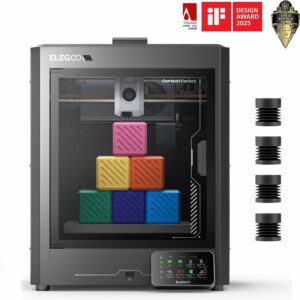
The only enclosed filament printer we list, with a 320 °C hardened-steel nozzle and a 256 mm bed: ready for ABS and ASA from day one.
For a mid-size bed and a quick start: Flashforge Adventurer 5M
The Flashforge Adventurer 5M is an open CoreXY printer with an all-metal frame and a 220 mm bed, between the two Bambu Lab sizes. Its quick-release nozzle swaps in about 3 seconds, according to Flashforge, and the build plate is removable magnetic PEI.
Skip it if you want ABS, which Flashforge says isn’t compatible, or multicolour.
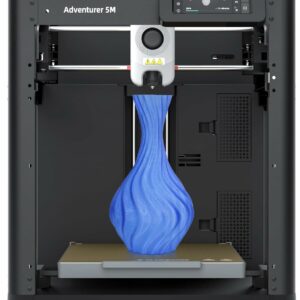
A 220 mm bed, one-click levelling and a quick-release nozzle, ready in about 10 minutes according to Flashforge. Best with PLA and PETG; Flashforge lists TPU for its optional 0.6 mm nozzle.
For miniatures and fine detail: Anycubic Photon Mono 4
If what you really want is tabletop miniatures or jewellery, resin gives detail that filament can’t match. The Anycubic Photon Mono 4 is a compact 7-inch 10K resin printer with 17 µm detail on a 153.4 × 87 × 165 mm platform. Plan for gloves, the wash-and-cure step and a ventilated space.
Skip it if you want larger models, since the platform is small, or the printer would have to live in a child’s room.
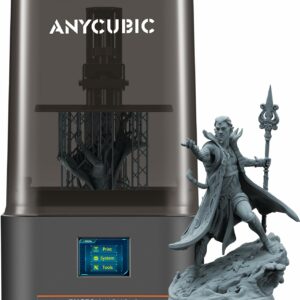
A gentle first step into resin: 17 µm detail in a compact machine, with levelling needed once according to Anycubic.
What to avoid with a first 3D printer
- Choosing on speed. A 600 mm/s rating against 500 mm/s tells you less than any spec above.
- A filament printer with manual-only levelling. Fine once you know the process; a hurdle on day one.
- An open frame for ABS or ASA. If those are on your list, buy the enclosure now.
- Colour you won’t use. Multicolour adds a feeder, purge waste and longer prints.
- A bed sized for a dream project. A large bed you rarely fill still takes desk space.
- Resin in a shared family space. Liquid resin irritates skin; keep resin printers out of children’s rooms.
- Forgetting the extras. Plan for a first spool, such as SUNLU PLA Filament, and a few tools: the Creality 3D Printer Tool Kit Pro covers print removal, finishing and nozzle-clearing needles.
Your first 3D printer checklist
Run through this before you add anything to your basket.
- The largest thing you want to print fits the build volume, measured in all three directions, with room to spare.
- Your materials match the frame: PLA, PETG and TPU on an open frame; ABS, ASA or fibre-filled filaments in an enclosure.
- The printer has automatic bed levelling at the very least.
- You’ve measured the space, including the spool and, on a moving-bed printer, the bed’s travel. The surface takes the printer’s weight.
- You’ve decided on colour: a combo with a feeder now, a printer that can add one later, or single colour.
- The room can be aired, and fan noise won’t disturb anyone during long prints.
- If you’re choosing resin, you have a ventilated place away from children for printing and washing.
- Speed came last.
Common questions
Is a bigger 3D printer better for a beginner?
Not automatically. A bigger bed lets you print larger parts in one piece, but the frame grows with it, and on a moving-bed printer so does the space the bed needs. Measure your largest planned project and choose the smallest bed that fits it with a margin.
Can I print ABS on an open-frame printer?
It isn’t what open-frame printers are built for. Prusa recommends an enclosure for ABS because it warps, and Flashforge states that ABS is not compatible with the Adventurer 5M. If ABS or ASA matters to you, choose an enclosed printer such as the Elegoo Centauri Carbon.
Do self-calibrating printers still need adjusting?
The automatic routines take over the jobs that used to be manual, such as bed levelling. Slicers also offer optional test prints for fine-tuning, for example to reduce ringing marks on fast prints. Most beginners can leave those until a print shows a problem.
Should I start with a 3D pen instead of a 3D printer?
They do different jobs. A 3D pen is for drawing and building freehand, while a printer makes a part from a digital model, layer by layer. A pen is a smaller, simpler first step for crafters, and for children within the maker’s age rating; a printer suits anyone who wants repeatable, precise parts.
Sources
- First layer calibration (i3) — Prusa Research
- Input Shaping — OrcaSlicer
- Material volumetric speed limitation — OrcaSlicer
- ABS — Prusa Research
- Adventurer 5M 3D Printer — Flashforge
- Characterizing 3D Printing Emissions and Controls in an Office Environment — NIOSH