

PLA filament is the easiest plastic to start with on a 3D printer and the usual refill for hot 3D pens. Makers publish nozzle settings of roughly 190–240 °C and beds of 25–60 °C, with the cooling fan on. It’s stiff and detailed but softens at around 50–60 °C, and it only breaks down in industrial composting.
If you’re buying your first spool, PLA is almost certainly the right one. This guide covers what it does well and badly, the settings filament makers actually publish, the 1.75 mm and 2.85 mm question, the variants on the shelf (matte, silk, PLA+ and PLA-CF), and what “biodegradable” really means. Every figure below comes from a maker’s data sheet or an official source, named next to it.
What is PLA good at, and where does it fall short?
PLA is good at accurate, detailed prints with little fuss, and weak at heat, impact and sunlight. Prusa lists it as easy to print and suited to beginners, with good detail and low warping, so it suits large models too. It doesn’t even need a heated bed, according to Prusa.
The downsides are just as clear. Prusa describes PLA as brittle and inflexible, with low resistance to UV and temperature: it breaks along layers or into shards on impact, and it gets soft and deforms above 60 °C. Post-processing is harder than with some plastics, as sanding needs water cooling.
That gives you a simple rule. Models, prototypes, desk organisers, cosplay pieces and anything that stays indoors: PLA. A part that lives in a hot car, sits near a heater or takes knocks: look at PETG instead, which our PLA and PETG comparison covers in detail.
PLA settings and properties at a glance
These are the starting settings and heat figures three makers publish for five PLA filaments, each row with its source. Treat them as a range to tune within: your printer, nozzle and speed shift the ideal value.
| Filament (source) | Nozzle | Bed | Cooling fan | Heat figure |
|---|---|---|---|---|
| SUNLU PLA (SUNLU) | 200–210 °C at 50–100 mm/s; 210–240 °C at 100–200 mm/s | 50–60 °C | Not stated | Heat deflection 55 ± 5 °C |
| PolyLite PLA (Polymaker) | 190–230 °C at 50–200 mm/s | 25–60 °C | On | Heat deflection 58 °C at 1.8 MPa, 60 °C at 0.45 MPa |
| Prusament PLA (Prusa) | 215 °C first layer, 210 °C after | 60 °C; a heated bed isn’t required | Not stated | Softens and deforms above 60 °C |
| Silk PLA+ (SUNLU) | 210–230 °C at 50–200 mm/s | 50–60 °C | Not stated | Heat deflection 57 ± 3 °C |
| PLA-CF (Polymaker) | 190–230 °C at 50–300 mm/s | 25–60 °C | On | Heat deflection 50 °C at 1.8 MPa, 54 °C at 0.45 MPa |
What the figures tell you
The nozzle ranges overlap around 210 °C, which is why a printer’s generic PLA profile works for most spools. SUNLU ties temperature to speed: the faster you print, the hotter the nozzle needs to be to melt plastic in time. Polymaker also says its PLA needs no enclosure, so an open-frame printer is fine.
Heat deflection temperature is the point where a loaded test bar starts to bend in the lab. Every PLA here sits between 50 and 60 °C, so none of them is a heat-resistant plastic, the carbon-fibre version included.
1.75 mm or 2.85 mm PLA?
Buy the diameter your printer or pen takes, and for almost every reader that is 1.75 mm. It’s the size of the SUNLU PLA we pair with every filament printer we list, and the size standard hot 3D pens take. SUNLU makes its PLA in 1.75 mm, 2.85 mm and 3 mm, so check the label before you add a spool to the basket: a thicker filament won’t feed into a 1.75 mm extruder.
Check the diameter tolerance too: SUNLU publishes ±0.02 mm for its 1.75 mm PLA. A tight tolerance keeps the flow of plastic steady.
Which printers and 3D pens take PLA?
3D printers
Every filament printer in our ranked list of 3D printers handles PLA. The Bambu Lab A1 mini has an 80 °C maximum bed, well above the 60 °C the makers above ask for, and Elegoo gives the Centauri Carbon a build plate with a PLA-specific side. Prusa says a smooth or satin PEI sheet gives the best adhesion; glass, Kapton tape or a glue stick also work.
For a first spool, we’d start with SUNLU PLA Filament: plain 1.75 mm PLA on a 1 kg spool, with SUNLU’s published settings to start from. SUNLU gives the spool as 19.5 cm across, so check it fits your printer’s holder or feeder.
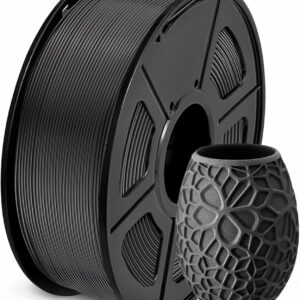
Everyday 1.75 mm PLA with a ±0.02 mm tolerance and published nozzle and bed settings, which suits any of the filament printers we list.
When you want other materials, our printer filament and resin range shows the spools and resins we list side by side.
3D pens
Standard hot 3D pens take 1.75 mm PLA, usually sold as packs of short refills in many colours. Pen refills are rated lower than printer spools: SCRIB3D gives its refills a printing temperature of 160–210 °C, and 3Doodler says the Flow adjusts from 160 to 220 °C. The diameter matches printer filament, but check your pen’s manual for the temperature it runs at before you feed it a length cut from a spool.
Low-temperature children’s pens are the exception. The 3Doodler Start+ takes only 3Doodler’s own low-temperature Start plastic, and standard 1.75 mm PLA doesn’t fit it. The full picture is in our guide to 3D pen filament types, and if you’re choosing between the two common pen plastics, here is how PLA compares with ABS.
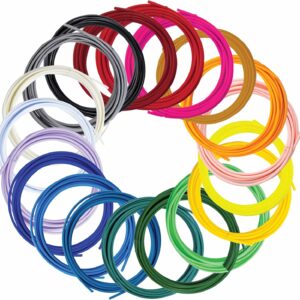
Twenty colours of SCRIB3D’s own 1.75 mm PLA, each vacuum packed, for most pens that take standard PLA. Not for the 3Doodler Create+.
PLA variants: matte, silk, PLA+ and PLA-CF
Most variants are PLA with something added for looks or stiffness. Settings stay close to plain PLA, but read each data sheet.
Silk PLA
SUNLU describes its Silk PLA+ as having a smooth, glossy, silk-like surface for decorative models. Its published nozzle range of 210–230 °C starts higher than SUNLU’s standard PLA, and its impact figure is lower: 3.5 ± 1.5 kJ/m² against 5 ± 3 kJ/m² for the plain filament. Keep silk for display pieces rather than parts that take knocks.
Matte PLA
Matte filaments trade shine for a flat, non-glossy finish. Polymaker describes its PLA-CF as having a smooth, matte surface, at the usual PLA settings; for a plain matte PLA, follow that brand’s data sheet.
PLA+ and PLA Pro
Treat “+” or “Pro” as a brand’s own label rather than a grade you can compare across makers: it means whatever that brand’s data sheet says. SUNLU, for example, uses it on its silk filament, whose impact figure is lower than its plain PLA. Compare the published impact and strength figures rather than the name.
PLA-CF
PLA-CF is PLA reinforced with chopped carbon fibre. Polymaker pitches its version at functional parts with a matte finish, and publishes the same 190–230 °C nozzle range as its plain PLA, but a slightly lower heat deflection figure. Elegoo fits the Centauri Carbon with a hardened-steel nozzle for carbon-fibre filaments; on any other printer, check the maker’s advice on nozzles before you load a fibre-filled spool.
How to get good results with PLA
Work through these in order before you change anything else.
- Start from the data sheet. Set the nozzle and bed to the middle of the maker’s published range, then tune in small steps.
- Clean the build plate. A clean plate helps the first layer stick. Use the surface your printer maker recommends, and add a glue stick if the data sheet suggests it.
- Keep the cooling fan on. Polymaker lists the fan as on for PLA. Good cooling sets each layer before the next one lands.
- Match temperature to speed. If you print fast, move towards the top of the range, as SUNLU’s speed-linked figures show.
- Design for the material. PLA is stiff and brittle, so add thicker walls where a part flexes or takes a load, and keep it away from heat.
Storage, moisture and safe use
Opened PLA can take on moisture from the air. SCRIB3D vacuum packs each refill colour and notes that filament which has absorbed moisture can bubble in a hot pen. Keep opened spools sealed with a desiccant; how to store and dry filament goes through boxes, bags and drying step by step.
If a spool has already gone damp, dry it at the temperature on its own data sheet. Polymaker gives 55 °C for 6 hours for PolyLite PLA. A dedicated dryer holds that temperature steadily, and our guide on whether you need a filament dryer helps you decide.
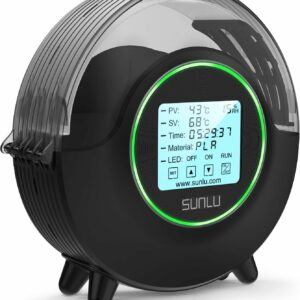
A one-spool dryer from 35 to 70 °C with a 1–99 hour timer and a live humidity reading, and it feeds the printer while it dries.
On safety, PLA doesn’t change the usual rules. Follow your printer’s and pen’s manuals, keep hot nozzles away from children, and respect each pen’s age rating. Prusa says PLA is food-safe as a material but doesn’t recommend it for dishes or food containers, and warns that the solvents used to smooth PLA chemically are dangerous outside a laboratory.
Is PLA biodegradable?
Only under industrial conditions, so treat “biodegradable” on a spool as a narrow claim. Prusa says PLA, made from corn, sugar cane or sugar beet, can be broken down only in specialised composting facilities. It warns against garden compost: the plastic won’t disintegrate, and it leaves plastic microparticles in the soil.
The European Commission makes the same distinction for plastics in general. Compostable plastics typically decompose in industrial composting facilities and first need to be collected, and the Commission warns that “biodegradable” claims risk encouraging littering. It also points out that bio-based, meaning made from plant sources, is not the same as biodegradable.
So failed prints and offcuts go in your general waste unless your local council or waste authority says otherwise. The greener habit is wasting less: get settings right on small test pieces before a long print.
Common questions
Is PLA filament toxic to print indoors?
Prusa lists PLA as suited to beginners, but no hot plastic should be treated as harmless. Print in a room you can ventilate, follow your printer maker’s guidance, and keep children away from the hot nozzle. Prusa warns that the solvents used for chemical smoothing are dangerous, so leave that to laboratories.
Can I use printer PLA in a 3D pen?
Usually, if the pen takes 1.75 mm PLA and the filament is plain PLA. Cut a length from the spool and check the pen’s manual for its working temperature first. It won’t fit low-temperature pens such as the 3Doodler Start+, which use their own plastic.
How long does a 1 kg spool of PLA last?
It depends entirely on what you print. Your slicer shows how many grams each model needs before you start, and infill, walls and supports make the biggest difference.
Does PLA go off if it sits on the shelf?
An opened spool can slowly take on moisture from the air, so keep it sealed with a desiccant between prints. If an older spool prints badly or bubbles, dry it at the temperature on its data sheet before you blame the printer.
Sources
- SUNLU PLA — SUNLU
- SUNLU Silk PLA+ — SUNLU
- PolyLite PLA technical data sheet — Polymaker
- PLA-CF technical data sheet — Polymaker
- PLA (material guide) — Prusa Research
- Bio-based, biodegradable and compostable plastics — European Commission