
First confirm it really is the nozzle: heat it and purge, and watch whether plastic comes out at all. Then work through four fixes in order, stopping as soon as a steady strand returns: heat and push, a cold pull, a cleaning needle, and finally a new nozzle.
This guide covers FDM printers. If it’s a 3D pen that has jammed, the job is different: see our fixes for a clogged 3D pen.
Try this first: is it really the nozzle?
It is a clog if heated filament won’t come out of the nozzle, or comes out thin and patchy. Heat the nozzle to your filament’s printing temperature and use the printer’s load or extrude command. Prusa’s troubleshooting guides list these signs:
| What you see or hear | What it points to | Start with |
|---|---|---|
| Nothing comes out; filament won’t load | Full clog | Fix 1, then fix 3 |
| Extrusion comes and goes mid-print, lines look much thinner, purged filament curls up and sticks to the nozzle | Partial clog | Fix 1, then fix 2 |
| Printer keeps moving but extrusion stops mid-print, often with clicking | Heat creep | Clear it, then fix the cause below |
| Clicking or ticking from the extruder | A clog, or a feed problem | Rule out the feed first |
Clicking alone doesn’t prove a clog. Prusa explains that it means the extruder motor is skipping steps because it can’t push the filament, and lists other causes besides a blocked hotend: a nozzle that is too cool, idler tension that isn’t set correctly, dirty drive gears and a jammed PTFE tube. If a purge comes out steadily and doesn’t curl, look there instead. If plastic flows freely but prints still have gaps, read our guide to what causes under-extrusion.

Before you start: the hotend burns
Some of these fixes are done with the nozzle hot, so never touch it: work with pliers and the needle, and keep your fingers on the filament above. For anything else, such as cleaning the gears or checking the PTFE tube, let the hotend cool and unplug the printer first. Follow your printer maker’s manual for anything that involves removing parts.
How to clear a clogged nozzle: four fixes, in order
The temperatures below are from Prusa’s guides for its own printers. Use your maker’s figures where they publish them, and never go above your printer’s maximum: 300 °C on the Bambu Lab A1 Combo and 280 °C on the Flashforge Adventurer 5M, according to their makers.
1. Heat and push
Start here whatever the symptom: it needs no tools. Heat the nozzle above your usual printing temperature, wait a couple of minutes, then load fresh filament so the new strand pushes the old material out. Prusa’s clog guide uses 260 °C for PLA and 280 °C for PETG and ABS, and waits two minutes for old material to drip out. If a steady strand appears, purge until the colour runs clean and print a small test. If nothing comes out, move on.
2. Do a cold pull
A cold pull, sometimes called an atomic pull, drags stuck or burnt material out with a plug of filament. Prusa recommends it when the nozzle is only partly clogged and some filament still comes out, and says PLA works best because other filaments don’t keep the shape of the tip as well.
- Heat the nozzle (Prusa uses 270 °C) and free the filament from the extruder gears as your manual describes.
- Push PLA by hand until it comes out of the nozzle.
- Switch the heater off and keep pushing gently until the plastic stops flowing, around 170 °C.
- Let it cool down, then set the nozzle to 85 °C and wait until it gets there.
- Grip the filament with pliers and pull it straight up, slowly and steadily, holding the extruder with your other hand.
A good pull shows the shape of the nozzle on the tip, in one clean colour with no dark marks. Repeat until it does. Check your maker’s advice first if your printer has a hardened or coated nozzle: Prusa advises against cold pulls on one of its hardened nozzles and suggests cleaning filament instead.
3. Use a cleaning needle
If the nozzle is still blocked, Prusa heats it again (260 °C for PLA, 280 °C for PETG and ABS), waits two minutes, then pushes a 0.3–0.35 mm needle into the nozzle from below, 1–2 cm deep. Never feed it in from the top, and never load filament while the needle is in. Take it out, load PLA, and let the new strand push the debris through.
The needle must be narrower than the nozzle opening. The Creality 3D Printer Tool Kit Pro includes ten 0.38 mm needles, which suit 0.4 mm and larger nozzles but not 0.2 or 0.25 mm ones, plus a 1.5 mm needle and a metal brush. For a blockage higher up, Prusa pushes a straight 1.5 mm wire into the hotend to force the plastic down and out, taking care not to damage the drive gears or the PTFE tube.
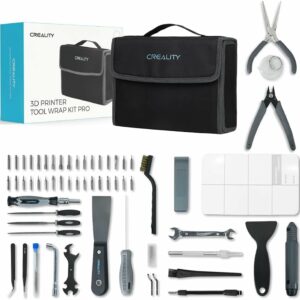
Ten 0.38 mm nozzle needles, a 1.5 mm needle and a metal brush in one case, plus spatulas and 34 screwdriver bits for everyday maintenance.
4. Fit a new nozzle
When nothing gets through after the first three fixes, or the clog keeps coming back, replace the nozzle. Prusa changes its nozzles hot, at 280 °C, and warns that heated parts can cause severe burns, so follow your own manual to the letter. Some printers make this step quick: the Flashforge Adventurer 5M has a quick-release nozzle that swaps in about 3 seconds, according to Flashforge, and the Bambu Lab A1 Combo uses a one-clip quick swap.
Why nozzles clog, and how to stop it coming back
Heat creep
Symptom: prints stop extruding partway through, often with clicking. Why: Prusa explains that the parts above the heater get too hot, so filament softens too high up and jams. Fix: clear the clog, then remove the trigger. Prusa lists a room above 35 °C (30 °C for some filaments), an enclosed space without ventilation, a weak extruder fan or dusty heatsink fins, a hotend set too hot, and very thin layers or slow speeds. It suggests better ventilation, a bed 5–10 °C cooler when printing PLA, and thicker layers of 0.15–0.20 mm with faster speeds.
Filled filaments in a small nozzle
Symptom: clogs that start when you switch to wood- or metal-filled filament. Why: Prusa says these materials have a higher risk of clogging, and that metal-filled ones are highly abrasive. Fix: Never run wood-fill through a 0.2 mm nozzle. Prusa recommends at least 0.6 mm with 0.2 mm layers for wood-filled filaments other than its own Prusament, while some makers clear 0.4 mm for theirs, so check your spool’s data sheet and move up to 0.6 mm if clogs keep coming back. Metal-filled filament needs a hardened steel nozzle. Our guide to choosing a nozzle size explains what a larger nozzle changes.
When to replace instead
- The nozzle: replace it if repeated cold pulls never come out clean, or go straight to fix 4 if you have been printing abrasive filament on a brass nozzle. Otherwise, Prusa says a brass nozzle lasts many hundreds of printing hours.
- The PTFE tube or hotend: Prusa points out that a clogged hotend is not the same as a clogged nozzle. If a new nozzle doesn’t help, the blockage may sit in the PTFE tube or heatsink; replace the tube if it is damaged, following the maker’s manual.
- The printer: if you’d rather swap a clogged nozzle in seconds than unscrew a hot one, look for a quick-release or one-clip nozzle in our ranking of 3D printers.
After any clog, clean plastic dust from the extruder gear grooves, as Prusa recommends, so the gears grip the new filament properly.
Common questions
What size needle do I need for a 0.4 mm nozzle?
Anything narrower than the opening. Prusa’s clog guide uses 0.3–0.35 mm needles, and the needles in the Creality 3D Printer Tool Kit Pro are 0.38 mm. For 0.2 or 0.25 mm nozzles you need a finer needle, so check what your printer maker supplies.
How often should I do a cold pull?
Prusa’s guide gives no fixed schedule: it recommends a cold pull when the nozzle is partly clogged, such as thin lines or a purge that curls up, repeated until the tip comes out clean.
Does cleaning filament work instead of PLA?
Yes, Prusa says specialised cleaning filaments also work for a cold pull, and it suggests them for nozzles where a standard cold pull isn’t advised. Use the temperatures on the cleaning filament’s own instructions.
Can I clear a clog with the nozzle cold?
Not the clog itself: every method in Prusa’s guides works on softened plastic, so the nozzle has to be hot. Jobs away from the nozzle, such as cleaning the drive gears or checking the PTFE tube, are done cold with the printer unplugged.
Sources
- Clogged nozzle/hotend (MK3.5/S, MK3S+, MK2.5S) — Prusa Knowledge Base
- Cold pull (MK3/S/+, MK2.5/S, MK3.5/S) — Prusa Knowledge Base
- Extruder noises — Prusa Knowledge Base
- Extrusion stopped mid-print (Heat creep) — Prusa Knowledge Base
- Changing or replacing the nozzle (MK2.5/S, MK3/S/+, MK3.5/S) — Prusa Knowledge Base
- Composite materials (with metal or wood particles) — Prusa Knowledge Base