
Start with the free fix. Set the pen to the right temperature for the filament inside, wait until it is fully hot, then press reverse and pull the strand out gently. Cut off the melted end and reload. If plastic still won’t flow, work through the fixes below in order.
Before you assume the pen is broken, check the usual culprits: the wrong temperature for the filament, a damp or uneven strand, or filament left in an idle pen. The fixes below start with those and only then move on to the nozzle itself.
Is it a clog, a feed problem or a heating fault?
It’s a clog if the pen says it’s ready, the motor runs, and little or nothing comes out of the tip. The other two faults need different fixes.
| What you see | Likely problem | Where to start |
|---|---|---|
| Pen shows ready, motor runs, nothing or a thin dribble from the tip | Clog | Fix 1, below |
| Pen shows ready, but the motor is silent or the strand isn’t gripped | Feed problem | The filament path, not the nozzle |
| The light or display never reaches its ready state | Heating fault | Power and heating, not the nozzle |
3Doodler suggests pressing feed and listening for the drive gear: if it’s silent, reseat the filament. A strand that isn’t gripped at all points to a filament feed problem, and a pen that never gets hot points to a heating fault; clearing the nozzle won’t help with either.
Fix 1, try this first: heat, reverse, unload
It costs nothing, and 3Doodler’s instructions set the order: heat fully first, then reverse.
The nozzle stays hot after you switch the pen off: the SCRIB3D P1, for example, runs ABS at up to 230 °C according to its user manual, or 235 °C according to its Amazon listing. Never touch the tip with your fingers. Unless your manual tells you to work on the pen while it is hot, unplug it and let it cool before you handle the nozzle. Keep children away while you work on it.
- Check which filament is in the pen and select the matching setting, PLA or ABS.
- Switch on and wait until the light or display says the pen is fully heated.
- Press reverse (or unload). When the motor stops, pull gently on the back of the strand.
- Cut the melted end off the strand with scissors.
- Reload, give the filament a few seconds to heat (3Doodler suggests 10–15 seconds on its pens), then press feed.
If plastic flows evenly, you’re done. If the strand won’t come out, or the fresh one jams again, carry on with fix 2.
Fixes 2 to 7: match the fix to the cause
Each fix below starts from a symptom. They run from free checks to the one fix that needs a tool.
2. The temperature doesn’t match the filament
Symptom: the pen says it’s ready, but plastic comes out stiff, in spurts or not at all, often just after you changed material. Why: ABS needs more heat than PLA. SCRIB3D gives 160–210 °C for PLA on the SCRIB3D P1; for ABS, its Amazon listing says 210–235 °C and its user manual 200–230 °C, so ABS loaded on a PLA setting may never soften enough to flow.
Fix: select the mode for the filament you loaded; 3Doodler’s guide for the 3Doodler Flow says ABS setting for ABS filament, PLA for PLA. With a dial, stay inside both the pen’s range and the one on the filament pack, such as 180–210 °C for the Yungden 30-Colour PLA Refills. Our page on how PLA and ABS differ covers which to choose.
3. A melted end went back in
Symptom: the jam starts right after you reload a strand you had already used. Why: the end that sat in the hot nozzle comes out melted and misshapen, and it can catch on the way back in.
Fix: unload the strand while the pen is hot, cut off the melted end with scissors, and reload. 3Doodler tells owners to do this every time they reinsert a strand, to reduce blockages.
4. A short stub is stuck inside
Symptom: the strand ran out mid-drawing, or you loaded a short offcut, and now nothing comes through. Why: a piece that has gone fully inside has nothing behind it to push it on.
Fix: with the pen hot and feeding, insert a fresh strand behind the stub to push it down into the gear. 3Doodler’s guide for the 3Doodler Flow suggests exactly this, or its unblocking tool, when the filament inside is too short to grip or push by hand.
5. Filament was left in an idle pen
Symptom: the pen sat switched on with filament loaded, or was switched off without unloading, and now it won’t feed or reverse. Why: 3Doodler tells owners to always remove strands when the pen is idle, and to reverse only once the pen is fully heated. Plastic that cooled in the nozzle has to melt again before it can move.
Fix: run fix 1 again, letting the pen finish its warm-up before you press reverse. If the strand won’t release, push it through from behind as in fix 4, then try fix 7.
6. The filament is damp or uneven
Symptom: popping or flow that comes and goes, even at the right setting. Why: Prusa Research lists bubbling and smoke during extrusion among the signs of filament that has taken on moisture, though it notes PLA is less affected than materials such as polyamide (nylon) or TPU. Uneven diameter is the other suspect: a study of 3D printer extrusion links irregular filament diameter to extruder jams. Speciality strands add to the risk: wood-fill is more prone to clogging than plain PLA.
Fix: if it bubbles or crackles, try 5–10 °C less heat first; our guide to bubbling and stringy lines takes the fixes in order. If the flow still comes and goes, unload and try a strand from a freshly opened pack. Look for 1.75 mm PLA with a published diameter tolerance, such as the ±0.02 mm Yungden states, or packs sealed colour by colour; our filament refill packs list both.
7. The nozzle itself is blocked
Symptom: right setting, fresh filament, clean-cut end, and still nothing from the tip. Why: plastic or debris has set hard inside the nozzle.
Fix: clear it only the way your manual describes. 3Doodler says the 3Doodler Flow comes with an unblocking tool: with the pen on and the nozzle hot, you unscrew the nozzle with the back end of the tool, set reverse, then gently push the tool in through the front to drive the filament out of the back. Handle the hot nozzle only with the tool, never your fingers; 3Doodler warns that the nozzle and tool may be hot, so let them cool before you touch them. If your pen has a fixed nozzle and no tool, don’t improvise with pins or drill bits: contact the maker.
Fix 8: when to replace the nozzle or the pen
Replace the nozzle if your maker sells a spare and clearing it hasn’t worked: it’s the smaller job. Replace the pen if the nozzle is fixed and fixes 1 to 7 haven’t cleared it, or if it keeps clogging with fresh filament on the right setting.
If the pen is new, contact the seller before you open anything. Citizens Advice explains that you have rights when an item is broken or unusable, but not when the damage comes from wear and tear, an accident or misuse (its page covers England; Scotland, Wales and Northern Ireland have their own).
If you are buying again, run through what to check before buying first. For a pen designed against clogs, the MYNT3D Super has an ultrasonic nozzle that MYNT3D describes as almost clog-proof. It only works plugged in, and its starter filament is ABS, so ventilate the room. If you want a temperature display and published ranges for each mode, plus an auto sleep after a few minutes without use for the times you forget to unload, the SCRIB3D P1 is the alternative.
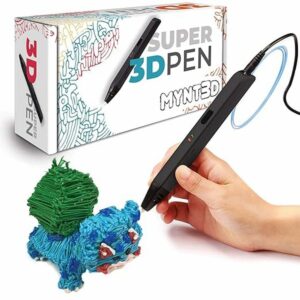
An ultrasonic nozzle that MYNT3D describes as almost clog-proof, with a stepless slider for fine control of the flow. Plan to draw near a socket: there is no battery.
How to stop your pen clogging again
- Unload before you switch off. Reverse the strand out while the pen is still hot, every time you finish.
- Change the setting with the filament every time you switch between PLA and ABS.
- Keep filament dry. Prusa Research recommends a closed box with desiccant, or a vacuum bag with desiccant inside; that is the basis of storing filament dry between sessions.
- Clean the nozzle after wood-fill or other speciality strands.
- Let it cool before packing it away. Give the nozzle at least five minutes before it goes into a case.
Common questions
Can I use a needle to unclog a 3D pen?
Only if your pen’s maker supplies one or describes the method in the manual. 3Doodler, for example, supplies an unblocking tool that goes in through the front with the nozzle removed and reverse running. Use any tool to clear, never to force.
Is it bad to leave filament in a 3D pen?
Yes, if the pen is left idle. 3Doodler tells owners to always remove strands when the pen isn’t in use. Reverse the filament out while the pen is still hot, then switch off.
How long does a 3D pen nozzle stay hot after switching off?
There is no single figure: it depends on the pen and on how hot it was running. We’d unplug it and allow at least five minutes before packing it away. Never test the tip with your fingers; if in doubt, wait longer.
Why does my pen clog every time I change colour?
Usually because a melted end goes back in, or a short piece is left inside. Unload while the pen is hot, cut the melted end off before storing the strand, and push any stub through with the new colour.
Sources
- Flow – Getting Started — 3Doodler
- PRO Troubleshooting Guide — 3Doodler
- Pro+ 3D Pen — 3Doodler
- Drying filament — Prusa Research
- Effects of Filament Diameter Tolerances in Fused Filament Fabrication — IU Journal of Undergraduate Research
- Return faulty goods — Citizens Advice