
The best 3D printing ideas after the first test cube are small prints that teach you something about your printer, then gifts, desk tidies, toys and learning projects that stretch it a little further. Below are eleven ideas by difficulty and purpose, each with its filament, and step outlines for three.
3D printing ideas at a glance
Print length is a rough planning band, not a measured time: once you slice a model, your slicer shows the real estimate.
| Idea | Purpose | Level | Filament | Print length (rough guide) |
|---|---|---|---|---|
| 3DBenchy boat | First print that teaches | Easy | PLA | Short |
| Print-in-place flexi toy | Games and toys | Easy | PLA | Short to medium |
| Name keyring or bag tag | Gifts | Easy | PLA | Short |
| Cable clips and desk tidies | Desk and home | Easy | PLA | Short |
| Spiral-vase pot or vase | Decor | Intermediate | PLA | Medium |
| Flexible phone case or bumpers | Useful gift | Intermediate | TPU | Medium |
| Dice tower or game organiser | Games and toys | Intermediate | PLA | Medium to long |
| Garden ornament or bird feeder | Outdoor decor | Intermediate | PETG | Medium |
| Multicolour figure or sign | Gifts and decor | Ambitious | PLA in several colours | Long |
| Working gear or mechanism model | Learning project | Ambitious | PLA | Long, plus assembly |
| A part you design yourself | Learning project | Ambitious | PLA, then PETG | Several short test prints |
3D printing ideas by difficulty
Easy: prints that teach you your printer
1. 3DBenchy. A small boat that Creative Tools designed for testing and benchmarking 3D printers. Its surfaces show up typical problems with finish, accuracy and warping. The file is in the public domain, so you can use, share and change it freely. Print it in PLA; steps below.
2. Print-in-place flexi toy. An articulated lizard, dragon or fish that comes off the plate already jointed, with no assembly. It’s a good check that your printer keeps the small gaps between moving parts clear. Print it in PLA. Keep small printed parts away from young children: Bambu Lab warns that filament and broken fragments are a swallowing and choking risk for infants, children and pets.
3. Name keyring or bag tag. A flat tag with a name in raised or engraved letters, and an easy first present. In Bambu Studio, the Text Shape tool adds the letters to any model, flat or curved; steps below. One colour of PLA works; a second colour makes the name stand out.
4. Cable clips and desk tidies. Small, quick and immediately useful, in PLA. Our list of useful things to 3D print at home covers twenty practical prints room by room, so this guide leaves the household list there.
Intermediate: gifts, decor and flexible parts
5. Spiral-vase pot or vase. A pot for pens or dried flowers, printed as one continuous wall. Bambu Studio’s Spiral Vase mode, under Others, then Special mode, sets one wall, no top layers and 0 % infill, and leaves no seam on the surface. Bambu Lab notes it only suits relatively simple shapes, so pick a model made for this mode. PLA is all you need.
6. Flexible phone case or bumpers. TPU stretches and returns to its shape, and Bambu Lab lists phone cases and toy parts among its common uses. It’s the first step beyond PLA, because flexible filament needs slower printing and dry filament. Choose a 95A TPU: Bambu Lab lists 95A as compatible with its A1 series printers, while softer grades can buckle in the feeder.
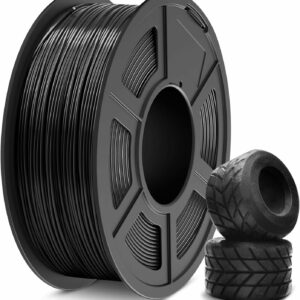
A 95A TPU with SUNLU’s published settings for slower and faster printing, for phone cases, bumpers and soft toy parts.
7. Dice tower or board-game organiser. A tower that tumbles dice, or a box insert that keeps tokens and cards sorted. These are bigger prints, often in several parts, so check each part’s size against your build plate before you start. PLA is fine for anything that lives indoors.
8. Garden ornament or bird feeder. Anything that sits outside belongs in PETG rather than PLA: Prusa describes PETG as suitable for most exterior use. SUNLU gives its PLA a heat deflection temperature of 55 ± 5 °C and its PETG 70 ± 5 °C, so PETG also copes better with a sunny windowsill. For festive decorations, our guide to printed Christmas ornaments runs from flat snowflakes to LED-lit shells.
Ambitious: multicolour, mechanisms and your own designs
9. Multicolour figure or sign. A figure, logo or sign printed in up to four colours in one go. It needs a multicolour feeder such as the AMS lite on the Bambu Lab A1 Combo, and every colour change purges some filament, so these prints take longer and use more material than single-colour ones.
10. Working gear or mechanism model. A gearbox, a planetary gear set or a wind-up toy printed as separate parts and assembled. It teaches tolerances: if parts bind or wobble, you learn how your printer handles fits. Read the designer’s notes on orientation, screws and bearings first.
11. A part you design yourself. Measure something you need, such as a replacement knob or a bracket, draw it in a beginner-friendly CAD program and print it. Expect several short test prints in PLA before the fit is right; print the final version in PETG if it has to cope with warmth or the outdoors.
Which idea should you print first?
A model that ticks all five is a good first choice; each missing tick makes it a step harder.
- It fits your plate. Check its size in the slicer against your printer’s build volume.
- It’s one colour. Multicolour models need a feeder or manual filament swaps.
- It prints in PLA. SUNLU describes PLA as easy to print with low warping, which is why it’s the usual first filament.
- It needs few or no supports. Flat-bottomed models come off the plate ready to use.
- Other people have printed it. Photos of real prints, or a ready-made print profile, show the model works.
What you need
A printer and filament
Every idea here prints on an open-frame filament printer. If you are still choosing, start with our ranked list of 3D printers, or read how to choose a 3D printer if you want to weigh build size and multicolour first.
The Bambu Lab A1 mini arrives assembled, calibrates itself and prints PLA, PETG and TPU. Its 180 × 180 × 180 mm build volume is plenty for everything above except the larger game organisers, which may need printing in parts. Multicolour needs the optional AMS lite.
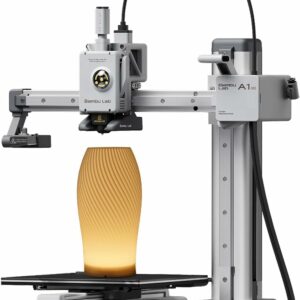
Assembled and self-calibrating, with an open frame that suits PLA, PETG and TPU: enough for every easy and intermediate idea here.
For filament, one spool of PLA covers most of the list, with PETG for outdoor pieces and TPU for flexible ones. Our printer filament and resin section lists the spools we recommend. SUNLU PLA Filament is the everyday choice: SUNLU publishes its nozzle and bed temperatures, and the 1 kg spool will see you through many of the easy ideas.
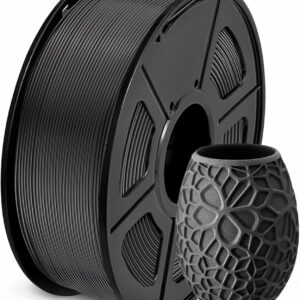
Everyday PLA with SUNLU’s published settings and a ±0.02 mm diameter tolerance, for Benchys, flexi toys, keyrings and vases.
A model library, and respect for the licence
Most of these ideas are a search away on the big free libraries: MakerWorld, Printables and Thingiverse. On MakerWorld, a model can come with a print profile, a Bambu Studio file with the orientation, slicing settings and filaments already chosen, so you can print it without setting everything up yourself. Our guide to finding free 3D models compares the three libraries and shows how to judge a model before you print it.
Respect each model’s licence. The designer picks it when uploading, and Prusa notes that many free models use Creative Commons terms: always credit the designer, don’t sell prints of anything marked NC (non-commercial), and don’t share changed versions of anything marked ND (no derivatives).
Step outlines for three ideas
3DBenchy as a first lesson
- Download 3DBenchy from one of the model libraries.
- Load PLA and open the file in your printer’s slicer with its default PLA profile.
- Print it and stay for the first layer.
- Let it cool, then check the hull for rough patches, the base for lifted edges and the cabin roof for drooping strands.
- If you own callipers, measure it: Creative Tools suggests this to check your printer’s dimensional accuracy.
- Change one setting at a time and print again, so you know what each change did.
Name keyring with Bambu Studio’s Text Shape tool
- Download a blank tag or keyring shape that already has a hole for the ring, and whose licence allows changes.
- Open it in Bambu Studio, select it and click the Text Shape tool.
- Type the name, pick a font and click B for bold, so thin letters print cleanly.
- Set the operation to Part for raised letters or Cut for engraved ones.
- For a two-colour tag, assign the letters a second filament.
- Slice, print and fit the split ring.
TPU phone case
- Find a case model made for your exact phone model, with photos of real prints, and check its licence.
- Dry the TPU if the spool has been open: Bambu Lab calls TPU highly hygroscopic and says moist filament causes stringing, bubbles and weak layers.
- Feed it from a spool holder rather than a multicolour feeder, unless the feeder’s maker says it takes TPU.
- Choose a TPU profile and start from SUNLU’s slower settings for its 95A TPU: 190–210 °C at 50–80 mm/s, with the bed at 50–60 °C.
- Print one case at a time: Bambu Lab warns that several models printed layer by layer on one plate mean extra travel moves and more stringing.
- If the case sticks, lift one corner gently, spray a little isopropyl alcohol into the gap and peel it away slowly.
- Fit the phone and check the buttons and ports line up.
Common questions
What should I 3D print first?
Something small, flat-bottomed and in PLA that other people have printed successfully. 3DBenchy is the usual choice because its shapes show up problems with finish, accuracy and warping.
Which filament should a beginner use for these ideas?
PLA for almost everything: SUNLU describes it as easy to print with low warping. Move to PETG for anything that lives outdoors or near warmth, since SUNLU rates its PETG’s heat deflection temperature higher than its PLA’s. Use TPU only for parts that need to flex.
Can I sell things I print from free models?
Only when the model’s licence allows commercial use. Anything marked NC under Creative Commons rules out selling prints, and every Creative Commons licence asks you to credit the designer. Read the licence on each model page, because similar models can carry different terms.
Are 3D printed toys suitable for small children?
Be careful with them. Bambu Lab warns that filament and broken fragments are a swallowing and choking risk for infants, children and pets, so keep small printed parts away from young children. Print toys for older children, and check them for cracks and loose pieces.
Sources
- About #3DBenchy — Creative Tools
- Where can you get 3D models? — Prusa Knowledge Base
- How to Upload Models and Print Profiles — Bambu Lab Wiki
- About CC Licenses — Creative Commons
- TPU Printing Guide — Bambu Lab Wiki
- Spiral Vase mode — Bambu Lab Wiki