
Yes, if your pen has a hot nozzle. Hot PLA sticks to wood, paper, glass and cloth, and it melts plastic tablecloths; a silicone mat takes the heat and lets cooled plastic peel away. Choose a mat whose heat rating sits above your pen’s top temperature: the AQTAQ mat, rated 220–260 °C, covers PLA and ABS pens.
If your first drawings keep fusing to the table, the pen isn’t faulty. Sticking is what hot plastic does: it’s how a 3D pen builds one line on top of another. The fix is a surface the plastic can’t bond to and can’t damage. Below you’ll find what hot filament does to the surfaces you have at home, how to read a mat’s heat rating against your pen, and one pick for each kind of reader.
Want something ready to trace? Download our free printable 3D pen templates, with shapes, letters and simple 3D builds on A4 pages.
Which 3D pen mat to buy: the short version
The product we’d buy for each reader. The detail, and who should skip each one, comes further down.
| If you… | Our pick | What you get |
|---|---|---|
| have a hot pen and nothing to draw on | AQTAQ 3D Pen Starter Kit | Silicone mat, 45 × 28 cm, rated 220–260 °C; 4 finger guards; 40 templates; 50 m of PLA |
| need filament as well as a mat | 3Dmate PLA Refill Kit | About 110 m of PLA, a silicone mat, a stencil book, 4 finger guards |
| haven’t bought the pen yet | SCRIB3D P1 | Published PLA and ABS temperatures to check a mat against; no mat in the box |
| are buying for a child under ten | 3Doodler Start+ | No external hot parts, according to 3Doodler, so a heat-rated mat becomes optional |
What hot filament does to each surface
Most household surfaces either grab hot filament or get damaged by it. Silicone does neither. Here is what happens on each; where a claim comes from a maker, we name it.
| Surface | What hot filament does | Verdict |
|---|---|---|
| Wood: tables and desks | Sticks to it. 3Doodler even suggests its wood filament for filling cracks in floorboards. | Cover it |
| Plastic: tablecloths, desk and cutting mats | Hot filament melts plastic tablecloths. Even 3Doodler’s low-temperature Start plastic may leave marks on polycarbonate and PET. | Avoid with a hot pen |
| Paper and card | PLA sticks to paper, according to 3Doodler. ABS peels off paper and stencils. | Templates only, under a clear board |
| Glass | PLA sticks to it, says 3Doodler, which adds that its Start plastic comes out very shiny on glass. | Fine for flat pieces, but heavy and breakable |
| Fabric | PLA sticks to cloth, according to 3Doodler, which recommends rough fabrics such as denim for its Start plastic. | Only when the design should stay on |
| Silicone mat | Takes the heat up to its rating, and cooled plastic lets go. | Our choice for everyday drawing |
Wood and plastic: the two to cover
If you draw straight onto a wooden table, hot filament sticks to it. If a strand has already bonded, let it cool completely and lift it slowly with your fingers rather than scraping with a blade.
A wipe-clean plastic tablecloth is worse, because hot filament melts it. If 3Doodler’s Start plastic, from a pen with no external hot parts, can mark polycarbonate and PET, a hot PLA pen is a different matter: the LIHUACHEN RPC200B 3D Pen (Button Version) sets itself to 190–210 °C.
Paper, glass and fabric: for particular jobs
Paper is for templates, not for drawing on. Since PLA sticks to paper, slide the template under a transparent drawing board or a clear mat and draw on that. Glass suits flat pieces with a glossy face, but it is heavy and breakable, so it’s no surface for a child’s desk. Fabric is for designs meant to stay on it: a fabric tablecloth is a canvas, not a cover.
Why silicone wins
Silicone has the two things the other surfaces lack: it handles heat, and it lets go of plastic. Silicone maker Wacker cites good release properties for its silicone rubber in baking moulds and kitchen utensils, and high heat resistance for its use in household appliances. Release matters most: once your drawing has cooled, it lifts off cleanly.
A mat also gives you one place where anything hot happens. Lay it out before you plug the pen in. Our guide to your first hour with a 3D pen takes you through the rest of the set-up.
Silicone isn’t a blank cheque, though. Mats are sold with different heat ratings, or none at all, and that’s the first thing to check.
What actually matters in a 3D pen mat
Five things decide whether a mat suits you, most important first.
Heat rating, checked against your pen’s temperature
Start here. Find the highest temperature your pen reaches with the plastic you use, then compare it with the mat’s rating. If the pen’s top figure sits below the mat’s, you have margin. If the pen’s maker doesn’t publish a temperature, you can’t run the check, so choose a mat whose rating covers ABS-level heat.
The AQTAQ mat is rated 220–260 °C. The listing doesn’t explain what each end of the range means, so we read it cautiously. Under 220 °C, you are below every figure on the label. Between 220 and 260 °C, you are inside the rated range but closer to its limit. Here is where the pens we list fall.
| Pen | Plastic | Published temperature | Against a 220–260 °C mat |
|---|---|---|---|
| LIHUACHEN RPC200B 3D Pen (Button Version) | PLA | 190–210 °C, set automatically | Below 220 °C |
| SCRIB3D P1 | PLA | 160–210 °C | Below 220 °C |
| SCRIB3D P1 | ABS | 210–235 °C on SCRIB3D’s Amazon listing; 200–230 °C in its user manual | Inside the range, under 260 °C |
| MYNT3D Super | ABS and PLA | Not published by the manufacturer | Can’t be checked |
| 3Doodler Flow | PLA, ABS and wood-fill | 160–220 °C, according to 3Doodler | Top of the range meets the bottom of the mat’s 220–260 °C rating |
| 3Doodler Start+ | Start plastic | No external hot parts, according to 3Doodler | The rating barely matters |
ABS at up to 235 °C (the top of the range on SCRIB3D’s Amazon listing; its manual says 230 °C) is the hottest published figure among the pens we list, and the AQTAQ rating still covers it, with less room to spare. Whatever the rating, keep the nozzle moving while you draw and never leave a hot pen lying on the mat.
Check the filament too. Refills give their own printing range: the Yungden 30-Colour PLA Refills list 180–210 °C and the SCRIB3D PLA Refills 160–210 °C. If your pen lets you set the temperature, that’s the range you’ll run, and both sit below 220 °C.
Size: cover your whole working area
A small mat protects the spot under the nozzle. A bigger one also covers where your hand rests, where the template lies and where a stray strand lands. The AQTAQ mat measures 45 × 28 cm. Before you buy, measure the patch of table you actually draw on and pick a mat at least that big.
We don’t list a size or a heat rating for the mat in the 3Dmate PLA Refill Kit, so check both on the listing before you order. Whatever the size, store the mat flat so it lies flat when you draw.
Templates: built in or on separate sheets
Some mats have shapes printed or moulded into them; others come with separate template sheets. Built-in shapes can’t get lost, but you only get the ones on the mat. Separate sheets give you more designs: the AQTAQ kit has 40 on 20 double-sided sheets, plus a transparent drawing board to lay over them, and the 3Dmate kit comes with a stencil book.
Tracing a shape, filling it and lifting it out cleanly is a separate skill, covered step by step in our guide to getting clean lines from a stencil.
Cleaning: let it cool, then peel
Silicone’s release does most of the work. Give the plastic time to harden first: 3Doodler’s tips for teachers suggest counting slowly to 30 before removing filament from a stencil, then peeling back gently, and the same patience pays on a mat. The AQTAQ mat is sold as washable, so warm soapy water takes care of dust and smears. Dry it before you put it away.
Don’t scrape a silicone mat with a knife or craft blade: you’d be cutting into the surface you rely on. Wood-fill is the one filament to try on a corner first. 3Doodler tells owners of its own DoodlePad to switch to the back side for wood filament, because creations get stuck on the front.
Finger guards: a mat doesn’t protect your hands
A mat protects the table, not your fingers, and the nozzle is still hot. Finger guards are sleeves that slip over your fingertips, so the fingers closest to the nozzle and the fresh plastic are covered. The AQTAQ kit includes four (two large, two small), the 3Dmate kit has four silicone guards, and the LIHUACHEN RPC200B comes with one in the box. Buy a kit with both sizes if adults and children share the pen.
If you do touch the nozzle, the NHS advice for a burn is to hold it under cool running water for 20 minutes, and not to put creams, oils or butter on it. Supervision, ages and house rules for children are in our 3D pen safety guide for children.
Our picks by reader profile
Everything we list for protecting the table and your hands is in our accessories and tools range.
A hot pen and nothing to draw on: AQTAQ 3D Pen Starter Kit
This is the kit we’d buy first for any hot pen. It is the only mat we list with a published heat rating, and that rating covers PLA and ABS pen temperatures.
- Mat: silicone, 45 × 28 cm, rated 220–260 °C, washable
- Finger guards: 4, two large and two small
- Templates: 40 designs on 20 double-sided sheets, plus a transparent drawing board
- Filament: 50 m of 1.75 mm PLA in 10 colours
- Pen: not included
The templates give you a ready-made start on a few easy first projects.
Who should skip it: owners of the 3Doodler Start+, because its PLA won’t fit a pen that takes 2.5 mm Start plastic, and anyone who already has plenty of filament and only wants a mat.
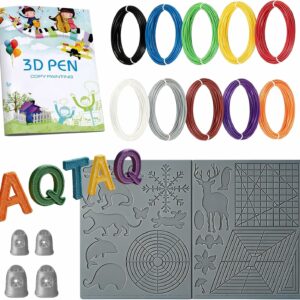
A washable 45 × 28 cm silicone mat rated 220–260 °C, four finger guards and 40 templates. It covers PLA and ABS pen temperatures; the pen is sold separately.
You need filament too: 3Dmate PLA Refill Kit
If your starter filament is running low, this kit puts plastic and protection in one box. You get about 110 m of PLA, more than twice the AQTAQ kit’s 50 m, with the mat, stencils and guards alongside.
- Filament: 1.75 mm PLA, about 110 m (360 ft) in total
- Colours: standard, transparent, metallic and fluorescent
- Accessories: silicone design mat, stencil book, 4 silicone finger guards
- Pen: not included
Who should skip it: anyone who wants a published heat rating before buying, since we don’t list one for this mat; ABS users who need to know the mat covers 235 °C; and 3Doodler Start+ owners, whose pen won’t take 1.75 mm PLA.
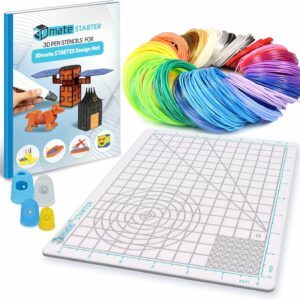
About 110 m of 1.75 mm PLA with a silicone mat, a stencil book and four finger guards: everything but the pen, in one order.
You haven’t bought the pen yet: SCRIB3D P1
A heat rating is only useful if you know how hot your pen gets. The SCRIB3D P1 publishes both of its ranges, so you can check any mat against it before you draw a line.
- Age: 14+, according to SCRIB3D (its user manual says adult use only)
- Temperature: PLA 160–210 °C; ABS 210–235 °C on SCRIB3D’s Amazon listing, 200–230 °C in the manual
- Auto sleep: after a few minutes without use (2 minutes on the Amazon listing, 5 in the manual)
- Power: no built-in battery; a 5 V 2 A adapter, or a power bank of at least 2 A according to the manual
- In the box: 3 colours of PLA (30 ft in total), power adapter, manual, stencil guide; no mat
To see how it compares with other pens, look it up in our ranked list of 3D pens.
Who should skip it: anyone buying for a child under 14, since SCRIB3D rates it 14+; younger children are better off with the next pick, and any hot pen needs adult supervision.
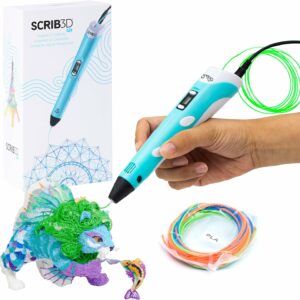
Published temperatures for PLA and ABS, so you can match a mat to it, plus a stepless speed slider and auto sleep after a few minutes without use.
Buying for a child under ten: 3Doodler Start+
Here the mat question almost answers itself. 3Doodler says the Start+ has no external hot parts. It also says drawing in Start plastic directly on laminated coffee tables, flooring and countertops won’t damage them. A wipe-clean surface still helps, since the plastic can bond firmly to polycarbonate and PET and may leave marks.
- Hot parts: no external hot parts, according to 3Doodler
- Age: designed for ages 6 to 13, according to 3Doodler UK
- Power: rechargeable, charging cable included, with a stand-by mode
- Plastic: 3Doodler Start plastic only
Who should skip it: older children who want crisp detail, since Start plastic stays softer than PLA, and anyone who wants standard 1.75 mm PLA: refills must be 3Doodler Start plastic or a compatible 2.5 mm pack.
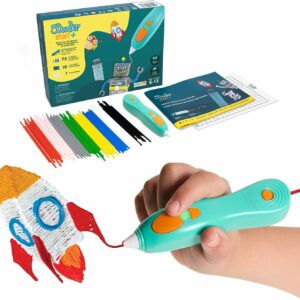
No external hot parts, according to 3Doodler, and a low-temperature plastic it says won’t damage laminated surfaces, so a heat-rated mat becomes optional.
What to avoid
- A mat with no heat rating. You can’t check it against your pen.
- Plastic as protection. A wipe-clean tablecloth melts under hot filament, and desk and cutting mats are plastic too.
- PLA straight onto a paper template. PLA sticks to paper. Lay a transparent board or a clear mat over the sheet.
- A hot pen left lying on the mat. Keep the nozzle moving while you draw, and switch the pen off when you put it down.
- Peeling too soon. Let the plastic harden before you lift it, then peel back gently.
- Treating the mat as burn protection. It covers the table. Finger guards and care cover your hands.
Common questions
Can I use a silicone baking mat as a 3D pen mat?
It is the same family of material, so it can work. Check the heat rating its maker gives against your pen’s top temperature, exactly as you would for a craft mat. Once it has been used for crafts, we would keep it for crafts rather than go back to baking on it.
Does a 3D pen mat stop you getting burnt?
No. It protects the table and gives the plastic a surface to release from, but the nozzle is still hot. Use finger guards and keep your fingers away from the tip. Switch the pen off whenever you put it down.
Why does my drawing stick to the mat?
Usually it hasn’t cooled for long enough. 3Doodler suggests counting slowly to 30 before lifting filament off a stencil, then peeling back gently. Wood-fill grips harder: 3Doodler tells owners of its DoodlePad to use the back side for wood, so try it on a corner of your mat first.
Sources
- FAQ: using the 3Doodler Start on fabrics, glass or wood — 3Doodler
- 3Doodler Create+ Filament — 3Doodler
- FAQ: the Create/Create+ DoodlePad with Wood filament — 3Doodler
- Top Teacher Tips for 3Doodlers — 3Doodler
- Household and Consumer Goods — Wacker Chemie
- Burns and scalds — NHS