

A layer shift is mechanical: the print head or the bed lost its place, so every layer above a certain height sits off to one side. Check in this order: something in the way, the nozzle hitting a curled part, too much speed or acceleration, loose belts, then loose pulley screws, always with the printer off and cold.
What does a layer shift look like?
A layer shift looks like a staircase: the print is fine up to one height, then everything above it steps sideways. Prusa describes it as layers moving away from their intended positions because the X or Y axis moved abnormally.
Simplify3D points out why the error sticks: a typical 3D printer runs open-loop, with no feedback about where the print head actually is. If a motor misses steps or a belt slips, the printer carries on regardless, and every later layer lands in the wrong place.
If the layers sit in the right place but look thin or full of holes, that’s a different fault: see gaps and thin walls from under-extrusion.
Try this first: read the shift
Before you change anything, note which way the layers moved, at what height, and whether you heard clicking during the print.
Direction tells you which axis to check. Prusa’s belt guide for its moving-bed printers puts the Y-axis belt under the heatbed, while the X-axis belt moves the print head. So a step towards the front or back points to the bed’s belt and motor, and a step to the side points to the print head’s. On a CoreXY printer, Prusa suggests testing moves along X, Y and the diagonals; our guide to how CoreXY differs from a moving bed explains why.
| What you see or hear | Likely cause | Check |
|---|---|---|
| Shift where a cable or tube pulls tight, or plastic waste near a pulley | Something in the way | Cause 1 |
| One shift at the height of an overhang, with a curled edge just below | The nozzle hit the print | Cause 2 |
| Clicking from a motor during fast moves, shifts on large prints | Too much speed or acceleration | Cause 3 |
| Shifts along one axis that keep coming back, ghosting, out-of-round circles | Loose belt | Cause 4 |
| Shifts along one axis at random heights, belt tension fine | Loose pulley on the motor | Cause 5 |
Before you touch the printer, switch it off, unplug it and let the nozzle and bed cool. Prusa’s own checks for its CoreXY printer move the axes by hand with the printer cold and off. For anything that means removing covers or parts, follow your maker’s manual.
Causes of layer shifting, in the order to check them
The order runs from quick checks that need no tools to the ones that do. Stop as soon as the shift stops.
1. Something in the way
Symptom: a shift at the same point in the head’s or bed’s travel, often where a cable or filament tube runs out of slack.
Why: if anything blocks the head or the bed, the motor can’t finish the move. Prusa lists filament stuck around pulleys, cable bundles not routed as the assembly guide shows, and waste from earlier prints caught near a pulley.
Fix: move the head and the bed slowly by hand across their full range. Both should glide; feel for a snag, a tight cable or a hard spot. Clear old plastic from around the belts and pulleys, and leave room so a moving bed can’t touch a wall behind it. Prusa also suggests checking that smooth rods have no deep scratches and that the bearings are lubricated, with the lubricant your manual names.
2. The nozzle hit the print
Symptom: a single shift at the height of an overhang or thin edge, often with a curled-up lip just below the step.
Why: Prusa explains that some overhangs warp upwards as they print, and the nozzle can crash into them, knocking the head or bed off position. The same can happen with a very small infill percentage, Prusa adds.
Fix: Prusa suggests raising the print fan speed, lowering the print speed, or cutting the model so it prints without the overhang. Avoid a very sparse infill on parts like this. In your slicer, Z-hop lifts the nozzle slightly during travel moves to avoid hitting the print; OrcaSlicer notes it is particularly useful for tall, thin features and for several objects on one plate. If it’s the bottom corners that lift off the bed, that’s warping: see how to stop corners lifting.
3. Too much speed or acceleration
Symptom: clicking from a motor during fast moves, and shifts on large prints, often after a switch to a faster profile.
Why: Simplify3D explains that if you ask a printer to move faster than its motors can handle, you will typically hear clicking as the motor fails to reach the position. The printer then carries on from the wrong spot.
Fix: as a test, Simplify3D suggests cutting the speed by 50 %, for printing moves and for the fast travel moves between them. Some printers also let you slow down from the screen mid-print; Prusa describes this for its MINI. If you raised acceleration in your slicer, put it back: in OrcaSlicer a value of 0 uses the printer’s default, and travel acceleration is usually set higher than printing acceleration, so check both.
A spec-sheet maximum is a ceiling, not a setting for every print. The Bambu Lab A1 mini, for example, is rated at up to 500 mm/s and 10,000 mm/s², according to Bambu Lab. If a part shifts, go back to the standard profile before you suspect the hardware.
Also check any quiet mode. Prusa advises normal mode rather than stealth mode for large prints, and notes that its crash detection doesn’t work in stealth mode.
4. Loose or worn belts
Symptom: shifts along one axis that keep coming back. Prusa notes that loose belts can also cause ghosting, or circles that print irregular instead of round.
Why: a loose belt can slip on the drive pulley, Simplify3D explains: the pulley turns, the belt doesn’t. Too tight is a problem too, as an overtightened belt adds friction in the bearings that can stop the motors turning.
Fix: pluck each belt. Prusa’s rule of thumb is that it should sound roughly like a low bass string, and that you should be able to pinch the two sides together with a little resistance. Look for damaged teeth or plastic caught in them, and check that the belt runs straight over the pulley without brushing other parts, as Prusa advises. Adjust tension only the way your manual describes, since every design uses a different tensioner.
5. A loose pulley on the motor
Symptom: shifts along one axis only, at random heights, even though the belt passes the pluck test.
Why: the toothed pulley on each motor shaft is held by grub screws. Simplify3D notes that these can work loose, and the pulley then no longer turns with the shaft.
Fix: try to wiggle the pulley on its shaft, then move the axis gently by hand. If the pulley rocks, or turns while the shaft stays still, tighten the screws as your manual shows. Prusa’s pulleys have two grub screws, one against the flat part of the motor shaft, and both must be tight. If you can’t reach the pulley without removing covers, check the manual or ask the maker’s support first.
When to replace instead
Replace a part, or hand the job to the maker, when a fix stops holding:
- The belt: if the teeth are worn or it won’t hold tension, fit a new one following the manual.
- The pulley: if the screws keep working loose or the teeth are damaged, replace it.
- The electronics: if the mechanics check out and shifts carry on, Simplify3D names two electrical causes: too little current to the motors, and motor drivers that overheat and stop the motors for a moment. That means working inside a mains-powered case, so leave it to the maker’s support.
- The printer: if belts and pulleys keep slipping on an older machine after new parts and careful tensioning, it may be time to see how current printers compare.
If you decide on a new machine and want fewer set-up steps, the A1 mini arrives assembled and calibrates itself, according to Bambu Lab. It has a moving bed and a compact 180 × 180 × 180 mm build volume, so the checks above still apply.
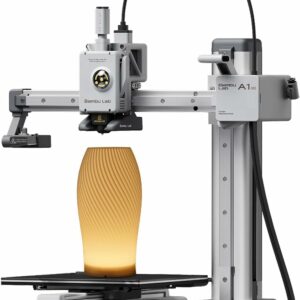
It arrives assembled and calibrates itself, according to Bambu Lab, so you start from the factory’s set-up. The trade-off is the compact 180 mm bed.
Common questions
Why does my print shift at the same height every time?
Look at what the model does at that height. An overhang that curls up can catch the nozzle, and a cable can snag whenever the head or bed reaches the same position. Watch the printer as it reaches that layer.
Why does my printer click just before a layer shift?
If the clicking comes from an axis motor during fast moves, the motor is probably being asked to move faster than it can manage. Halve the print and travel speeds for a test print, then raise them again in small steps.
Can a belt be too tight?
Yes. An overtightened belt adds friction in the bearings, which can stop the motors turning. Aim for the tension in your printer’s manual; Prusa’s rule of thumb is a low bass note when plucked.
Is a layer shift the same as warping?
No. Warping is the part lifting at its corners or edges; a layer shift is the upper part stepping sideways. They can be linked, though: an edge that curls up can catch the nozzle.
Sources
- Layer Shifting — Simplify3D
- Layer shifting — Prusa Knowledge Base
- Adjusting belt tension (MK4/S, MK3.9/S, MK3.5/S, MK3/S/+) — Prusa Knowledge Base
- Z-Hop — OrcaSlicer Wiki
- Acceleration — OrcaSlicer Wiki