

Buy the A1 mini if space is tight and most of what you’ll print fits in a 180 mm cube. Buy the A1 if you want parts up to 256 mm in one piece, or more parts per plate. Both share the same hot end, speed, sensors and software: bed size, bed heat and desk space decide it.
These two printers are closer than the names suggest. Both are open-frame machines with a moving bed, and both run from the same app and Bambu Studio slicer. You aren’t choosing between two ways of printing, only between two sizes of the same one.
A1 mini vs A1: the specs side by side
Every figure below comes from Bambu Lab’s specification sheet for each printer and from our product pages.
| Specification | A1 mini | A1 |
|---|---|---|
| Build volume | 180 × 180 × 180 mm | 256 × 256 × 256 mm |
| Max bed temperature | 80 °C | 100 °C |
| Printer dimensions | 347 × 315 × 365 mm | 385 × 410 × 430 mm |
| Net weight | 5.5 kg | 8.3 kg |
| Screen | 2.4-inch touch screen | 3.5-inch touch screen |
| Build plates it takes | Textured PEI, Smooth PEI | Textured PEI, Smooth PEI, Cool Plate |
| Max power | 150 W | 1300 W at 220 V |
| Max nozzle temperature | 300 °C | 300 °C |
| Max speed and acceleration | 500 mm/s, 10,000 mm/s² | 500 mm/s, 10,000 mm/s² |
| Nozzle sizes | 0.4 mm included; 0.2, 0.6 and 0.8 mm optional | 0.4 mm included; 0.2, 0.6 and 0.8 mm optional |
| Filaments rated ideal by Bambu Lab | PLA, PETG, TPU, PVA | PLA, PETG, TPU, PVA |
| Multicolour | Up to 4 colours with the optional AMS lite | Up to 4 colours; AMS lite included in the A1 Combo |
Three rows stand out: build volume, bed temperature and the size of the printer itself. The rest of what shapes everyday printing is shared.
What fits on a 180 mm bed, and what doesn’t?
Anything up to 180 mm in every direction fits on the A1 mini. That covers plenty: phone stands, desk tidies, cable clips, keyrings, miniatures, coasters and small plant pots. The A1’s 256 mm bed has about twice the area (655 cm² against 324 cm²) and nearly three times the volume.
The limit bites with long, wide or bulky parts: a full-width drawer organiser, a tablet stand, a lampshade, a cosplay helmet. Before you buy, run this check:
- Pick the three biggest things you’d like to print and measure the longest side of each.
- Under 180 mm: both printers cope, so let desk space decide.
- Between 180 and 256 mm: the mini can still take a long, thin part laid corner to corner, since a 180 mm square is about 254 mm on the diagonal, less a margin for the brim. Anything bulky needs the A1.
- Over 256 mm: neither prints it in one go, though the A1 needs fewer pieces.
Splitting a model is less of a defeat than it sounds. Slicers such as OrcaSlicer and PrusaSlicer include a cut tool for models too big to print in one piece, and PrusaSlicer can add plugs, dowels, snap-fits or dovetails so the parts fit back together. You’ll still have joins to tidy, so if big one-piece prints are the point, size up.
Where the A1 mini wins
It needs far less desk space
Bambu Lab gives the A1 mini as 347 × 315 × 365 mm and the A1 as 385 × 410 × 430 mm. Taken figure by figure, the mini is between 38 and 95 mm smaller on each measurement: enough to decide it on a narrow desk or a shelf.
Both are bed slingers rather than CoreXY machines, so the bed carries the print back and forth: leave clear space in front and behind, plus room for the spool and filament tube. Footprint is only half of the question; also think about noise and where the printer will live.
It’s lighter, with a lower power rating
At 5.5 kg, the mini is easy to carry between rooms or take to a school club; the A1 weighs 8.3 kg. Bambu Lab rates the mini’s maximum power at 150 W, against 1300 W at 220 V for the A1.
Both accept 100–240 V AC at 50/60 Hz, so both run on UK mains. Electrical Safety First notes that many cable reels are rated at 10 A or less and warns against plugging one extension lead into another, so a wall socket is the tidy answer for the A1.
You don’t give up print-quality features
The mini isn’t a cut-down A1 inside. Bambu Lab lists the same 300 °C all-metal hot end, hardened steel extruder gears, motion controller and camera with time-lapse on both, plus filament run-out and tangle sensors and power-loss recovery. Both calibrate themselves; for the A1, Bambu Lab details Z-offset, bed levelling, vibration compensation and flow.
Where the A1 wins
Twice the bed, so fewer compromises
The 256 mm bed is the reason to buy the A1. Bigger parts print in one piece, and small ones print in bigger batches: a plate of keyrings for a school fair or a set of matching storage boxes goes on as one job instead of two. Height grows too, from 180 to 256 mm, which suits vases, lamps and tall organisers.
The 100 °C bed: headroom, not a new list of materials
The A1’s bed reaches 100 °C against the mini’s 80 °C. It sounds decisive, but Bambu Lab’s spec sheets give both printers the same filament list: PLA, PETG, TPU and PVA are rated ideal, while ABS, ASA, PC, PA, PET and carbon- or glass-fibre filaments are not recommended on either.
For the everyday materials, 80 °C leaves room to spare. SUNLU publishes a bed temperature of 50–60 °C for its PLA and TPU and 60–70 °C for its PETG. The extra 20 °C gives headroom if you experiment later, but ABS and ASA want an enclosure, which neither printer has.
A bigger screen and the AMS lite in the box
The A1 has a 3.5-inch touch screen where the mini has a 2.4-inch one, and it takes Bambu Lab’s Cool Plate as well as the two PEI plates both share. The version we list, the A1 Combo, comes with the AMS lite, so four-colour printing works from the first day.
Multicolour on both: what the AMS lite adds
Both printers print in up to four colours with the AMS lite, a separate feeder that switches between spools during a print. It’s included with the A1 Combo; for the mini it’s an optional extra, sold separately or in a bundle. Four colours is the ceiling on both.
Every colour change purges filament, so multicolour prints take longer and use more material. Weigh that before colour tips you towards either printer, and read up on multicolour printing with the AMS lite if four colours are the main draw.
A1 mini or A1: who should choose which?
Work through these four questions in order; the first one with a clear answer settles it.
- Where will it live? Measure the spot. If it can’t take the A1’s 385 × 410 × 430 mm plus working room, the mini decides itself.
- What’s the biggest thing you want to print? Bulky and over 180 mm on a side: the A1. Under 180 mm: either.
- Do you want colour from the start? The A1 Combo includes the AMS lite; with the mini, you add it.
- Will it travel? For a printer that moves between home, school or a club, the 5.5 kg mini is the easier carry.
Choose the A1 mini if space is tight or it’s your first printer
The Bambu Lab A1 mini suits a first printer on a small desk or in a shared family space, where most prints are small and practical. It’s the budget way into the same system, and the AMS lite can follow later. Skip it if you already know you want helmets, lampshades or anything bulky wider than 180 mm.
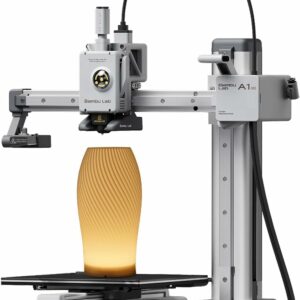
The same hot end, sensors and self-calibration as the A1 on a 180 mm bed, in a printer that measures 347 × 315 × 365 mm and weighs 5.5 kg.
Choose the A1 if you want room to grow or colour from day one
The Bambu Lab A1 Combo is the better buy if you’ve got the depth to spare and your list includes anything big, or you’d rather print in batches than queue jobs. With the AMS lite in the box, it’s also the simpler route to four-colour prints. Skip it if your space can’t take a 385 × 410 × 430 mm printer plus the feeder.
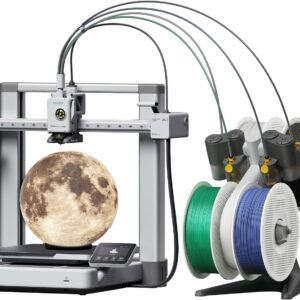
A 256 mm bed with twice the mini’s area, a 100 °C bed and the AMS lite included, for up to four colours in one print.
If neither fits, for instance because you want ABS in an enclosure, our ranked list of 3D printers covers the alternatives, and our guide to what matters in a first printer gives the wider picture. Both A1 models print filament; if finely detailed miniatures are what drew you in, check whether resin or filament suits you first.
Common questions
Can the A1 mini print PETG?
Yes. Bambu Lab rates PETG as ideal on both the A1 mini and the A1, and SUNLU publishes a 60–70 °C bed temperature for its PETG, inside the mini’s 80 °C. PETG can bond very hard to a smooth PEI plate, so check Bambu Lab’s plate advice before the first print.
Can I add the AMS lite to the A1 mini later?
Yes. The AMS lite is an optional add-on for the mini, sold separately or in a bundle, and it gives up to four colours, the same ceiling as on the A1. Measure for it when you plan the desk, as it is a separate unit.
Is the A1 harder to set up than the A1 mini?
No. Both calibrate themselves and use the same Bambu Studio slicer and app. The A1 is bigger and weighs 8.3 kg, so the main extra job is finding it a sturdy home.
Is the A1 mini big enough for cosplay props?
For small pieces, yes; for helmets and armour, expect to print in sections. A slicer’s cut tool splits a large model into parts that fit the 180 mm bed. The A1’s 256 mm bed needs fewer pieces, which means fewer joins to fill and sand.
Will either printer run on UK mains?
Yes. Bambu Lab rates both for 100–240 V AC at 50/60 Hz, and UK low-voltage supply is declared at 230 V and 50 Hz. The A1 is rated at up to 1300 W at 220 V, so give it a wall socket or a lead that isn’t already busy.
Sources
- Bambu Lab A1 mini Technical Specification — Bambu Lab
- Bambu Lab A1 Technical Specification — Bambu Lab
- Cut tool — Prusa Knowledge Base
- Cutting tool — OrcaSlicer Wiki
- Overloading sockets — Electrical Safety First
- Electricity Safety, Quality and Continuity Regulations, regulation 27 — legislation.gov.uk