
For a school or a family, choose a 3D printer for reliability and safety rather than speed: automatic calibration, PLA only, a filtered enclosure wherever children are close, and software that runs on the computers you already have. Our classroom pick is the enclosed Elegoo Centauri Carbon; for a family desk, the Bambu Lab A1 mini.
Speed is the headline figure on most printer boxes, and it’s the one that matters least here. A school printer works in a shared room, with pupils close by and lessons that end on a bell. A family printer lives where children and pets can reach it. What decides whether either one gets used is simpler: does it print first time, is it out of reach while it’s hot, and does it keep the air clean?
New to all of this? Start with our beginner’s guide to 3D printing, which takes you from choosing a printer to a first successful print.
The most useful checklist we know of is the CLEAPSS guidance on 3D printing in schools and colleges, produced with the Health and Safety Executive. The guidance itself says it may interest home users too. This guide turns it into buying decisions. It covers printers only: using 3D pens in class is a different purchase with its own rules. And if the printer is for you rather than a class or a household, start with choosing a first printer for yourself.
What actually matters in a 3D printer for school or home
Six things, in the order we’d weigh them.
An enclosure: hot parts and fumes behind a door
A running printer has hot parts that can burn and moving parts that can catch fingers or hair; our guide to 3D printing safety at home sets out the figures. An enclosure puts all of that behind a door.
It also helps with emissions. Melting plastic releases ultrafine particles and chemical vapours, and CLEAPSS names people with asthma or breathing difficulties among those most at risk. Its preferred answer is a fully enclosed printer with filters for both particles and chemical emissions. Failing that, it recommends an exposure control cabinet over each open-frame printer, with a fan drawing air through a HEPA filter for ultrafine particles and a carbon filter for volatile organic compounds.
Two details catch buyers out. CLEAPSS warns that some enclosed printers have openings at the top that let particles and gases escape, so check the lid as well as the door. And every enclosure needs time to clear once a print ends, so the door stays shut for a while afterwards: follow the maker’s guidance.
Look for: a closing door and a top cover, a built-in filter and what kind it is, and the maker’s advice on clearance time. For a printer kept in a room children can’t enter, an open frame is a reasonable trade.
A camera, so nobody has to hover
CLEAPSS says that standing close to a printer for long periods increases the risk of breathing in its emissions. An open printer in a busy room invites exactly that. A built-in camera lets you check a print from a desk or a phone instead, and a time-lapse turns a long print into a short clip the class can watch together.
Two of the three printers we feature have one. Elegoo lists a chamber camera with LED lighting and time-lapse on the Centauri Carbon, and Bambu Lab lists a built-in camera on the A1 mini that you can watch through Bambu Studio or its Bambu Handy app. Flashforge lists no camera for the Adventurer 5M. Two other features make long prints less of a gamble: a filament run-out sensor, which flags an empty spool before the print is ruined, and power-loss recovery, which picks the job up after a cut. All three makers list both.
Look for: a built-in camera you can view remotely, a run-out sensor and power-loss recovery.
Automatic calibration and no assembly
Every minute a teacher spends levelling a bed is a minute not teaching, and manual levelling is the step most likely to go wrong when several adults share one printer. All three of our picks level themselves. Bambu Lab says the A1 mini comes pre-assembled, takes about 20 minutes to set up and calibrates itself before every print; the Centauri Carbon comes fully assembled and pre-calibrated; and Flashforge says the Adventurer 5M is 95 % pre-assembled, with only the screen and filament holder to fit, and ready to print in about 10 minutes.
CLEAPSS recommends buying only printer equipment that carries a CE mark and, if you’re offered a kit, asking the supplier for evidence that it meets the same standards. For a school, that’s one more reason to skip kits altogether.
Look for: automatic bed levelling, a ready-built frame and a CE mark.
PLA only, printed cool rather than fast
The CLEAPSS advice on filament is short: choose PLA as your main material and avoid more hazardous filaments such as ABS. It also asks you to print at the lower end of the temperature range the filament maker gives, because higher nozzle temperatures produce more emissions.
That’s where speed comes back in. SUNLU publishes two ranges for its PLA: 200–210 °C at 50–100 mm/s, and 210–240 °C at 100–200 mm/s. Run a school or family printer at the slower setting and you can print at the cooler temperature. The top speed on the box is a ceiling, not a target.
CLEAPSS adds two habits: buy from a supplier that can give you a safety data sheet, and store spools in sealed, dry, dark containers. SUNLU PLA Filament is the everyday spool we’d stock: 1 kg of 1.75 mm PLA with a ±0.02 mm diameter tolerance, according to SUNLU, and the speed-matched settings above. Whichever brand you choose, ask for its safety data sheet before you order for a whole class.
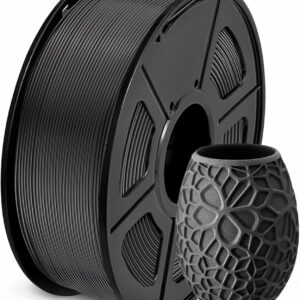
Everyday 1.75 mm PLA with published settings for slow and faster printing, so you can run cool and steady in a classroom.
Look for: a printer that handles PLA well. A 320 °C nozzle or ABS support adds nothing in a PLA-only room.
Software pupils can actually use
There are two jobs here. Pupils design the object, then a slicer turns the design into instructions for the printer. The design half is the one in the curriculum: in England, computer-aided design appears in the key stage 2 design and technology programme, and key stage 3 adds 3-D modelling and computer-aided manufacture.
For design, Tinkercad fits most school set-ups: Autodesk lists Windows 10 and 11, macOS and Chrome OS on Chromebooks among the systems known to work well with it. Slicers are a different matter: each printer maker has its own. Bambu Lab pairs its Bambu Studio slicer with the Bambu Handy phone app and lists remote control and monitoring through both. Flashforge supports FlashPrint 5, Orca-Flashforge and OrcaSlicer on a computer, plus its FlashMaker app on a phone. Elegoo has its own ELEGOO Slicer.
In practice, that points to a simple routine: pupils design on whatever devices the school has, and one adult slices and sends the jobs from a staff laptop. CLEAPSS suggests checking the software against your operating system before you buy, and setting secure passwords so the design software can’t be misused. Ask your IT team, too, whether a printer may join the school network at all. The Adventurer 5M also connects by Ethernet and USB, which helps where Wi-Fi devices aren’t allowed.
Look for: a slicer that runs on the computer that will send the jobs, and a connection your network allows.
Where to put it
CLEAPSS recommends a well-ventilated room with space to work around the printer and an adequate power supply, with access controlled by a responsible adult. It suggests fixing the printer in place, and not crowding several printers into one room, especially a small or poorly ventilated one. In a D&T workshop, ask your technician how the printer fits the room’s emergency isolation arrangements, which the guidance covers in detail. If you add an exposure control cabinet, CLEAPSS treats it as local exhaust ventilation: its filters need regular checks, and it needs a thorough examination and test by a competent person.
Lesson length matters as much as the room. CLEAPSS points out that some prints take many hours, so being able to pause a job, or split a model into smaller parts, may be necessary. Size pupils’ models to fit the gap between lessons, and agree who checks the printer when a job finishes.
At home, the same rules scale down: a room with a window you can open, a sturdy surface, the printer out of reach of small children and pets, and not in the bedroom of anyone with asthma. The Centauri Carbon weighs 17.5 kg, so a flimsy shelf won’t do. The safety guide linked above has more on fumes and placement at home.
Our picks for schools and families
All three appear in our ranked list of 3D printers. Here’s how they line up against the checklist, using the makers’ published specifications.
| Checklist point | Elegoo Centauri Carbon | Bambu Lab A1 mini | Flashforge Adventurer 5M |
|---|---|---|---|
| Enclosure | Built in: tempered glass door and top cover | None: open frame, moving bed | None: open shell; enclosure sold separately |
| Air filter | Built in, described by Elegoo as a nano mineral crystal filter | None | None listed |
| Camera | Built in, with LED lighting and time-lapse | Built in, low frame rate, with time-lapse | None listed |
| Set-up | Fully assembled and pre-calibrated | Pre-assembled; about 20 minutes to set up; automatic calibration | 95 % pre-assembled; one-click automatic levelling |
| Build volume | 256 × 256 × 256 mm | 180 × 180 × 180 mm | 220 × 220 × 220 mm |
For a classroom or shared room: Elegoo Centauri Carbon
The Elegoo Centauri Carbon ticks the most boxes. It’s an enclosed CoreXY printer with a tempered glass door and top cover, a built-in air filter that Elegoo says absorbs harmful particles and odours, and a chamber camera with real-time monitoring and time-lapse. It arrives fully assembled and pre-calibrated, with automatic bed levelling, a filament run-out detector and power-loss recovery. Its dual-sided build plate includes a PLA-specific surface that Elegoo says prints well at lower bed temperatures.
Two caveats. Elegoo’s product page calls the filter a nano mineral crystal filter, not a HEPA or carbon filter, so weigh it against the CLEAPSS recommendation in your risk assessment. And the 320 °C hardened-steel nozzle and carbon-fibre ability go unused in a PLA-only room; keep the filament cupboard to PLA so nobody is tempted.
Skip it if the printer will live in a room pupils never enter, or if your bench can’t take 17.5 kg: the A1 mini or the Adventurer 5M will handle the same PLA jobs.
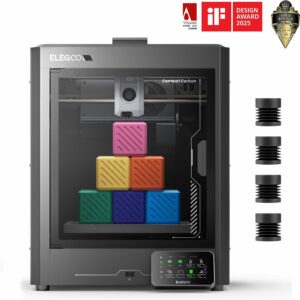
Enclosed, filtered and watched by a built-in camera, so pupils can follow a print without standing over it.
For a family desk, run by an adult: Bambu Lab A1 mini
The Bambu Lab A1 mini is the simplest of the three to live with. It arrives assembled, calibrates itself, and its 180 × 180 × 180 mm build volume keeps it small enough for a shelf or a desk in a study. The open frame and 80 °C bed suit PLA, PETG and TPU, which covers everything a family needs. Its built-in camera lets you check a print from your phone instead of standing beside it.
The trade-off is the open frame: the nozzle and the moving bed are within reach, and there’s no filter. Put it where small hands can’t get at it, in a room with a window you can open, and treat it as a machine the adults run while the children design.
Skip it if it has to sit where young children can reach it, or if your projects regularly outgrow a 180 mm bed.
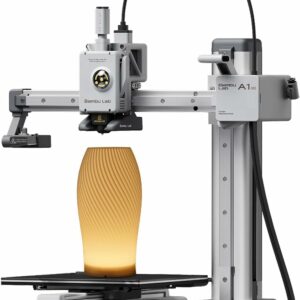
Small enough for a study shelf and quick to get going, for family PLA projects with an adult at the controls.
For a D&T department or after-school club: Flashforge Adventurer 5M
The Flashforge Adventurer 5M suits a room that works through a steady queue of pupils’ PLA parts. Its 220 × 220 × 220 mm bed sits between the other two, levelling is one-click and automatic, and the quick-release nozzle swaps in about 3 seconds, according to Flashforge, so a clog costs minutes rather than a lesson. It has a run-out sensor and power-loss recovery, and it connects by Wi-Fi, Ethernet or USB.
The shell is open and Flashforge lists no air filtration, so in a school it belongs in a prep room or under an exposure control cabinet, as CLEAPSS recommends for open-frame printers. Flashforge sells an enclosure separately and publishes files for building your own; check what any enclosure does about filtering before you count it as containment.
Skip it if it has to sit in the classroom itself and you can’t add a cabinet: the Centauri Carbon has the enclosure built in.
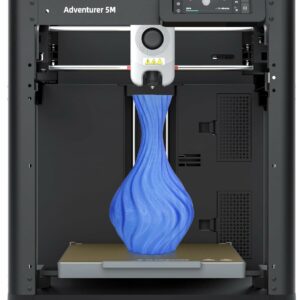
A mid-sized bed, automatic levelling and a quick-release nozzle, with Ethernet for school networks that won’t take Wi-Fi devices.
What to avoid
- ABS, ASA and fibre-filled filaments in a classroom. CLEAPSS says to avoid more hazardous filaments such as ABS. A printer that can handle them doesn’t change that.
- Kits and unmarked printers. CLEAPSS recommends CE-marked equipment, and evidence of the same standards for anything sold as a kit.
- Filament with no paper trail. CLEAPSS calls a supplier that can provide a safety data sheet a good sign. If yours can’t, buy elsewhere.
- Several printers in a small room. Emissions add up. Spread printers out, or put them in a larger, well-ventilated space.
- Opening the door the moment a print ends. Give the enclosure the clearance time its maker recommends.
- Resin printers around children. Liquid resin irritates skin and needs gloves, ventilation and a wash-and-cure step. Keep resin printers out of children’s rooms and away from younger pupils.
- Buying for speed. For the same PLA, SUNLU’s faster settings call for a hotter nozzle, and a high top speed won’t save a lesson if the print fails.
Common questions
Are 3D printers safe for primary school children?
They can be part of a primary lesson when an adult runs the printer. CLEAPSS puts nozzle temperatures at 200–300 °C and warns that hair and clothing can catch in moving parts, so children design and watch while an adult loads filament and removes prints. An enclosure keeps small hands away from the hot parts.
Do schools need a risk assessment for a 3D printer?
Yes. CLEAPSS says a COSHH risk assessment of the printing process is required, and a written one may be needed. It should cover hot and moving parts, emissions, electricity and the room’s ventilation, and the HSE website has guidance on preparing one.
Can pupils design 3D prints on Chromebooks?
Yes, with a design tool that runs on them: Autodesk lists Chrome OS on Chromebooks among the systems known to work well with Tinkercad. The slicer is a separate check: make sure the one for your printer runs on the computer that will send the jobs, and plan for an adult to do that step.
What filament should a school buy?
PLA. CLEAPSS recommends it as the main filament for schools and advises avoiding ABS. Buy from a supplier that can give you a safety data sheet, print at the lower end of the maker’s temperature range, and keep spools in sealed, dry, dark containers.
Can a 3D printer go in a child's bedroom?
We’d avoid it. CLEAPSS says long periods close to a running printer increase the risk of breathing in its emissions, and a bedroom is where a child spends the most hours. A well-ventilated room the child doesn’t sleep in, with the printer out of reach, is a better spot.
Sources
- G276 3D Printing in Schools and Colleges: Managing the Risks — CLEAPSS
- Centauri Carbon — Elegoo
- Adventurer 5M 3D Printer — Flashforge
- Bambu Lab A1 mini 3D Printer — Bambu Lab
- Technical Requirements — Tinkercad (Autodesk)
- National curriculum in England: design and technology programmes of study — Department for Education, GOV.UK